Vermont in 113 form 2026

Get Form
in 113 Preview on Page 1

Here's how it works

01. Edit your in 113 online
Type text, add images, blackout confidential details, add comments, highlights and more.

02. Sign it in a few clicks
Draw your signature, type it, upload its image, or use your mobile device as a signature pad.

03. Share your form with others
Send schedule in 113 via email, link, or fax. You can also download it, export it or print it out.

How to use or fill out Vermont IN-113 form with our platform

Form edit decoration
9.5
Ease of Setup
DocHub User Ratings on G2
9.0
Ease of Use
DocHub User Ratings on G2
  1. Click ‘Get Form’ to open the Vermont IN-113 form in the editor.
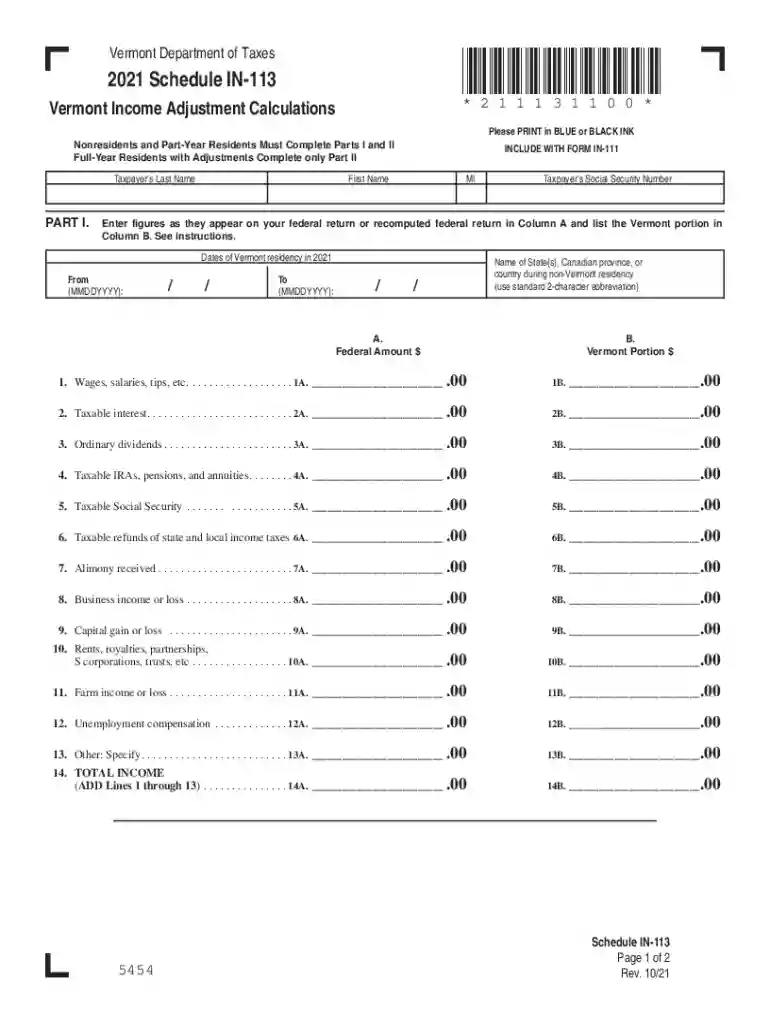
  2. Begin by filling in your personal information at the top of Part I, including your last name, first name, middle initial, and Social Security number.
  3. Indicate your dates of Vermont residency for 2021. Enter the 'From' and 'To' dates in MMDDYYYY format.
  4. In Column A, enter the federal amounts as they appear on your federal return for each income type listed (wages, interest, dividends, etc.). In Column B, specify the Vermont portion of these amounts.
  5. Continue through each line item from 1 to 14, ensuring all figures are accurately entered. Add up all income sources to complete Line 14.
  6. Proceed to Part II if applicable. Enter your adjusted gross income and any adjustments related to Vermont exempt income.
  7. Review all entries for accuracy before saving or printing your completed form.

Start using our platform today for free to simplify your form completion process!

See more vermont in 113 form versions

We've got more versions of the vermont in 113 form form. Select the right vermont in 113 form version from the list and start editing it straight away!
Versions Form popularity Fillable & printable
2022 4.8 Satisfied (24 Votes)
2021 4.8 Satisfied (157 Votes)
2020 4.4 Satisfied (184 Votes)
2019 4.4 Satisfied (79 Votes)
2018 4.3 Satisfied (173 Votes)
2017 4.4 Satisfied (54 Votes)
2012 4.4 Satisfied (53 Votes)
be ready to get more

Complete this form in 5 minutes or less

Get form

Got questions?

We have answers to the most popular questions from our customers. If you can't find an answer to your question, please contact us.
Contact us

Yes, and it’s really straightforward! DocHub is an online PDF editor with advanced document management capabilities that allow you rapidly adjust your forms, fill out blank fields and drop new ones for others to fill out, and create eSignatures in several ways. Upload your vt 113, provide information as requested, and select how you want to eSign your template - by typing your name, drawing your signature, uploading its image, or using a QR code.

If you edit your vermont in 113 form with DocHub, you only require a stable web connection and virtually any browser installed on your device. No need to install any third-party software or study guides. Simply open a tab with DocHub, drag and drop your file, and modify it on the spot.

Eligibility Your property qualifies as a homestead, and you have filed a Homestead Declaration for the current years grand list. You were domiciled in Vermont for the entire taxable year. You were not claimed as a dependent of another taxpayer. You owned and occupied the property as your homestead as of April 1.
VHEIP, also called VT529, is Vermonts official 529 college savings plan, administered by VSAC to help families more easily save for future education. The VT529 plan is the only program that qualifies for a nonrefundable tax credit to Vermont taxpayers.
With VT529 plan, Vermonts official 529 college savings program, what you save each year can add up more quickly with a 10% Vermont income tax credit on the annual contributions to your account, plus other federal tax advantages. Learn how to claim your VT529 tax credit for 2024.

Security and compliance

At DocHub, your data security is our priority. We follow HIPAA, SOC2, GDPR, and other standards, so you can work on your documents with confidence.

Learn more
ccpa2
pci-dss
gdpr-compliance
hipaa
soc-compliance
be ready to get more

Complete this form in 5 minutes or less

Get form

People also ask

Basically, the answer to the question posed in the title is simple: 97% of people are not wealthy enough. Also missing from the article was the mantra that a family should not contribute to a 529 plan unless they have made the maximum contributions to retirement plans first.
All employers required to remit Vermont Income Tax Withholding are subject to the Child Care Contribution tax. Only federal agencies are exempt. The contribution rate is set at 0.44% of employee wages. Employers must contribute at least 75% of the 0.44% contribution rate (e.g., 0.33%).
The Vermont Department of Taxes uses Form IN-111 for residents and non-residents to file their individual income tax return for the state of Vermont (VT). It reports your income earned during the previous tax year and calculates any taxes owed or refunds due to VT.
Other states do tax income but dont offer credits or deductions for 529 contributions. Those 4 states are: California, Hawaii, Kentucky, and North Carolina.
Vermont Charitable Contribution Tax Credit Vermonts Charitable Contribution Tax Credit provides a 5% credit of the first $20,000 in eligible charitable contributions made during the taxable year regardless of whether taxpayers itemize on their federal tax returns.

Related links