Get the free Irs-pdf Internal Revenue Service - DocHub.com 2026

Get Form
irs gov Preview on Page 1

Here's how it works

01. Edit your irs gov online
Type text, add images, blackout confidential details, add comments, highlights and more.

02. Sign it in a few clicks
Draw your signature, type it, upload its image, or use your mobile device as a signature pad.

03. Share your form with others
Send it via email, link, or fax. You can also download it, export it or print it out.

How to use or fill out Get the free Irs-pdf Internal Revenue Service - DocHub.com

Form edit decoration
9.5
Ease of Setup
DocHub User Ratings on G2
9.0
Ease of Use
DocHub User Ratings on G2
  1. Click ‘Get Form’ to open it in the editor.
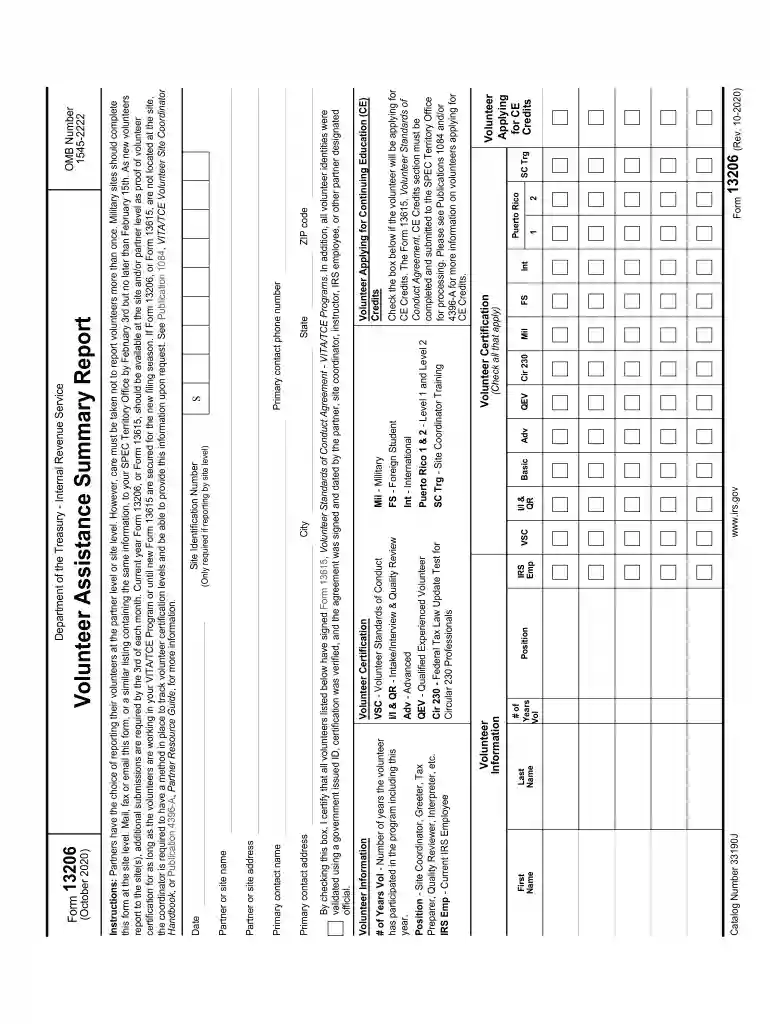
  2. Begin by entering your Site Identification Number, City, State, and ZIP code. This information is crucial for identifying your reporting site.
  3. Fill in the Primary Contact Name and Phone Number. Ensure accuracy as this will be used for communication regarding your submission.
  4. In the Volunteer Information section, list each volunteer's First and Last Name along with their number of years volunteering. Check all applicable boxes for certifications and training levels.
  5. If any volunteers are applying for Continuing Education Credits, check the corresponding box and ensure that Form 13615 is completed.
  6. Review all entered information carefully before submitting. Make sure to verify that no volunteers are reported more than once.

Start using our platform today to streamline your form completion process for free!

See more Get the free Irs-pdf Internal Revenue Service - DocHub.com versions

We've got more versions of the Get the free Irs-pdf Internal Revenue Service - DocHub.com form. Select the right Get the free Irs-pdf Internal Revenue Service - DocHub.com version from the list and start editing it straight away!
Versions Form popularity Fillable & printable
2023 4.5 Satisfied (47 Votes)
2022 4.4 Satisfied (35 Votes)
2021 4.8 Satisfied (77 Votes)
2020 4 Satisfied (27 Votes)
2004 4 Satisfied (49 Votes)
be ready to get more

Complete this form in 5 minutes or less

Get form

Got questions?

We have answers to the most popular questions from our customers. If you can't find an answer to your question, please contact us.
Contact us

Sure, and it’s really straightforward! DocHub is a web-based PDF editor with advanced document processing functions that allow you quickly modify your forms, fill out blank fields and drop new ones for other people to fill out, and create eSignatures in several ways. Add your Get the free Irs-pdf Internal Revenue Service - DocHub.com, provide information as required, and decide how you want to eSign your document - by typing your name, drawing your signature, uploading its picture, or utilizing a QR code.

If you use Chrome, there are two simple methods to modify your Get the free Irs-pdf Internal Revenue Service - DocHub.com online. First, visit the DocHub website, add your document, and modify it using our toolbar. You can also install our Chrome extension and modify any document by dragging and dropping it in your browser tab.

No, it is not part of the IRS, its only endorsed by and partnered with the IRS and is an authorized e-filing system with the IRS. Free File Fillable Forms is run by Free File Alliance, LLC. The IRS does not independently run any filing software or programs.
How IRS Free File offers work Choose a Free File option from .IRS.gov. IRS Free File sends you directly to the IRS partners website to create an account. Prepare and file your federal tax return. Get an email when the IRS has accepted your return.
The IRS Free File program is a fast, safe and free way to do your federal tax return online.

Security and compliance

At DocHub, your data security is our priority. We follow HIPAA, SOC2, GDPR, and other standards, so you can work on your documents with confidence.

Learn more
ccpa2
pci-dss
gdpr-compliance
hipaa
soc-compliance

People also ask

By phone. To get federal tax forms, you can also call the IRS at 1-800-829-3676. In person. You can walk in and pick up your forms at an IRS Taxpayer Assistance Center (TAC). Elsewhere. Your local government offices may have federal and state tax forms.
If you know what form or publication you need, call the IRS toll-free forms number at 1-800-TAX-FORM (1-800-829-3676).
Get the current filing years forms, instructions, and publications for free from the IRS. You can also find printed versions of many forms, instructions, and publications in your community for free at: Libraries. IRS Taxpayer Assistance Centers.
Portable Document Format (PDF) Right click on the link, which is usually the item number (if your mouse is configured for left-handed operation use the left mouse button). Select Save Target As or Save Link As when presented with a menu. Use docHub Reader to open the file after downloading.

Related links