




Here's how it works

01. Edit your form 13206 online
Type text, add images, blackout confidential details, add comments, highlights and more.

02. Sign it in a few clicks
Draw your signature, type it, upload its image, or use your mobile device as a signature pad.

03. Share your form with others
Send f13206 via email, link, or fax. You can also download it, export it or print it out.
How to use or fill out Form 13206 (Rev 10-2023) Volunteer Assistance Summary Report with DocHub

- Click ‘Get Form’ to open the Form 13206 in our editor.
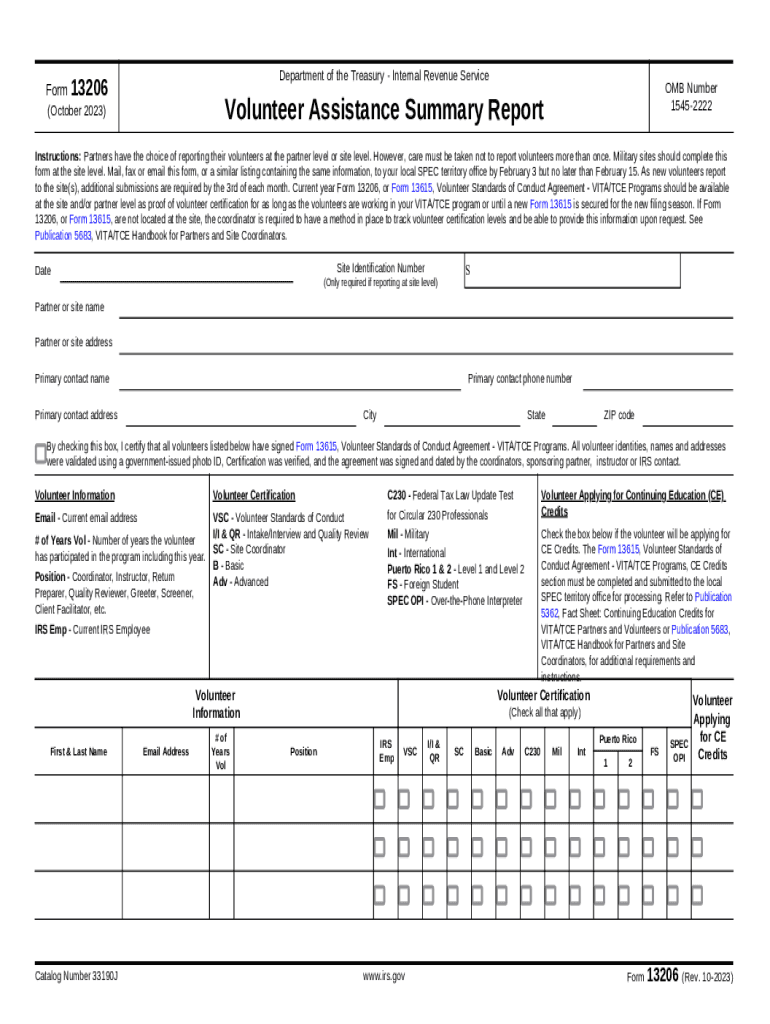
- Begin by entering the Site Identification Number and Date if reporting at the site level. Fill in the Partner or Site Name, Address, and Primary Contact details including name, phone number, and address.
- In the Volunteer Information section, list each volunteer's First & Last Name, Email Address, and Number of Years Volunteered. Check all applicable certifications for each volunteer.
- If a volunteer is applying for Continuing Education Credits, ensure to check the corresponding box and complete any required sections related to CE Credits.
- Review all entries for accuracy before submitting. Use our platform’s features to save your progress or share it with team members for verification.
Start using our platform today to easily fill out and manage your Form 13206 for free!
Fill out Form 13206 (Rev 10-2023) Volunteer Assistance Summary Report online
It's free
It's free
See more Form 13206 (Rev 10-2023) Volunteer Assistance Summary Report versions
We've got more versions of the Form 13206 (Rev 10-2023) Volunteer Assistance Summary Report form. Select the right Form 13206 (Rev 10-2023) Volunteer Assistance Summary Report version from the list and start editing it straight away!
Got questions?
We have answers to the most popular questions from our customers. If you can't find an answer to your question, please contact us.
Contact us
What must the certified volunteer preparer do with form 13614-C?
Form 13614-C guides the preparer through the interview with the taxpayer and allows them to gather all necessary information for accurate return preparation. The volunteer uses the completed tax return, the taxpayers supporting documentation, and the completed Form 13614-C to verify the tax return is free from error.
How is form 13614-C used and why is it important?
Form 13614-C is used by IRS-tax law certified volunteers to gather information needed to prepare an accurate tax return. SPEC redesigned the form to be more user-friendly and to increase conversation with taxpayers. This revised form has additional space for taxpayer and preparer comments.
What is Form 8986 reporting year?
The reporting year is the partners tax year that includes the date on which the AAR partnership filed the AAR and furnished Forms 8986 to its reviewed-year partners (i.e., the date reported in Part II, Item G, on Form 8986).
What is the IRS form to cancel all debt?
Form 1099-C. Lenders or creditors are required to issue Form 1099-C, Cancellation of Debt, if they cancel a debt owed to them of $600 or more. Generally, an individual taxpayer must include all canceled amounts (even if less than $600) on the Other Income line of Form 1040.
What is a 13615 form?
Use of Form 13615: This form provides information on a volunteers certification. All VITA/TCE volunteers must pass the Volunteer Standards of Conduct certification, and sign and date Form 13615, Volunteer Standards of Conduct Agreement - VITA/TCE Programs, prior to working at a VITA/TCE site.
Security and compliance
At DocHub, your data security is our priority. We follow HIPAA, SOC2, GDPR, and other standards, so you can work on your documents with confidence.
Learn more


