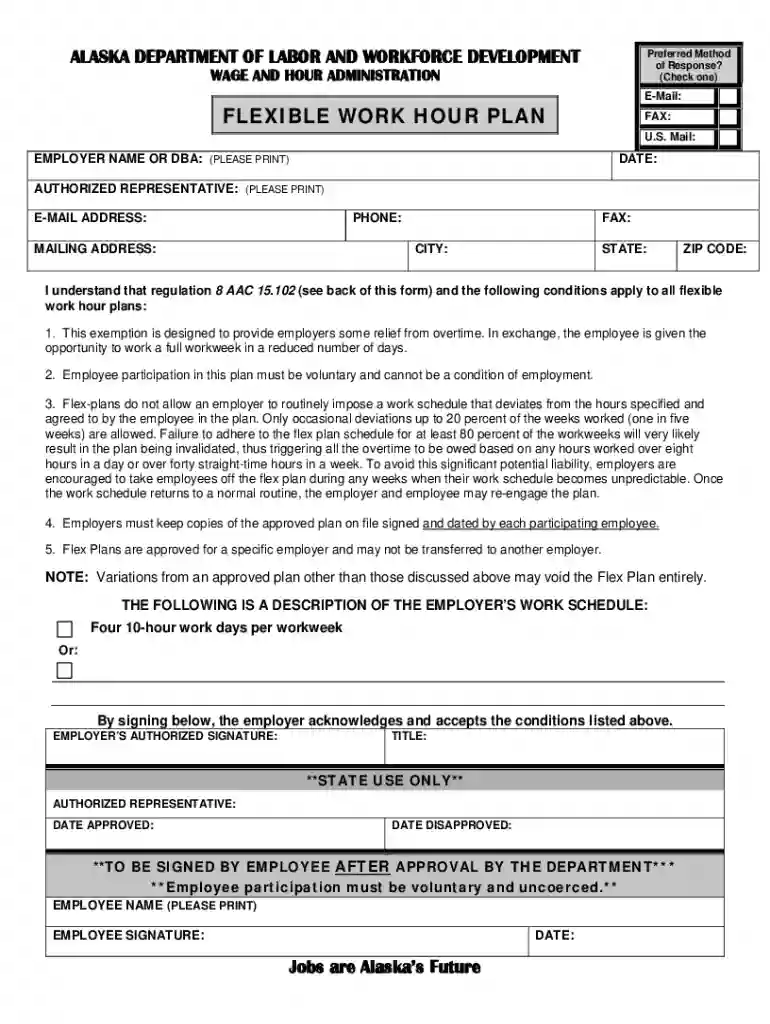
flexible work plan Preview on Page 1

Flexible work plan 2026

Here's how it works

  • 01. Edit your form online

    Type text, add images, blackout confidential details, add comments, highlights and more.

  • 02. Sign it in a few clicks

    Draw your signature, type it, upload its image, or use your mobile device as a signature pad.

  • 03. Share your form with others

    Send it via email, link, or fax. You can also download it, export it or print it out.

How to use or fill out flexible work plan with our platform

Form edit decoration
9.5
Ease of Setup
DocHub User Ratings on G2
9.0
Ease of Use
DocHub User Ratings on G2
  1. Click ‘Get Form’ to open the flexible work hour plan in the editor.
  2. Begin by entering the employer name or DBA in the designated field. Ensure this is printed clearly for accurate identification.
  3. Fill in the date of submission, followed by the authorized representative's name and email address. This information is crucial for communication regarding the plan.
  4. Provide a contact phone number and mailing address, including city, state, and ZIP code. This ensures that all correspondence related to the plan can be directed appropriately.
  5. Review the conditions outlined on the form carefully. Acknowledge understanding by signing where indicated, confirming that participation is voluntary and not a condition of employment.
  6. Once completed, save your changes and submit the form through our platform for processing. Keep a copy for your records as required by regulations.

Start using our platform today to streamline your flexible work plan process for free!

See more flexible work plan versions

We've got more versions of the flexible work plan form. Select the right flexible work plan version from the list and start editing it straight away!

VersionsForm popularityFillable & printable
20214.8 Satisfied (66 Votes)
20174.3 Satisfied (99 Votes)
20154.4 Satisfied (476 Votes)

be ready to get more

Complete this form in 5 minutes or less

Got questions?

We have answers to the most popular questions from our customers. If you can't find an answer to your question, please contact us.

With DocHub, you can rapidly approve your flexible work plan or any other document on iOS, even without installing additional applications. You can access your DocHub account from any internet-connected browser and fill out and sign your document in any way you like with just a couple of clicks.

If you are using Chrome, there are two easy methods to modify your flexible work plan online. First, go to the DocHub website, add your file, and modify it using our toolbar. You may also install our Chrome extension and modify any document by dragging and dropping it in your browser tab.

Security and compliance

At DocHub, your data security is our priority. We follow HIPAA, SOC2, GDPR, and other standards, so you can work on your documents with confidence.

Related links

Flexible Work Agreements - Human Resources at Ohio State

1. Review the policy 2. Understand the flexible work option needed 3. Develop a work plan 4. Identify needs for tools, equipment and security of technologyRead more

Learn more
Voluntary Flexible Work Hour Plan

A vehicle for workers whose normal work week was 35 to 40 hours per week to compress their work week and enjoy a longer time off.Read more

Learn more
If you believe that this page should be taken down, please follow our DMCA take down process here