



Here's how it works



How to use or fill out 20200213034587Eng. Class O Data form updated SOS includes opt out 4-2020 with our platform

- Click ‘Get Form’ to open it in the editor.
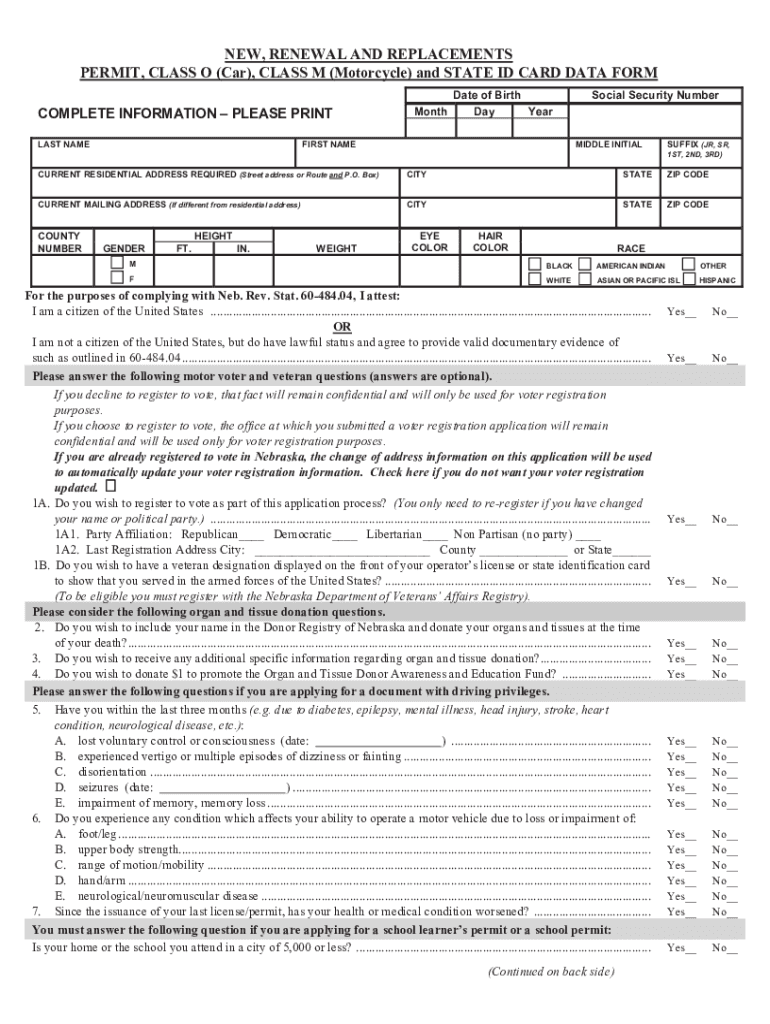
- Begin by filling in your last name, first name, middle initial, and suffix if applicable. Ensure all names are printed clearly.
- Enter your date of birth by selecting the month, day, and year from the dropdown menus provided.
- Complete your current residential address including street address, city, state, and zip code. If your mailing address differs, fill that section as well.
- Provide personal details such as height, weight, gender, eye color, hair color, and race by selecting from the options available.
- Respond to the citizenship question by checking the appropriate box and providing any necessary documentation if you are not a citizen.
- Answer optional questions regarding voter registration and veteran status as desired. Remember that these answers will remain confidential.
- If applying for driving privileges, answer health-related questions truthfully to ensure compliance with safety regulations.
- Finally, review all entered information for accuracy before signing and dating the application at the bottom of the form.
Start using our platform today to easily complete your Class O Data form online for free!
It's free
See more 20200213034587Eng. Class O Data form updated SOS includes opt out 4-2020 versions
Got questions?
Can I sign my 20200213034587Eng. Class O Data form updated SOS includes opt out 4-2020 electronically?
According to eSignature regulations, documents signed digitally have the same validity as those approved with pen and paper. You can electronically sign almost any business and private paperwork. Four types of documents still demand wet signatures only - wills and testamentary trusts, court orders and other court forms, state statutes governing divorce, adoption, or other family law, and notice of cancellation of utility services. If you adhere to the guidelines and use a reliable and compliant software solution, like DocHub, you can eSign your 20200213034587Eng. Class O Data form updated SOS includes opt out 4-2020 without printing it.
How to fill out 20200213034587Eng. Class O Data form updated SOS includes opt out 4-2020 online free of charge in 2024?
With a swift editing platform like DocHub, you do not need anything but a web browser and connection to the internet to modify your 20200213034587Eng. Class O Data form updated SOS includes opt out 4-2020 on the internet easily. Add your file or find the relevant form in DocHub’s catalog, open our editor with a single click, and complete it electronically. To revise your forms at any time, sign up a free account with DocHub.
Security and compliance
At DocHub, your data security is our priority. We follow HIPAA, SOC2, GDPR, and other standards, so you can work on your documents with confidence.
Learn more


Related forms