



Here's how it works



How to use or fill out letter landlord tenant with our platform

- Click ‘Get Form’ to open the letter landlord tenant in the editor.
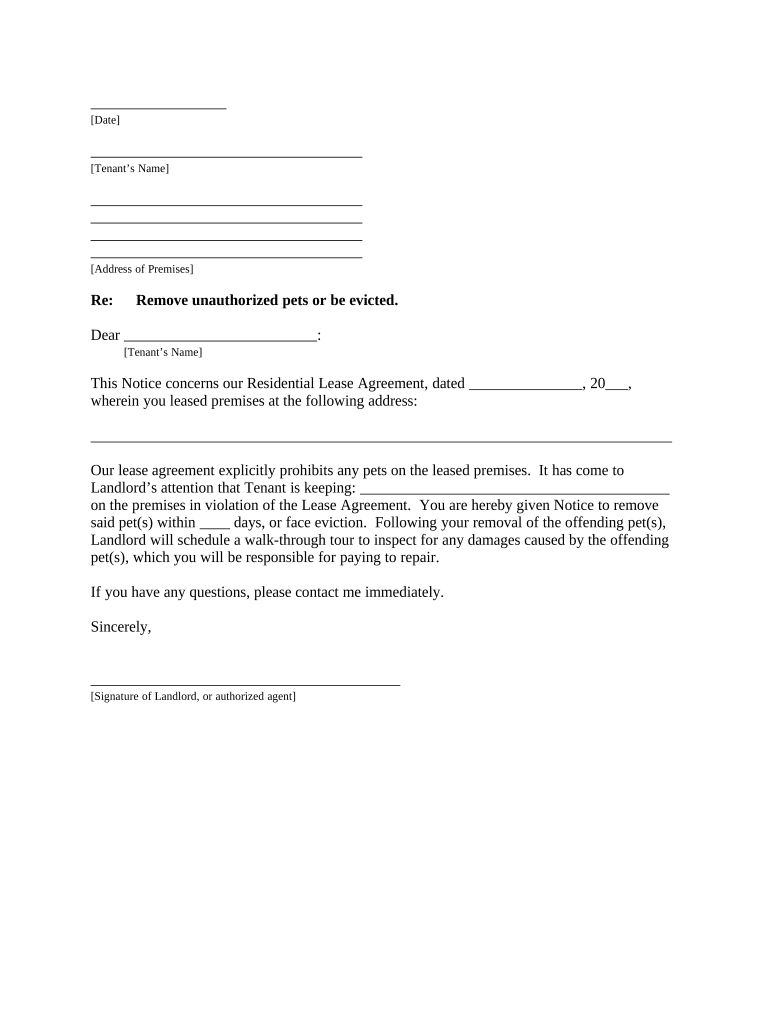
- Begin by entering the date at the top of the document. This sets the timeline for your notice.
- Fill in the tenant’s name and their address of premises. Ensure accuracy to avoid any confusion.
- In the body of the letter, specify the lease agreement date and address where the violation occurred.
- Clearly state what unauthorized pets are being kept on the premises, as this is crucial for clarity.
- Indicate a specific number of days for pet removal, ensuring it complies with local regulations.
- Sign off with your name and title, then add a signature line for authenticity.
- Complete the proof of delivery section by selecting how you delivered this notice to the tenant.
Start using our platform today to streamline your document editing and ensure effective communication!
It's free
Got questions?
Can I use DocHub to generate legal eSignatures on my letter landlord tenant?
Yes, you can utilize DocHub for signing any business and personal documentation, including your letter landlord tenant. All eSignatures you generate with our tool are legally binding and court-admissible, as DocHub complies with standards required by ESIGN and UETA. Save your accomplished paperwork with a detailed Audit Trail if needed.
How to complete and sign letter landlord tenant online?
You may easily fill out, modify, and even eSign your letter landlord tenant using DocHub. Create a new account and begin your free trial. After that, you can upload the file with the form and easily make all the needed edits. No need to print on paper or use a third-party application to sign it, as you can place your electronic signature on your document faster through DocHub.
Security and compliance
At DocHub, your data security is our priority. We follow HIPAA, SOC2, GDPR, and other standards, so you can work on your documents with confidence.
Learn more