




Here's how it works

01. Edit your va form 27 2008 online
Type text, add images, blackout confidential details, add comments, highlights and more.

02. Sign it in a few clicks
Draw your signature, type it, upload its image, or use your mobile device as a signature pad.

03. Share your form with others
Send 2021 va form 27 2008 via email, link, or fax. You can also download it, export it or print it out.
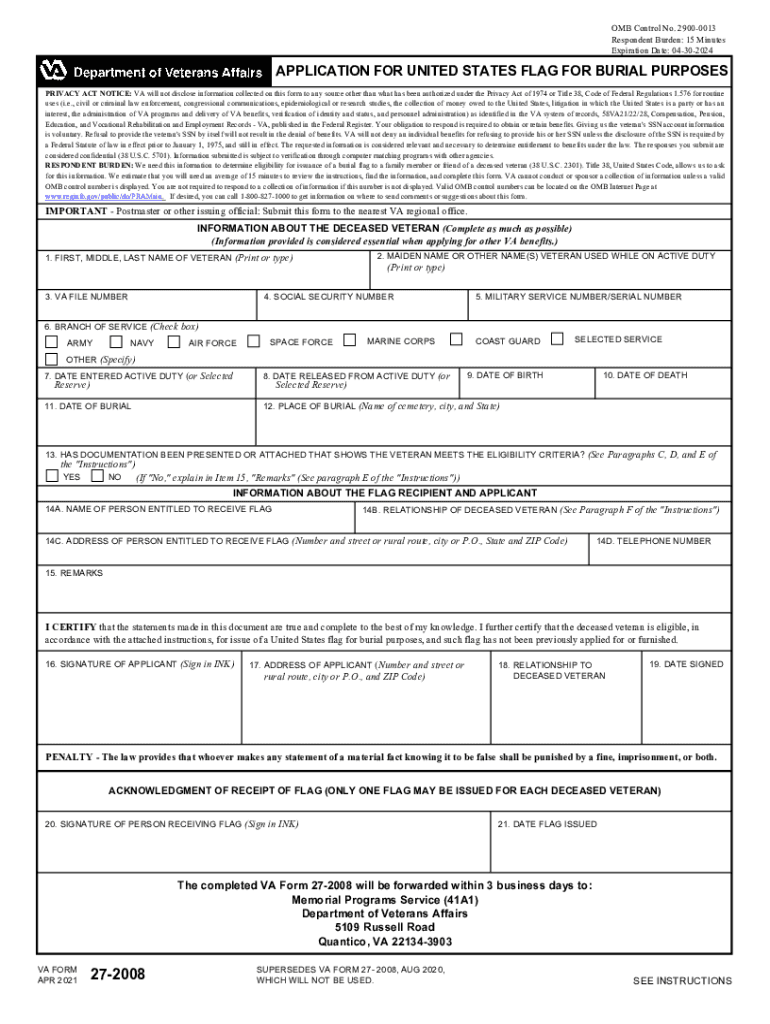
How to use or fill out VA Form 27-2008 with our platform

- Click ‘Get Form’ to open VA Form 27-2008 in the editor.
- Begin by filling out the 'Information About the Deceased Veteran' section. Enter the veteran's full name, VA file number, and other personal details such as Social Security Number and military service information.
- Complete the dates of birth, death, and burial. Ensure you provide accurate details about the burial location.
- In the 'Information About the Flag Recipient and Applicant' section, input the name and relationship of the person entitled to receive the flag. Include their address and contact number.
- Review all entries for accuracy. If documentation is required, ensure it is attached before submission.
- Sign and date the form in ink to certify that all information is true. Submit it to your nearest VA regional office or through a funeral director.
Start using our platform today for free to streamline your form completion process!
Fill out va form 27 2008 online
It's free
It's free
See more va form 27 2008 versions
We've got more versions of the va form 27 2008 form. Select the right va form 27 2008 version from the list and start editing it straight away!
Security and compliance
At DocHub, your data security is our priority. We follow HIPAA, SOC2, GDPR, and other standards, so you can work on your documents with confidence.
Learn more


Related forms
A perspective from simple exact models - UCSB College of - engineering ucsb
The document reviews the principles of protein folding, stability, and kinetics through simple exact models. It emphasiz ...
"But Seriously, Folks
The document reviews two significant works on comic art: David Kunzle's 'History of the Comic Strip: Vol. 2, The Ninetee ...

Children in the Workplace
The memo addresses concerns regarding staff and academic appointees bringing children to work, highlighting complaints a ...

Standard Operating Procedure for Monitoring of
This document outlines the Standard Operating Procedure (SOP) for monitoring temperatures in refrigerators and freezers ...
Dreams and Waking Life: Interview Information to Accompany
The document presents an extensive interview with Barbara Sanders, who has recorded over 4,000 dreams over 25 years. It ...

The effect of the legal form of business - Small Business
The document examines the impact of different legal forms of business organization—Sole Proprietorship, Partnership, and ...
HOW BEST TO FORM A NON-PROFIT SOCIAL ENTERPRISE - sbaer uca
The document discusses the challenges and potential solutions for developing a capital market specifically for non-profi ...

Liquidity Constraints, Household Wealth, and Entrepreneurship Revisited
The document revisits the relationship between household wealth and entrepreneurship, particularly focusing on liquidity ...