27 2008 2012 form-2026

Get Form
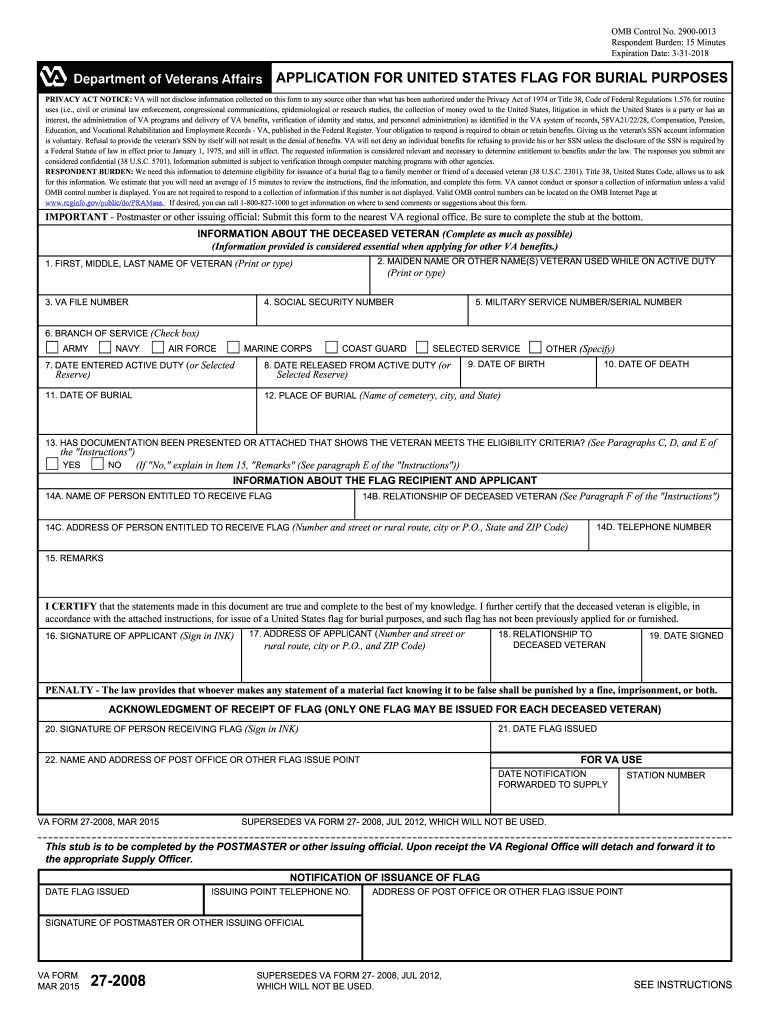
27 2008 Preview on Page 1

Here's how it works

01. Edit your 27 2008 online
Type text, add images, blackout confidential details, add comments, highlights and more.
02. Sign it in a few clicks
Draw your signature, type it, upload its image, or use your mobile device as a signature pad.
03. Share your form with others
Send it via email, link, or fax. You can also download it, export it or print it out.

How to use or fill out 27 2008 2012 form with our platform

Form edit decoration
9.5
Ease of Setup
DocHub User Ratings on G2
9.0
Ease of Use
DocHub User Ratings on G2
  1. Click ‘Get Form’ to open the 27 2008 2012 form in the editor.
  2. Begin by filling out the 'Information About the Deceased Veteran' section. Enter the veteran's full name, maiden name, VA file number, and Social Security number. Ensure accuracy as this information is crucial for eligibility.
  3. Complete the military service details by selecting the branch of service and entering relevant dates such as date entered active duty and date released from active duty.
  4. In the 'Information About the Flag Recipient and Applicant' section, provide the name, relationship to the deceased veteran, and contact details of the person entitled to receive the flag.
  5. Certify your statements by signing in ink at the designated area. Make sure to include your address and relationship to the deceased veteran before submitting.
  6. Finally, review all entries for completeness and accuracy before submitting your application to ensure a smooth process.

Start using our platform today for free to complete your forms efficiently!

See more 27 2008 2012 form versions

We've got more versions of the 27 2008 2012 form form. Select the right 27 2008 2012 form version from the list and start editing it straight away!
Versions Form popularity Fillable & printable
2021 4.9 Satisfied (43 Votes)
2018 4.4 Satisfied (103 Votes)
2015 4.4 Satisfied (276 Votes)
2012 4.4 Satisfied (338 Votes)
2012 4 Satisfied (20 Votes)
be ready to get more

Complete this form in 5 minutes or less

Get form

Got questions?

We have answers to the most popular questions from our customers. If you can't find an answer to your question, please contact us.
Contact us
VA disability pay or disability compensation is a tax-free monthly payment given to veterans with a service-related disability and an other than dishonorable discharge. Those veterans may qualify for a tax-free, monthly benefit ranging from $165 to over $3,600.
Appears In Navigate to VA.gov and sign in using any of the sign-in options. Click on VA Benefits and Health Care at the top of the VA website. Find the claim you are looking for. To locate your VA decision letter, click on View details. On the next page, click Get your claim letters. Select the letter you need.
Visit to fill out VA Form 27-2008, Application for United States Flag for Burial Purposes.
Whenever the VA sends you a letter about your claim, your VA file number will be on the document. Look in the upper right-hand corner. There is usually a note that says In reply refer to followed by two or three numbers separated by a \. Below those number will be your file number.
Frequently used VA forms You can now do many form-based tasks online, like filing a disability claim and applying for the GI Bill or VA health care. Well walk you through the process step-by-step.

Security and compliance

At DocHub, your data security is our priority. We follow HIPAA, SOC2, GDPR, and other standards, so you can work on your documents with confidence.

Learn more
ccpa2
pci-dss
gdpr-compliance
hipaa
soc-compliance

People also ask

How to Request Your VA C-File Gather Information: Collect personal details, including your VA file number and Social Security Number. Complete the VA Form: Use VA Form 3288 to request records release under the Freedom of Information Act (FOIA). Mail the Request: Send the completed form to your regional VA office.

Related links