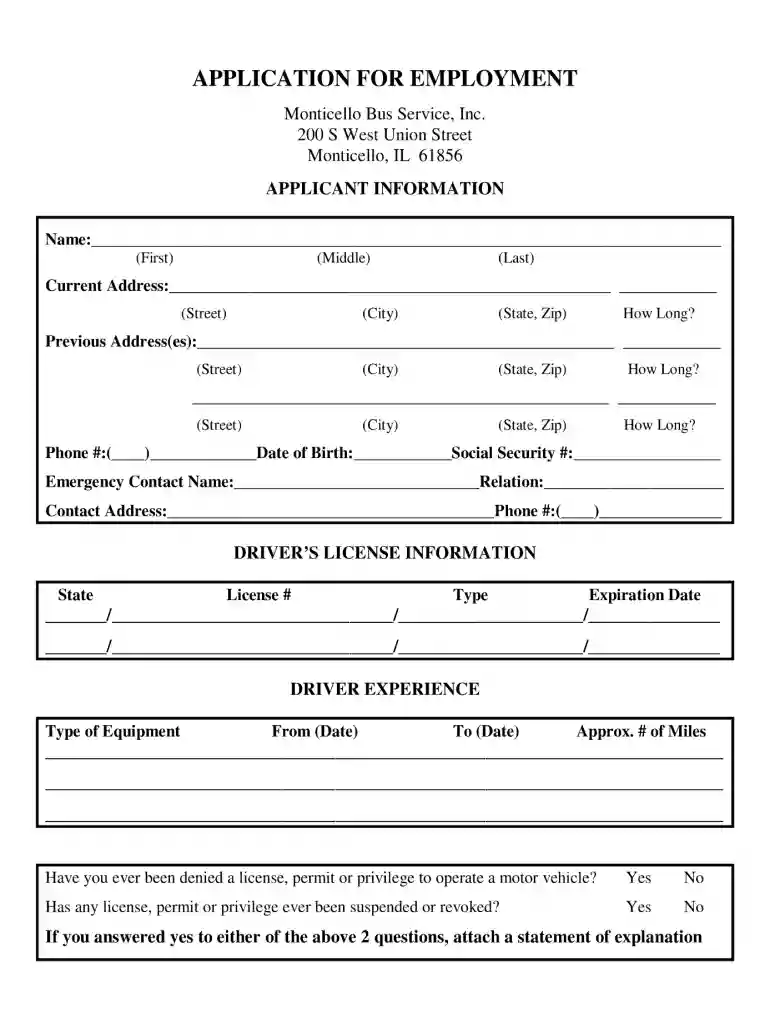
Truck driver employment application template word 2026

Get Form
truck driver format Preview on Page 1

Here's how it works

01. Edit your truck driver format online
Type text, add images, blackout confidential details, add comments, highlights and more.

02. Sign it in a few clicks
Draw your signature, type it, upload its image, or use your mobile device as a signature pad.

03. Share your form with others
Send truck driver employment application template word via email, link, or fax. You can also download it, export it or print it out.

How to use or fill out truck driver employment application template word with our platform

Form edit decoration
9.5
Ease of Setup
DocHub User Ratings on G2
9.0
Ease of Use
DocHub User Ratings on G2
  1. Click ‘Get Form’ to open the truck driver employment application template in the editor.
  2. Begin by entering your personal information in the designated fields, including your name, address, and contact details. Ensure accuracy for effective communication.
  3. Next, navigate to the employment history section. Fill in your previous job titles, employers, and dates of employment. Highlight relevant experience that showcases your qualifications as a truck driver.
  4. Proceed to the education section. Input your educational background, including any certifications related to driving or safety training that may enhance your application.
  5. Finally, review all sections for completeness and accuracy. Utilize our platform’s editing tools to make any necessary adjustments before saving or submitting your application.

Start using our platform today for free and streamline your truck driver employment application process!

be ready to get more

Complete this form in 5 minutes or less

Get form

Got questions?

We have answers to the most popular questions from our customers. If you can't find an answer to your question, please contact us.
Contact us

Most eSignature services require users to have a paid subscription. With DocHub, there are two options for you to create an electronic signature to your free driver application template at no cost:

  • You can do it during a 7-day trial period;
  • You can subscribe to a free plan.

The second option, however, has restrictions on the number of signatures, sign requests, emails, and documents for editing available per month. You can check for full information here.

If you use Chrome, there are two straightforward methods to edit your truck application online. First, go to the DocHub website, add your file, and edit it utilizing our toolbar. You may also install our Chrome extension and edit any document by dragging and dropping it in your web browser tab.

Job Application Letter Format Contact Information and Date. Start with your contact information at the top left of the page. Formal Salutation. Address the letter to a specific person whenever possible. Body of the Letter. Professional Font and Length. Formal Closing. Nov 27, 2025
When possible use writing samples that match the type of the writing that the position would involve. For journalism positions, submit clipsactual articles that have been published in a campus newspaper, blog, or other publication. For research positions, submit an in-depth analysis of an issue or a topic.
Here is a simple guide to formatting your job application letter correctly. Contact Information and Date. Start with your contact information at the top left of the page. Formal Salutation. Address the letter to a specific person whenever possible. Body of the Letter. Professional Font and Length. Formal Closing. Nov 27, 2025

Security and compliance

At DocHub, your data security is our priority. We follow HIPAA, SOC2, GDPR, and other standards, so you can work on your documents with confidence.

Learn more
ccpa2
pci-dss
gdpr-compliance
hipaa
soc-compliance

People also ask

Applicants residential address history for the past 3 years on the application without any gaps that are greater than 30 days. Applicants Drivers License number and state. Cannot have any gaps that are greater than 30 days. If the driver was unemployed for a period of time, it must be listed.
How to write a truck drive resume Create a header. To begin your resume, create a header with your contact information so the hiring manager can DocHub you easily. Write a professional summary. Add your experience. List your education. Include your skills. Add your certifications and licenses. Revise your resume. Dec 11, 2025
Go to File New. In the Search for online templates field, type Forms or the kind of form you want. Then press Enter. In the displayed results, right-click any item, then select Create.
How to write a truck driver cover letter Study the truck driver job description. Include your contact information in the header. Address the hiring manager by name. Introduce yourself in the first paragraph. Explain why youre the best candidate for the job. Write your cover letter closing. Sign off. Jan 29, 2024
Cover letter structure and format State clearly in your opening sentence the purpose for your letter and a brief professional introduction. Specify why you are interested in that specific position and organization. Provide an overview of the main strengths and skills you will bring to the role.

driver employment application