Motion summary judgment 2025

Get Form
motion summary judgment Preview on Page 1

Here's how it works

01. Edit your form online
Type text, add images, blackout confidential details, add comments, highlights and more.
02. Sign it in a few clicks
Draw your signature, type it, upload its image, or use your mobile device as a signature pad.
03. Share your form with others
Send it via email, link, or fax. You can also download it, export it or print it out.

How to use or fill out motion summary judgment with our platform

Form edit decoration
9.5
Ease of Setup
DocHub User Ratings on G2
9.0
Ease of Use
DocHub User Ratings on G2
  1. Click ‘Get Form’ to open the motion summary judgment document in the editor.
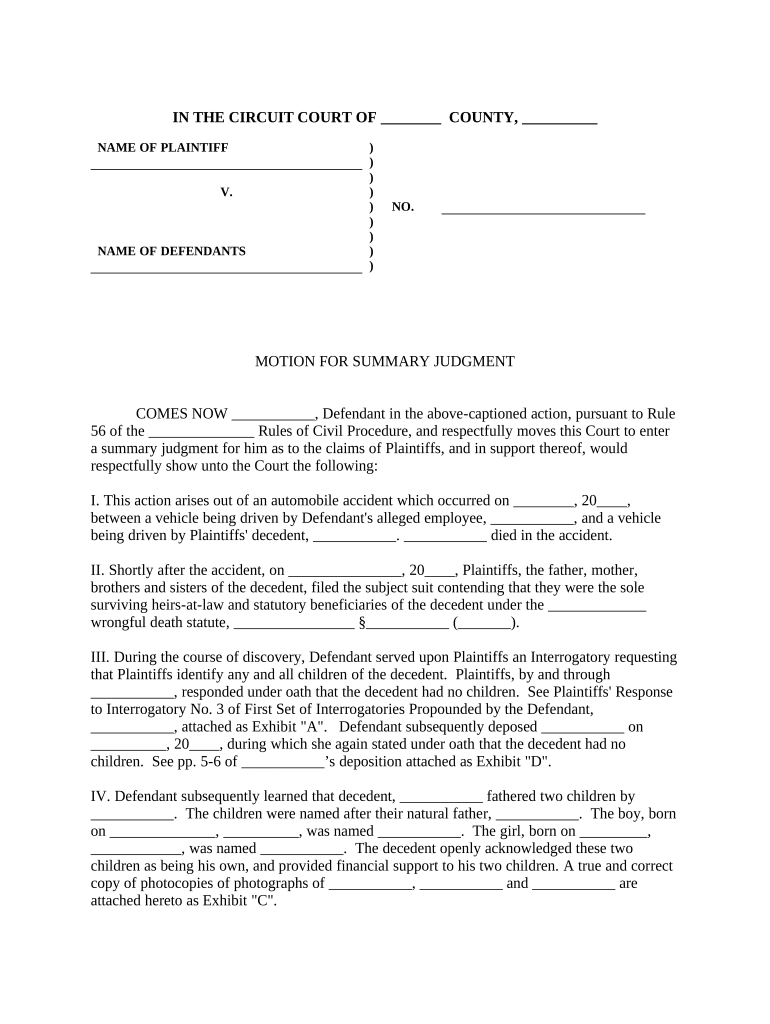
  2. Begin by filling in the court details at the top, including the county and names of the parties involved. This sets the context for your motion.
  3. In Section I, provide a brief description of the incident leading to the lawsuit, including dates and parties involved. This establishes the background of your case.
  4. Continue to Sections II through VIII, carefully detailing each point as outlined in your motion. Ensure you include all relevant facts and legal arguments supporting your request for summary judgment.
  5. Review each section for accuracy and completeness. Use our platform’s editing tools to make any necessary adjustments before finalizing your document.
  6. Once satisfied, utilize our signing feature to add your signature and date at the end of the document, ensuring it is ready for submission.

Start using our platform today to streamline your motion summary judgment process for free!

be ready to get more

Complete this form in 5 minutes or less

Get form

Got questions?

We have answers to the most popular questions from our customers. If you can't find an answer to your question, please contact us.
Contact us
Take summary judgment motions seriously. They can end your case and just because the standard of review on appeal is de novo, dont assume that will help you. Appellate court judges themselves estimate that only about 35% of the summary judgments granted are reversed on appeal.
It is established that although there is no discretion to enter summary judgment when there is a genuine issue as to any material fact, there is discretion to deny summary judgment when it appears that there is no genuine issue as to any material fact.
If summary judgment is denied, then the case will move forward to trial and the costs of litigation to both sides will likely increase substantially.
The odds of winning a summary judgment, known as the grant rate, vary widely by case type. The most common grant of summary judgment is in Title VII and employment cases. These are granted in whole in 49.2% of cases, in part in 23.3% of cases, and denied in 27.5% of cases.
The plaintiffs burden on summary judgment is to produce admissible evidence on each element of a cause of action entitling them to judgment. (Code Civ.

People also ask

Consider the following five approaches: Show that the motion fails to list the specific facts and law supporting summary judgment. Show that a dispute exists on a material fact. Show that the law does not support judgment on the undisputed facts.

Related links