Divorce dissolution marriage 2026

Get Form
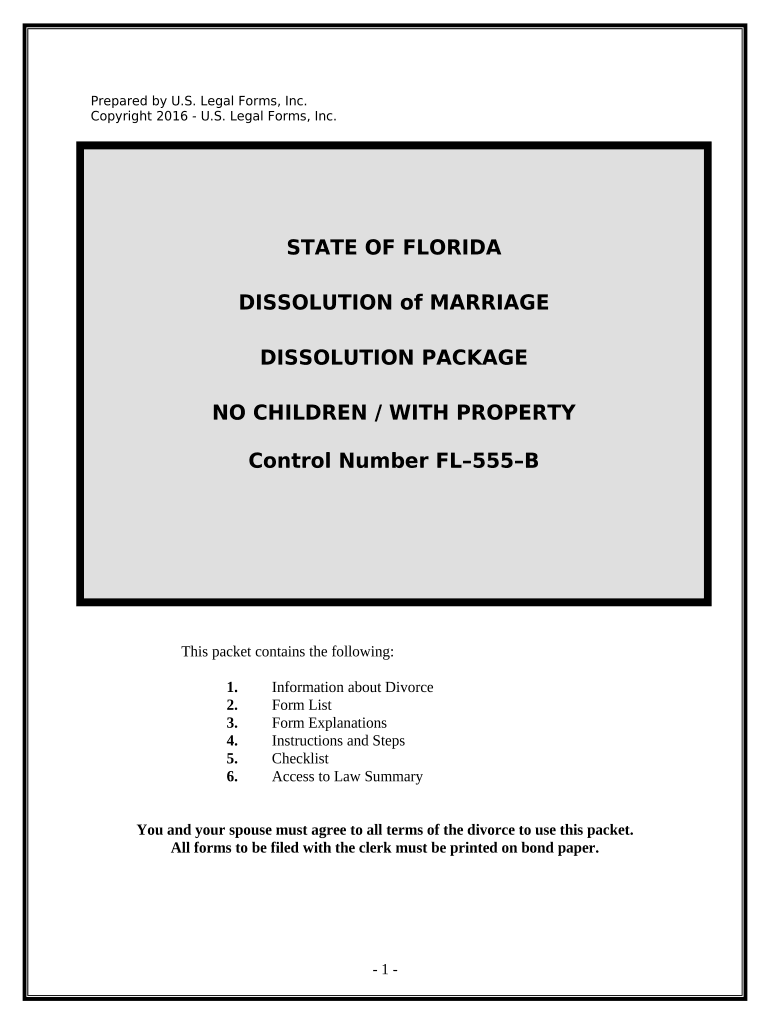
divorce dissolution marriage Preview on Page 1

Here's how it works

01. Edit your form online
Type text, add images, blackout confidential details, add comments, highlights and more.
02. Sign it in a few clicks
Draw your signature, type it, upload its image, or use your mobile device as a signature pad.
03. Share your form with others
Send it via email, link, or fax. You can also download it, export it or print it out.

How to use or fill out divorce dissolution marriage with our platform

Form edit decoration
9.5
Ease of Setup
DocHub User Ratings on G2
9.0
Ease of Use
DocHub User Ratings on G2
  1. Click 'Get Form' to open the divorce dissolution marriage document in the editor.
  2. Begin by completing the 'Petition for Dissolution of Marriage with Property but No Dependent or Minor Children'. Ensure all required fields are filled accurately.
  3. Next, complete the 'Certificate of Service' to confirm that both parties have received copies of all documents filed.
  4. Fill out the 'Notice of Social Security Number' form, which is mandatory for all parties involved in the dissolution process.
  5. If applicable, complete either the 'Financial Affidavit (Short Form)' or the standard 'Financial Affidavit', depending on your income level.
  6. Both parties should collaboratively fill out the 'Marital Settlement Agreement', ensuring mutual agreement on all terms.
  7. Once completed, file all documents with the Clerk of Court and pay any necessary filing fees. Follow up by serving copies to your spouse using a process server.
  8. After a waiting period of 20 days, set a date for your final hearing and notify your spouse accordingly using our platform's notification tools.

Start your journey towards a smooth divorce process today by utilizing our platform for free!

be ready to get more

Complete this form in 5 minutes or less

Get form

Got questions?

We have answers to the most popular questions from our customers. If you can't find an answer to your question, please contact us.
Contact us
Your marriage is officially dissolved the day the judge signs the divorce decree. A certificate of dissolution will be issued by the state, which is a legal document providing proof that your marriage has ended (similar to the way a marriage certificate shows you are married).
The basic difference between dissolution and divorce relates to whether the spouses agree on all of the issues related to the end of the marriage or not. In addition, dissolution does not assign fault to either party while divorce does.
Dissolution is usually quicker, less stressful, and cheaper, but it requires both parties to agree on all terms. Divorce, while allowing for more legal options and court intervention, can be more expensive, time-consuming, and emotionally taxing.

Security and compliance

At DocHub, your data security is our priority. We follow HIPAA, SOC2, GDPR, and other standards, so you can work on your documents with confidence.

Learn more
ccpa2
pci-dss
gdpr-compliance
hipaa
soc-compliance