Wisconsin child 2026

Get Form
wisconsin child Preview on Page 1

Here's how it works

01. Edit your form online
Type text, add images, blackout confidential details, add comments, highlights and more.

02. Sign it in a few clicks
Draw your signature, type it, upload its image, or use your mobile device as a signature pad.

03. Share your form with others
Send it via email, link, or fax. You can also download it, export it or print it out.

How to use or fill out Wisconsin Child with our platform

Form edit decoration
9.5
Ease of Setup
DocHub User Ratings on G2
9.0
Ease of Use
DocHub User Ratings on G2
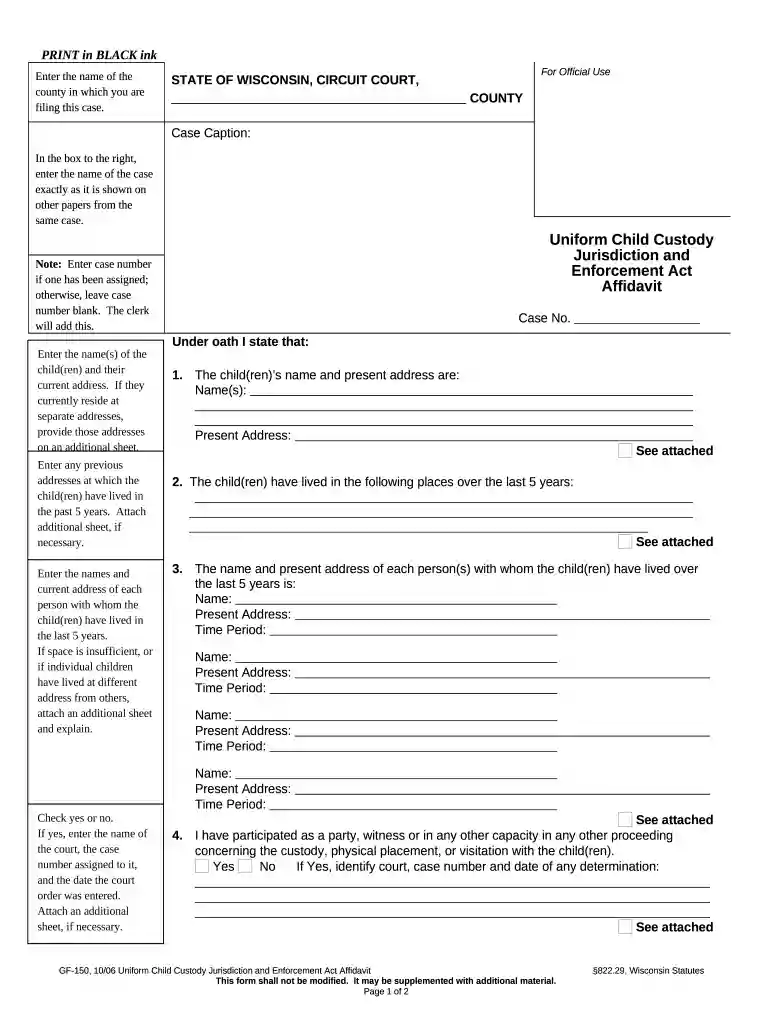
  1. Click ‘Get Form’ to open the Wisconsin Child form in the editor.
  2. Begin by entering the name of the county where you are filing this case in the designated field.
  3. In the 'Case Caption' box, input the name of your case exactly as it appears on other related documents.
  4. If a case number has been assigned, enter it; otherwise, leave it blank for the clerk to fill in later.
  5. Provide the names and current addresses of each child. If they live at different addresses, include those on an additional sheet.
  6. List any previous addresses where the children have lived over the past five years. Attach an additional sheet if necessary.
  7. Enter details about individuals with whom the children have lived during that time frame, including their names and addresses.
  8. Indicate whether you have participated in any other custody-related proceedings by checking 'Yes' or 'No', and provide relevant court information if applicable.
  9. Finally, ensure to take this document to a Notary Public for signing after being sworn in front of them.

Start filling out your Wisconsin Child form today for free using our platform!

be ready to get more

Complete this form in 5 minutes or less

Get form

Got questions?

We have answers to the most popular questions from our customers. If you can't find an answer to your question, please contact us.
Contact us

Electronic document approval demands a software solution that complies with data protection and eSignature standards. DocHub is a great tool for that, since it fulfills all the aforementioned requirements. Whatever method you prefer to sign your wisconsin child in DocHub, your electronic signature will be legally binding and court-admissible.

If your go-to email service is Gmail, it is simple to incorporate your DocHub editor in your work. Modify your wisconsin child with DocHub tools and attach it to your drafts in Gmail. See how straightforward it is to exchange documents and work together having a swift PDF editing solution at hand.

If child support is deducted from the payers paycheck but not received, contact your local child support enforcement agency immediately. They can track payments and ensure funds are properly distributed. Keep records of pay stubs showing deductions and any communication with employers or agencies.
Sometimes the employers dont properly identify the payments with the noncustodial parents name, case number(s) or ID number(s). In other situations, the employers payroll department is located out-of-state. There can also be delays when two or more child support agencies are involved.
You can either call them anonymously or write them an anonymous letter and tell the child support office this information, which will prompt them to look into it further. You may also want to consider petitioning the court to terminate his rights.

Security and compliance

At DocHub, your data security is our priority. We follow HIPAA, SOC2, GDPR, and other standards, so you can work on your documents with confidence.

Learn more
ccpa2
pci-dss
gdpr-compliance
hipaa
soc-compliance
be ready to get more

Complete this form in 5 minutes or less

Get form

People also ask

Child support does not take your entire paycheck. The amount of child support a person pays is based on their financial situation. The court will set an amount, generally a certain percentage..that you can afford while still being able to cover your own living expenses.

Related links