



Here's how it works



How to use or fill out the Certegy VIP Enrollment Form

- Click ‘Get Form’ to open it in the editor.
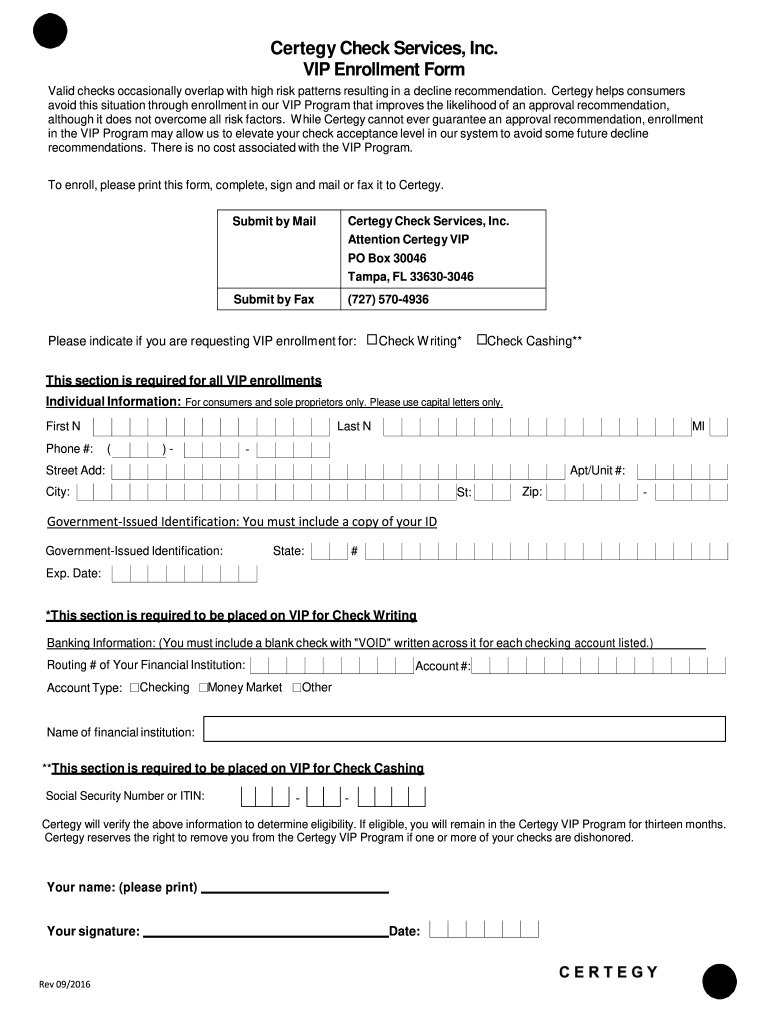
- Begin by filling out the 'Individual Information' section. Use capital letters for your first name, last name, middle initial, phone number, street address, apartment/unit number, city, state, and zip code.
- In the 'Government-Issued Identification' section, provide a copy of your ID along with the state and expiration date.
- For 'Banking Information', include a blank check marked 'VOID' for each checking account. Fill in the routing number, account type (checking or money market), account number, and name of your financial institution.
- If you are applying for check cashing privileges, ensure you provide your Social Security Number or ITIN.
- Finally, print your name and sign the form before submitting it via mail or fax to Certegy.
Start using our platform today to complete your Certegy VIP Enrollment Form online for free!
It's free
See more how to get around certegy versions
Got questions?
Can I draw my electronic signature to approve my what stores don't use telecheck or certegy?
Of course, electronically drawing your signature is acceptable, but only if you use a tool that complies with industry laws and regulations. Consider DocHub, which ensures eSignature validity under ESIGN and UETA requirements. All you need to approve your what stores don't use telecheck or certegy electronically is an account with DocHub and an internet connection. Once you open your document in our editor, click Sign and choose the Draw tool.
How to complete and sign cash check without certegy online?
You can easily complete, modify, and even eSign your cash check without certegy using DocHub. Create a new account and start your free trial. After that, you may add the document with the form and simply make all the needed edits. No need to print on paper or use a third-party application to sign it, as you can place your electronic signature on your document faster via DocHub.
Security and compliance
At DocHub, your data security is our priority. We follow HIPAA, SOC2, GDPR, and other standards, so you can work on your documents with confidence.
Learn more


Related forms