Gaprobateorg 2013 form-2026

Get Form
gaprobateorg 2013 form Preview on Page 1

Here's how it works

01. Edit your form online
Type text, add images, blackout confidential details, add comments, highlights and more.

02. Sign it in a few clicks
Draw your signature, type it, upload its image, or use your mobile device as a signature pad.

03. Share your form with others
Send it via email, link, or fax. You can also download it, export it or print it out.

How to use or fill out gaprobateorg 2013 form with our platform

Form edit decoration
9.5
Ease of Setup
DocHub User Ratings on G2
9.0
Ease of Use
DocHub User Ratings on G2
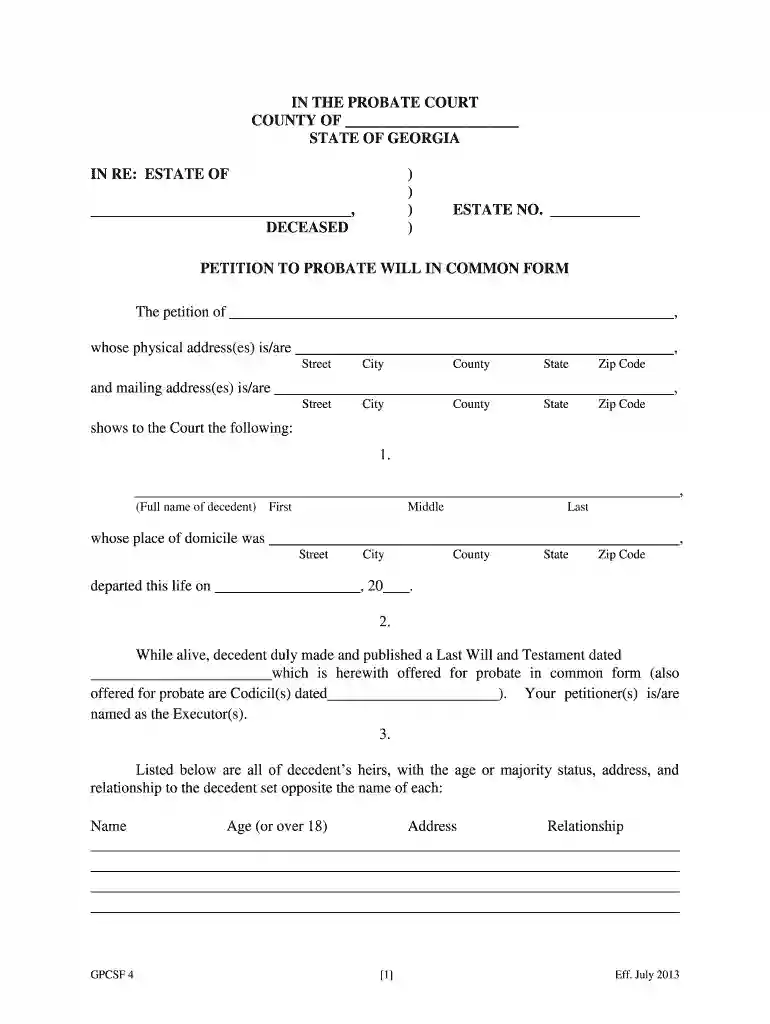
  1. Click ‘Get Form’ to open the gaprobateorg 2013 form in the editor.
  2. Begin by entering the decedent's full name and address in the designated fields. Ensure accuracy as this information is crucial for probate proceedings.
  3. In section 2, provide details about the Last Will and Testament, including its date. Attach any codicils if applicable.
  4. List all heirs in section 3, including their ages and relationships to the decedent. This ensures that all potential heirs are accounted for.
  5. In paragraph 4, supply sufficient factual information regarding heirs, including any deceased heirs' names and dates of death. This helps the court verify heirship.
  6. Complete sections regarding other pending proceedings or guardianship if applicable. Initial where required to confirm your statements.
  7. Finally, review all entries for accuracy before signing and submitting your petition through our platform.

Start using our platform today to streamline your document editing and ensure a smooth probate process!

See more gaprobateorg 2013 form versions

We've got more versions of the gaprobateorg 2013 form form. Select the right gaprobateorg 2013 form version from the list and start editing it straight away!
Versions Form popularity Fillable & printable
2016 4.8 Satisfied (60 Votes)
2015 4.4 Satisfied (1673 Votes)
2013 4.4 Satisfied (38 Votes)
be ready to get more

Complete this form in 5 minutes or less

Get form

Got questions?

We have answers to the most popular questions from our customers. If you can't find an answer to your question, please contact us.
Contact us
1013 Good for 48 hrs. Must be examined by M.D. *Georgia Law permits 1013/2013 to be signed by MD, Psychologist, LCSW, APRN [CNS].
A doctor who believes a person should be evaluated may sign a 1013 Request Form and submit it to the probate court.
What is a 1013/2013 in Georgia? Under current Georgia law, 1013s and 2013s are certificates that require emergency involuntary transportation to an emergency receiving facility of a patient who is experiencing a mental health crisis that poses an imminent danger to themselves or others.
Form 2013: A form utilized to initiate an involuntary substance use disorder evaluation of a person who presents a substantial risk of imminent harm to self or others.
The GA-8453 S is a signature form summarizing the agreement between the taxpayer and ERO or paid preparer. It may also be used by the Georgia Department of Revenue (GA DOR) to authenticate the electronic filing of the GA 600. A corporate officer must review and sign this form.

Security and compliance

At DocHub, your data security is our priority. We follow HIPAA, SOC2, GDPR, and other standards, so you can work on your documents with confidence.

Learn more
ccpa2
pci-dss
gdpr-compliance
hipaa
soc-compliance

People also ask

SUMMARY: The Act overhauls Georgias mental health system by enforcing compliance with federal mental health parity law. Most notably, the Act requires health insurers to provide coverage for mental health and substance use disorders equitably with physical health and defines generally accepted standards of care.