Application for Permission to File Emergent Motion - New Jersey ... - judiciary state nj 2026

Get Form
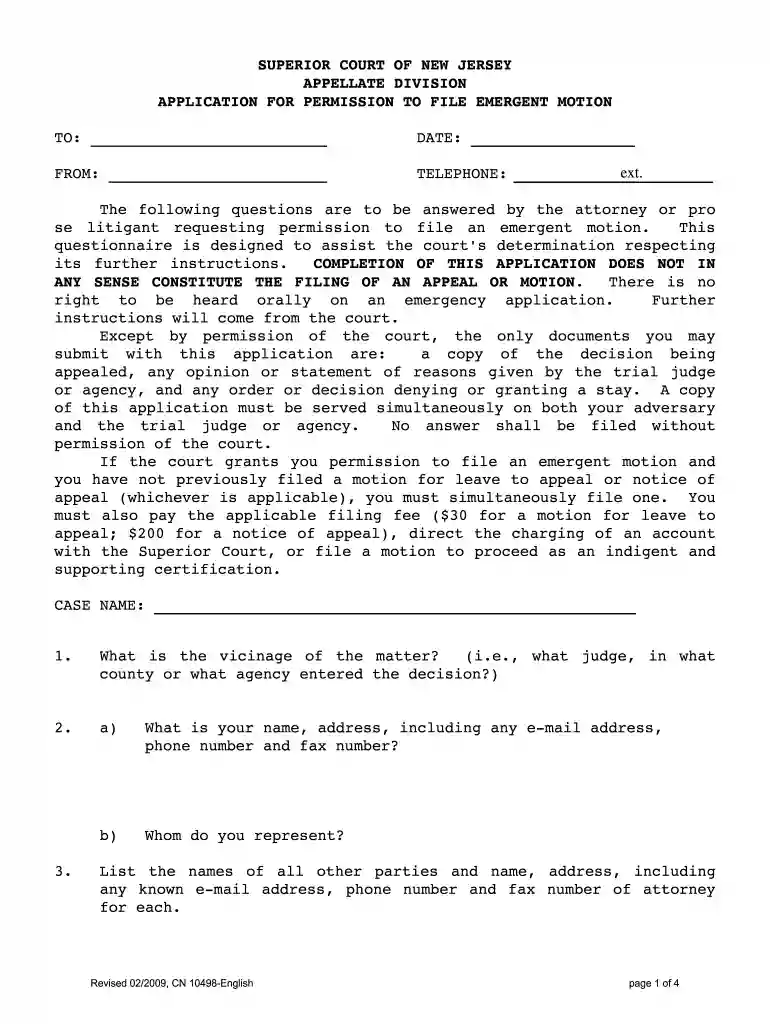
Application for Permission to File Emergent Motion - New Jersey ... - judiciary state nj Preview on Page 1

Here's how it works

01. Edit your form online
Type text, add images, blackout confidential details, add comments, highlights and more.

02. Sign it in a few clicks
Draw your signature, type it, upload its image, or use your mobile device as a signature pad.

03. Share your form with others
Send it via email, link, or fax. You can also download it, export it or print it out.

How to use or fill out Application for Permission to File Emergent Motion - New Jersey with our platform

Form edit decoration
9.5
Ease of Setup
DocHub User Ratings on G2
9.0
Ease of Use
DocHub User Ratings on G2
  1. Click ‘Get Form’ to open the Application for Permission to File Emergent Motion in the editor.
  2. Begin by filling in the 'TO' field with the appropriate court or agency name and the date of submission.
  3. In the 'FROM' section, provide your name, contact information, and any relevant details about your representation.
  4. Answer all questions thoroughly, starting with the vicinage of the matter. Ensure you include all parties involved and their attorneys' contact information.
  5. Attach any necessary documents as specified, such as a copy of the decision being appealed or any relevant orders.
  6. Review your responses carefully before submitting. Make sure that you have served copies of this application on both your adversary and the trial judge or agency.

Start using our platform today to streamline your document editing and submission process for free!

See more Application for Permission to File Emergent Motion - New Jersey ... - judiciary state nj versions

We've got more versions of the Application for Permission to File Emergent Motion - New Jersey ... - judiciary state nj form. Select the right Application for Permission to File Emergent Motion - New Jersey ... - judiciary state nj version from the list and start editing it straight away!
Versions Form popularity Fillable & printable
2009 4.8 Satisfied (80 Votes)
be ready to get more

Complete this form in 5 minutes or less

Get form

Got questions?

We have answers to the most popular questions from our customers. If you can't find an answer to your question, please contact us.
Contact us
Every motion shall state the time and place when it is to be presented to the court, the grounds upon which it is made and the nature of the relief sought, and, as to motions filed in the Law Division-Civil Part only, the discovery end date or a statement that no such date has been assigned.
12 Steps for Filing a Motion: Fill out the Notice of Motion (Form A) Get a court date for your motion Court Calendar. Fill out the Confidential Litigant Information Sheet. Fill out the Certification in Support of Motion (Form B) Fill out the Proposed Order (Form C)
You must serve your adversary no later than 16 days before the specified return date on your notice of motion. [If you are filing a motion for summary judgment, you must file it not later than 28 days before the time specified for the return date].
Payment to Clerk of the Court for $50. There is a $50 filing fee assessed by the Court for every motion filed, which should be paid by check or money order.
A motion for reconsideration must generally be filed within twenty days of receiving a final Court Order. However, when seeking reconsideration of a non-final Court Order (i.e., interlocutory or pendente lite), no time limit applies and the burden is much lower.

Security and compliance

At DocHub, your data security is our priority. We follow HIPAA, SOC2, GDPR, and other standards, so you can work on your documents with confidence.

Learn more
ccpa2
pci-dss
gdpr-compliance
hipaa
soc-compliance
be ready to get more

Complete this form in 5 minutes or less

Get form