




Here's how it works



How to use or fill out dads timesheet 2013 form with DocHub

- Click ‘Get Form’ to open the dads timesheet 2013 form in our platform's editor.
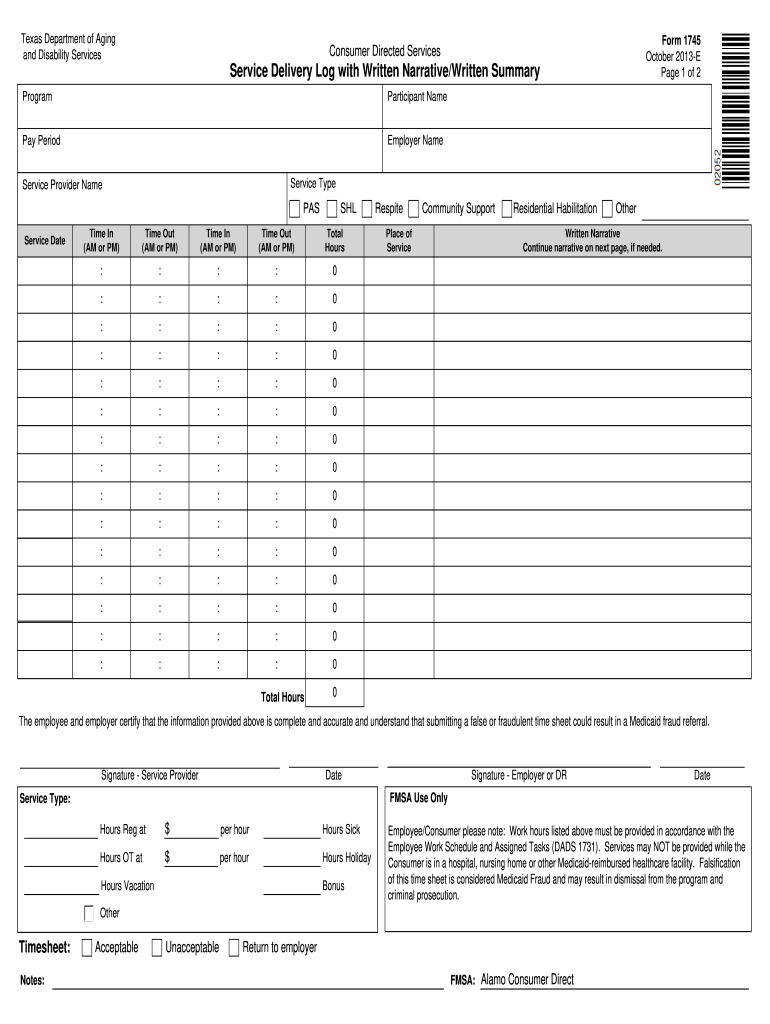
- Begin by entering the 'Participant Name' and 'Employer Name' at the top of the form. This information is crucial for identifying the service recipient and employer.
- Fill in the 'Pay Period' and 'Service Type' fields to specify the timeframe and nature of services provided.
- In the time entry section, record 'Time In' and 'Time Out' for each service date. Ensure you accurately log these times in AM/PM format.
- Calculate total hours worked for each day and enter them in the designated fields. Make sure all entries are correct to avoid issues with Medicaid compliance.
- Complete any additional sections such as 'Written Narrative' if further explanation is needed regarding services provided.
- Finally, ensure both the service provider and employer sign and date the form at the bottom before submission.
Start using our platform today to easily fill out your dads timesheet 2013 form online for free!
It's free
See more dads timesheet 2013 form versions
Got questions?
Can I sign my dads timesheet 2013 form on a mobile?
Of course, you’ll find numerous apps for this on the web. However, if you need to eSign your dads timesheet 2013 form without installing extra software, DocHub is the best choice you can make. This robust editor works on mobile devices just like on desktops. Open our editor in any internet browser, register or sign in to your account, and start processing your forms.
Can I edit dads timesheet 2013 form on my phone?
As a comprehensive document editing platform, DocHub is accessible on mobile devices. Open DocHub in your choice of mobile internet browser and use our smart mobile-friendly toolset to fill out your dads timesheet 2013 form.
Security and compliance
At DocHub, your data security is our priority. We follow HIPAA, SOC2, GDPR, and other standards, so you can work on your documents with confidence.
Learn more




