




Here's how it works



How to use or fill out cds in texas timesheet 2022 pdf with DocHub

- Click ‘Get Form’ to open the cds in texas timesheet 2022 pdf in our platform.
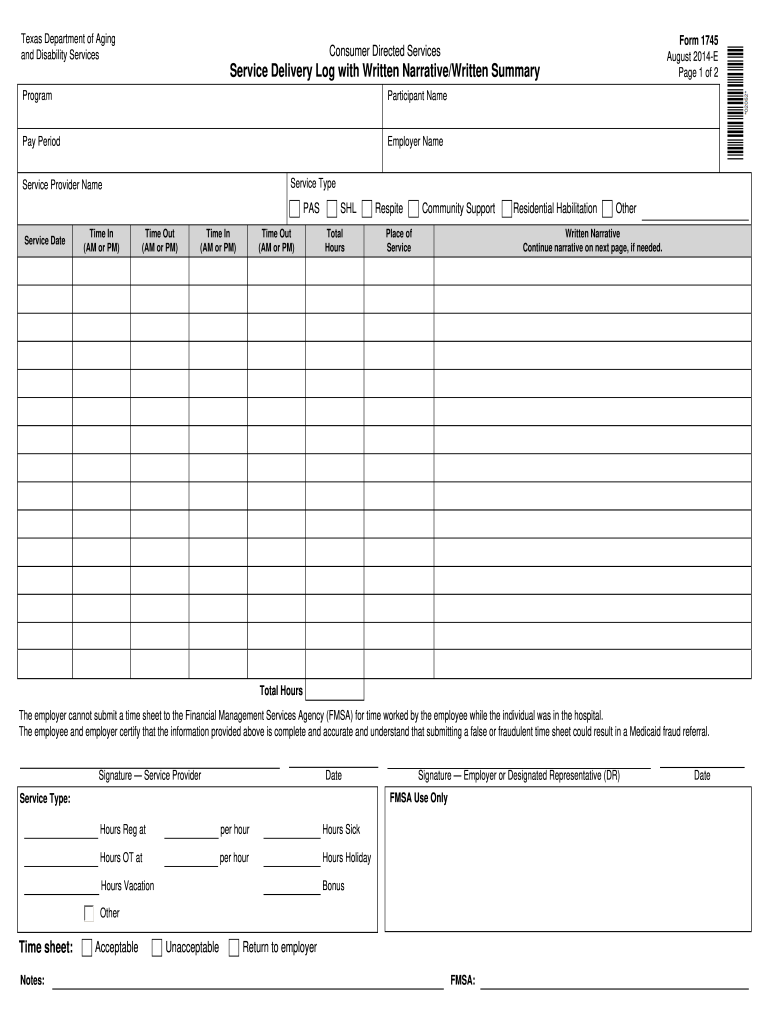
- Begin by entering the 'Participant Name' and 'Employer Name' at the top of the form. This information is crucial for identifying the individual receiving services.
- Fill in the 'Pay Period' to specify the timeframe for which you are reporting hours worked. Ensure this aligns with your payroll schedule.
- In the 'Service Type' section, select from options like PAS, Respite, or Community Support. This categorizes the services provided during the pay period.
- Record each service date along with corresponding 'Time In' and 'Time Out' entries. Be meticulous to ensure accuracy in reported hours.
- Complete any additional fields such as 'Place of Service' and provide a written narrative if necessary, continuing on the next page if needed.
- Finally, both the Service Provider and Employer must sign and date the form to certify its accuracy before submission.
Start using our editor today for free to streamline your document completion process!
It's free
See more cds in texas timesheet 2022 pdf versions
Got questions?
How can I create an electronic signature in my cds timesheet 2023 on Android?
Signing documents on a mobile device is fast, simple, and doesn’t require software installation if you have an account with DocHub. Log in from any browser, complete your empty fields with your information, and click on Sign → Create your signature. You can draw your electronic signature the same way you usually do on paper, add its image to your cds timesheet 2023, or type in your name and stylize its look. Whatever option you choose, your documentation will be valid.
How do you fill out cds in texas payroll 2024 on Android?
It is a no-brainer on a computer or via a mobile device to complete a cds in texas payroll 2024 with DocHub. All you need to do is open any installed internet browser on your smartphone and proceed to the DocHub website. Once authenticated, add your file and open it in editing mode. Use our toolbar to make your edits and save changes. Optionally, keep your file in your files or send it to a recipient on the spot.
Security and compliance
At DocHub, your data security is our priority. We follow HIPAA, SOC2, GDPR, and other standards, so you can work on your documents with confidence.
Learn more




