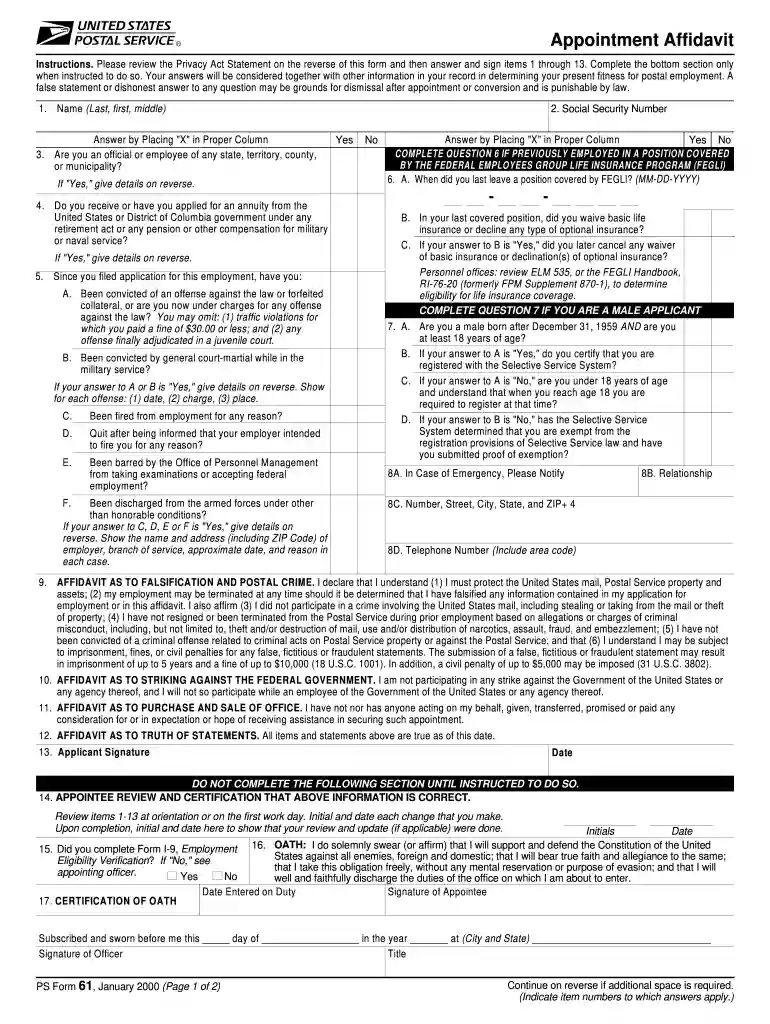
Ps form 61 2026

Get Form
ps form 61 Preview on Page 1

Here's how it works

01. Edit your ps form 61 online
Type text, add images, blackout confidential details, add comments, highlights and more.

02. Sign it in a few clicks
Draw your signature, type it, upload its image, or use your mobile device as a signature pad.

03. Share your form with others
Send it via email, link, or fax. You can also download it, export it or print it out.

How to use or fill out ps form 61 with our platform

Form edit decoration
9.5
Ease of Setup
DocHub User Ratings on G2
9.0
Ease of Use
DocHub User Ratings on G2
  1. Click ‘Get Form’ to open the ps form 61 in the editor.
  2. Begin by filling in your name (Last, First, Middle) in item 1 and your Social Security Number in item 2. Ensure accuracy as this information is crucial for your application.
  3. For items 3 through 5, answer each question by placing an 'X' in the appropriate column. If you answer 'Yes' to any questions, provide detailed explanations on the reverse side of the form.
  4. Complete items 6 and 7 if applicable, especially if you have been previously employed under specific conditions. Follow the prompts carefully to ensure all necessary details are included.
  5. In items 8 through 13, provide emergency contact information and sign where indicated. Review your answers thoroughly before submission.

Start using our platform today for free to streamline your ps form 61 completion!

See more ps form 61 versions

We've got more versions of the ps form 61 form. Select the right ps form 61 version from the list and start editing it straight away!
Versions Form popularity Fillable & printable
2015 4.8 Satisfied (149 Votes)
2004 4 Satisfied (22 Votes)
2000 4 Satisfied (30 Votes)
be ready to get more

Complete this form in 5 minutes or less

Get form

Got questions?

We have answers to the most popular questions from our customers. If you can't find an answer to your question, please contact us.
Contact us
Forms to Complete Before You Report. Appointment Affidavits (SF-61) Who Submits: All new employees. Purpose: This form is used on your first day of work when you take the Oath of Office.
To obtain an appointment as a commissioned or warrant officer in the Regular Army or Army Reserve, or to obtain selection to attend the US Army Officer Candidate School.
Form 61 is a declaration form used by individuals who earn their income from the agricultural department and do not earn any kind of taxable income. Moreover, individuals who do not possess a PAN (permanent account number) card need to submit Form 61 while making any of the financial transactions.
The SF-50 is the Notification of Personnel Action. It contains certain employment information useful to the applicant or if applying for another federal job. It is used by current and former federal employees.
PS Form 61 Revision: Appointment Affidavit Effective June 25, 2015, the Postal Service is revising PS Form 61, Appointment Affidavit, to include an affidavit attesting to citizenship. Please discard/recycle previous versions of PS Form 61 and begin using the current version immediately for all external hires.

Security and compliance

At DocHub, your data security is our priority. We follow HIPAA, SOC2, GDPR, and other standards, so you can work on your documents with confidence.

Learn more
ccpa2
pci-dss
gdpr-compliance
hipaa
soc-compliance
be ready to get more

Complete this form in 5 minutes or less

Get form

People also ask

WHO MUST SIGN OATH - As required in Section 3 of Article XX of the Constitution of the State of California, every State employee except legally employed noncitizens, must sign the following oath or affirmation before he or she enters upon the duties of his or her State employment.

Related links