Type text, add images, blackout confidential details, add comments, highlights and more.
02. Sign it in a few clicks
Draw your signature, type it, upload its image, or use your mobile device as a signature pad.
03. Share your form with others
Send sf 85 via email, link, or fax. You can also download it, export it or print it out.
How to use or fill out sf 85 with our platform
Ease of Setup
DocHub User Ratings on G2
Ease of Use
DocHub User Ratings on G2
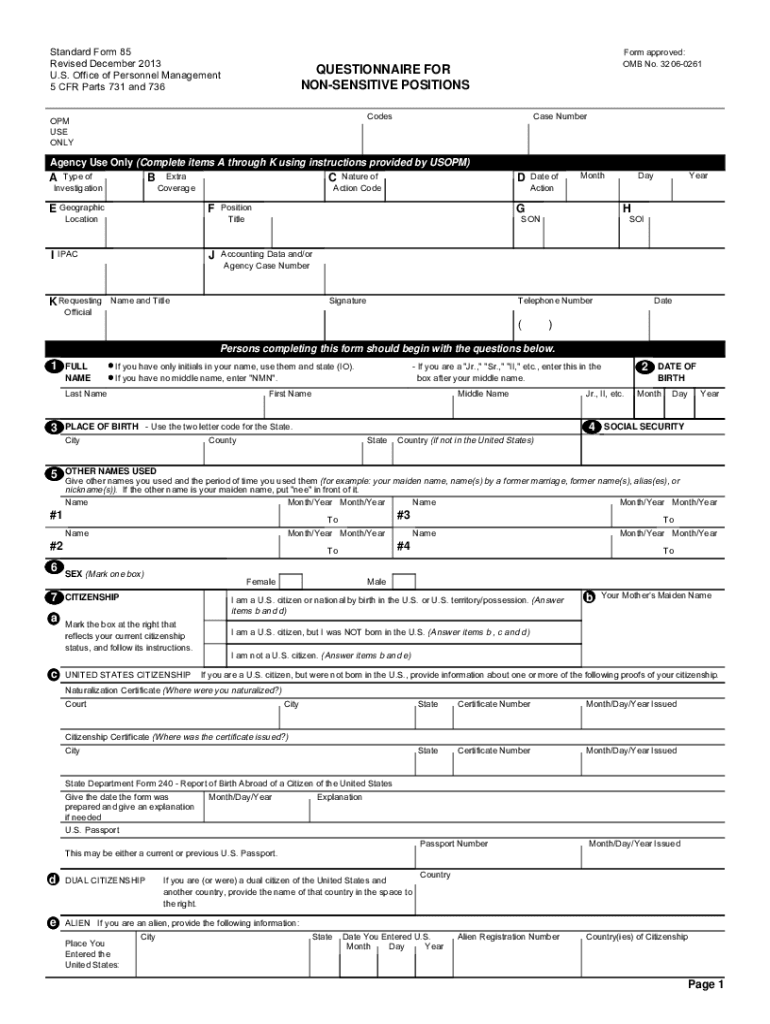
Click ‘Get Form’ to open the sf 85 in the editor.
Begin by entering your full name, date of birth, and Social Security Number in the designated fields. Ensure accuracy as this information is crucial for your background check.
Proceed to fill out your citizenship status. Mark the appropriate box that reflects your current citizenship and provide any necessary documentation if applicable.
List your residences for the past five years, ensuring you include complete addresses and names of individuals who can verify your residency.
Document your educational history, starting from the most recent institution attended. Include degrees received and relevant dates.
Detail your employment activities over the last five years, including all jobs held, military service, and periods of unemployment. Use the provided codes for clarity.
Finally, review all entries for completeness and accuracy before signing and dating the certification statement on Page 5.
Start using our platform today to fill out your sf 85 easily and efficiently!
Connecting with reverse polarity will cause the LED not to light and damage the built-in diode due to its specification. 5. 85. Humidity (% RH). Avoid icing.Read more
the Federal Government only for the purposes provided in this Standard Form 85, and that it may be disclosed by the. Government only as authorized by law.Read more
This document is for reference only and is not a form for completion. Individuals will be invited into the applicable eApplication system to complete theRead more
Cookie consent notice
This site uses cookies to enhance site navigation and personalize your experience.
By using this site you agree to our use of cookies as described in our Privacy Notice.
You can modify your selections by visiting our Cookie and Advertising Notice.