Type text, add images, blackout confidential details, add comments, highlights and more.
02. Sign it in a few clicks
Draw your signature, type it, upload its image, or use your mobile device as a signature pad.
03. Share your form with others
Send fedex loa form via email, link, or fax. You can also download it, export it or print it out.
How to use or fill out FedEx LOA with our platform
Ease of Setup
DocHub User Ratings on G2
Ease of Use
DocHub User Ratings on G2
Click ‘Get Form’ to open the FedEx LOA in the editor.
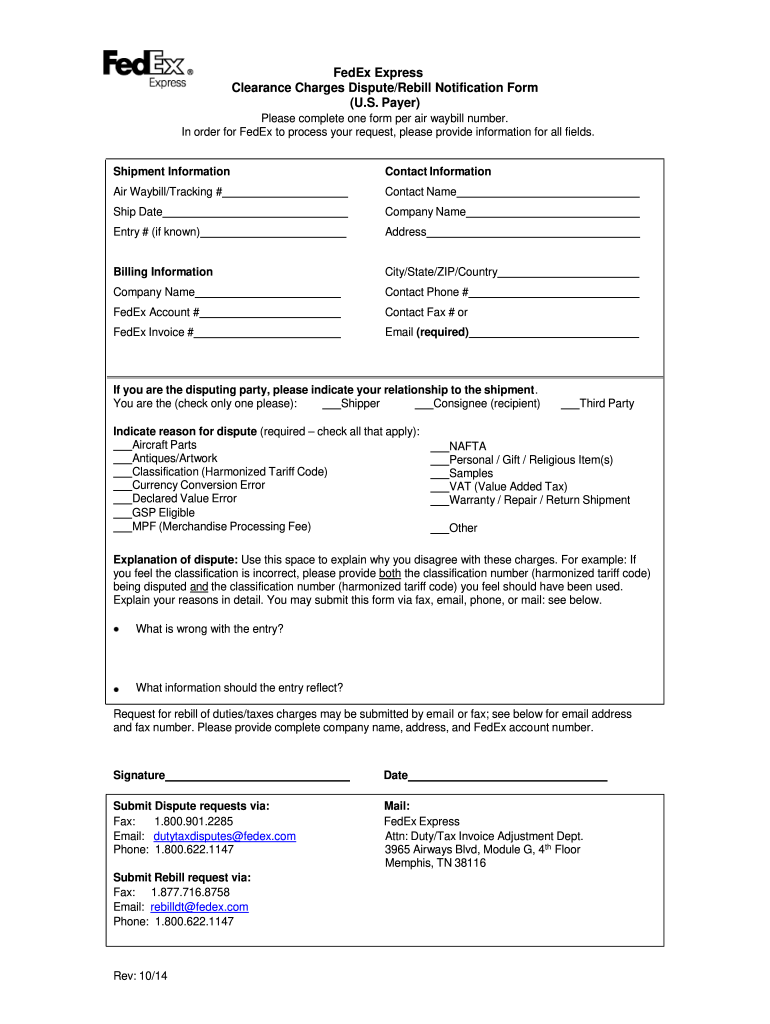
Begin by filling out the Shipment Information section. Enter the Air Waybill/Tracking #, Ship Date, and Entry # if known. Ensure all fields are completed for processing.
Next, provide your Contact Information. Fill in your name, company name, address, city/state/ZIP/country, and contact phone number. An email address is required for communication.
In the Billing Information section, include your FedEx Account # or Invoice #. This is crucial for identifying your account.
Indicate your relationship to the shipment by selecting either Shipper or Consignee. Then check all applicable reasons for dispute from the provided list.
Use the explanation space to detail your dispute clearly. Include any relevant classification numbers and reasons for disagreement.
Finally, sign and date the form before submitting it via fax, email, or mail as instructed at the bottom of the form.
Start using our platform today to streamline your FedEx LOA completion process for free!
Fedex loa meaningFedex loa phone numberFedex loa trackingFedEx LOA Form templateFedEx loa Form rebillFedEx letter of Authorization PDFFedex loa numberFedEx authorization letter for pickup
Security and compliance
At DocHub, your data security is our priority. We follow HIPAA, SOC2, GDPR, and other standards, so you can work on your documents with confidence.
The sender files the claim or a Letter of Authorization (LOA), is needed FedEx could deny the claim or the check will go to the Sender per. FedExsRead more
Cookie consent notice
This site uses cookies to enhance site navigation and personalize your experience.
By using this site you agree to our use of cookies as described in our Privacy Notice.
You can modify your selections by visiting our Cookie and Advertising Notice.