tjjd cloud mail Preview on Page 1

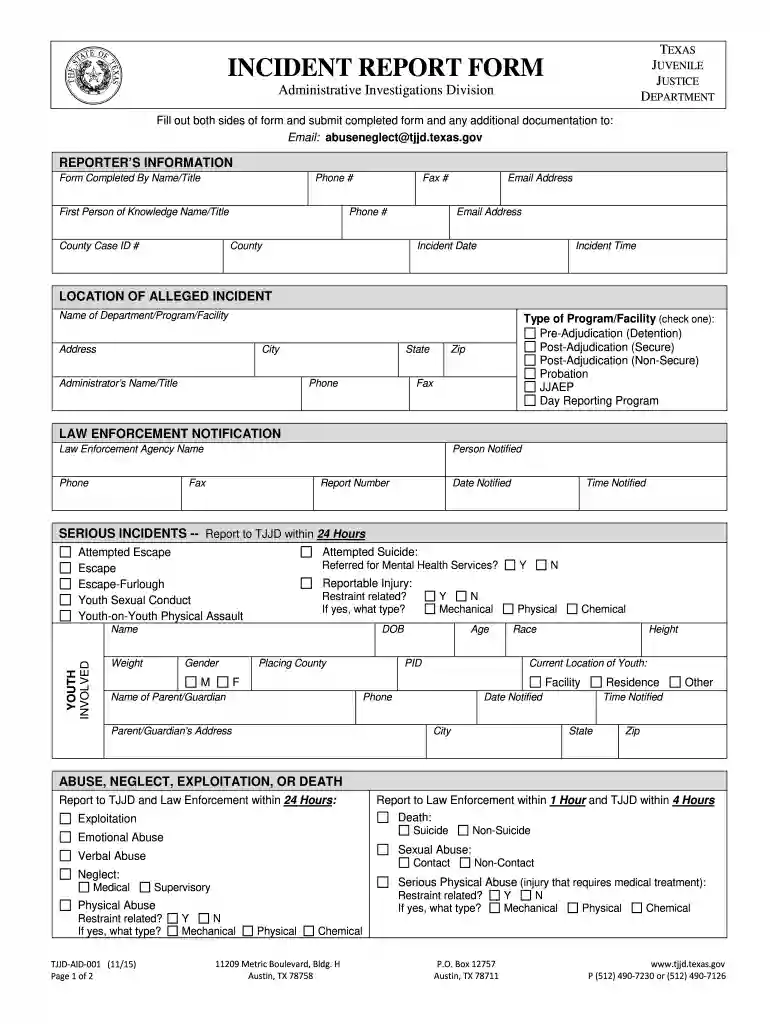
Texas tjjd incident report form 2026

Here's how it works

  • 01. Edit your tjjd cloud mail online

    Type text, add images, blackout confidential details, add comments, highlights and more.

  • 02. Sign it in a few clicks

    Draw your signature, type it, upload its image, or use your mobile device as a signature pad.

  • 03. Share your form with others

    Send it via email, link, or fax. You can also download it, export it or print it out.

How to use or fill out texas tjjd incident report form with our platform

Form edit decoration
9.5
Ease of Setup
DocHub User Ratings on G2
9.0
Ease of Use
DocHub User Ratings on G2
  1. Click ‘Get Form’ to open the Texas TJJD Incident Report Form in the editor.
  2. Begin by filling out the Reporter’s Information section. Enter your name, title, phone number, and email address. Ensure accuracy as this information is crucial for follow-up.
  3. Next, provide details about the incident. Fill in the Incident Date and Time, along with the Location of Alleged Incident. Specify the type of program or facility involved by checking the appropriate box.
  4. Complete the Law Enforcement Notification section if applicable. Include agency name, contact details, and notification times.
  5. In the Youth Involved section, enter all relevant details about the youth including DOB, gender, race, and current location.
  6. Describe the incident thoroughly in the Description of Incident section. This narrative should cover all aspects of what occurred.
  7. Finally, attest to the accuracy of your report by signing and dating at the bottom of the form before submission.

Start using our platform today to streamline your document editing and ensure a smooth reporting process!

See more tjjd cloud mail versions

We've got more versions of the tjjd cloud mail form. Select the right tjjd cloud mail version from the list and start editing it straight away!

VersionsForm popularityFillable & printable
20154.9 Satisfied (46 Votes)
20124.2 Satisfied (40 Votes)

be ready to get more

Complete this form in 5 minutes or less

Got questions?

We have answers to the most popular questions from our customers. If you can't find an answer to your question, please contact us.

A general staff incident report generally includes: Persons name and contact details. Incident Time, date, and site. Pertinent details about what happened. Kind of injury or damage. Name of witnesses. Safety measures taken Suggestions for prevention.
How to Write an Incident Report: A Step-by-Step Guide (with Examples) Step 1: Provide Fundamental Information. Step 2: Take Note of Any Damages and Injuries. Step 3: Identify Affected Individual(s) Step 4: Identify Witnesses and Take Their Statements. Step 5: Take Action. Step 6: Close Your Report.
How to write a workplace incident report Gather essential information. Describe the incident. Include injuries and damages. Interview witnesses. Identify contributing factors. Review company policies and procedures. Attach supporting documents. Maintain objectivity.
Public Information Request If you would like to view or obtain copies of records under the Texas Public Information Act, please send a written request. The request should include your name, contact information, and as much description as you can provide regarding the records you are requesting.
The Health and Safety Executive specifies that the following must be reported: Deaths and injuries caused by workplace accidents. Occupational diseases. Carcinogens mutagens and biological agents.

Security and compliance

At DocHub, your data security is our priority. We follow HIPAA, SOC2, GDPR, and other standards, so you can work on your documents with confidence.

People also ask

What are the five rules of incident report writing? Timeliness: Always report the incident as soon as possible. Accuracy: Make sure all information provided is accurate and detailed. Completeness: Be thorough and provide all important details. Confidentiality: Handle sensitive and personal information carefully.
2:02 20:25 And here incident type of incident by type of incidents. And this is the incident by the status. AndMoreAnd here incident type of incident by type of incidents. And this is the incident by the status. And here we have the incident by the month. You can just click on any of the slicer to filter the data.

Related links

[Effective 9/1/2025] Reporting Abuse, Neglect, and Exploitation

(B) If the report to TJJD is made by phone, a completed Incident Report Form must be submitted by email within 24 hours after the phone report. (C) The reportRead more

Learn more
tjjd - INCIDENT REPORT FORM

Fill out both sides of form and submit completed form and any additional documentation to: Email: abuseneglect@tjjd.texas.gov. REPORTERS INFORMATION.Read more

Learn more
If you believe that this page should be taken down, please follow our DMCA take down process here