EnergieKontor Application - Texas.gov 2026

Get Form
EnergieKontor Application - Texas.gov Preview on Page 1

Here's how it works

01. Edit your form online
Type text, add images, blackout confidential details, add comments, highlights and more.

02. Sign it in a few clicks
Draw your signature, type it, upload its image, or use your mobile device as a signature pad.

03. Share your form with others
Send it via email, link, or fax. You can also download it, export it or print it out.

How to use or fill out EnergieKontor Application - Texas.gov with our platform

Form edit decoration
9.5
Ease of Setup
DocHub User Ratings on G2
9.0
Ease of Use
DocHub User Ratings on G2
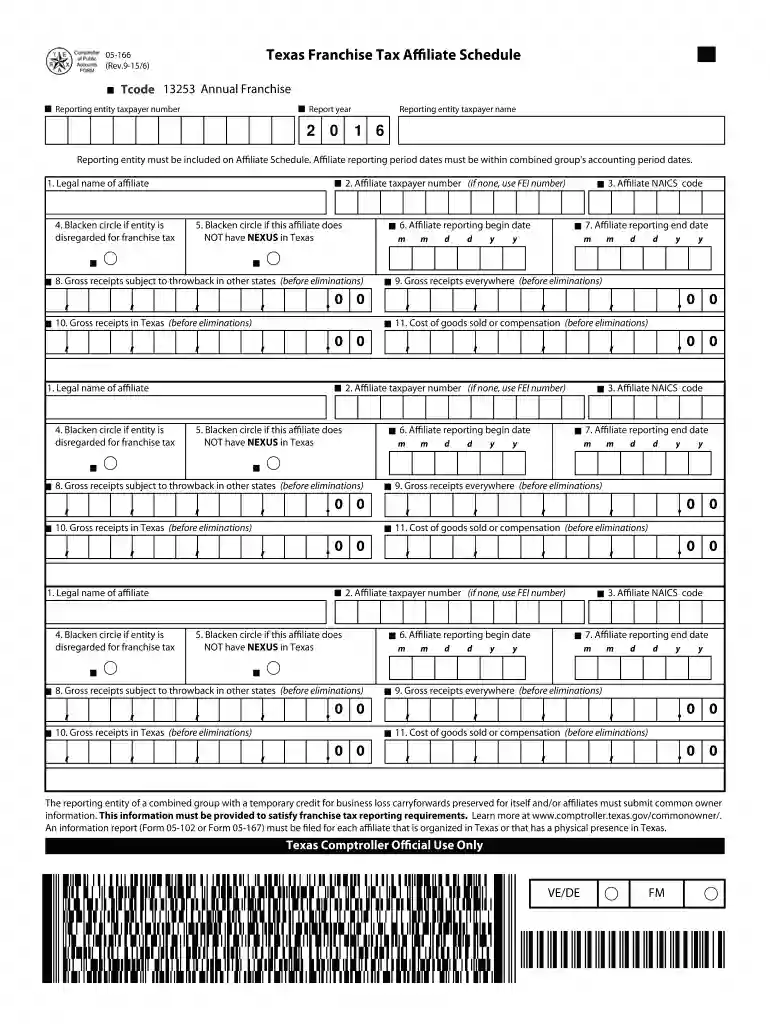
  1. Click ‘Get Form’ to open the EnergieKontor Application in our editor.
  2. Begin by entering your Annual Franchise Tax Code and Reporting Entity Taxpayer Number at the top of the form. Ensure that you input the correct report year.
  3. Fill in the Reporting Entity Taxpayer Name, ensuring it matches your official business name. This is crucial for accurate processing.
  4. Complete the Affiliate Taxpayer Number field. If you do not have one, use your FEI number instead.
  5. Provide the Legal Name of Affiliate and indicate if the entity is disregarded for franchise tax by blackening the appropriate circle.
  6. Indicate whether this affiliate has NEXUS in Texas by marking the corresponding circle.
  7. Enter gross receipts subject to throwback in other states, as well as gross receipts everywhere and specifically in Texas, before eliminations.
  8. Lastly, fill in the Cost of Goods Sold or Compensation before eliminations and ensure all dates are correctly formatted.

Start using our platform today to complete your EnergieKontor Application effortlessly and for free!

See more EnergieKontor Application - Texas.gov versions

We've got more versions of the EnergieKontor Application - Texas.gov form. Select the right EnergieKontor Application - Texas.gov version from the list and start editing it straight away!
Versions Form popularity Fillable & printable
2023 4.9 Satisfied (44 Votes)
2022 4.1 Satisfied (34 Votes)
2021 4.9 Satisfied (51 Votes)
2020 4.3 Satisfied (217 Votes)
2018 4.4 Satisfied (120 Votes)
2016 4.3 Satisfied (115 Votes)
2015 4.3 Satisfied (65 Votes)
2014 4.3 Satisfied (36 Votes)
2009 4 Satisfied (31 Votes)
be ready to get more

Complete this form in 5 minutes or less

Get form

Got questions?

We have answers to the most popular questions from our customers. If you can't find an answer to your question, please contact us.
Contact us
Apply online via AirTalk Wireless Navigate to the Tablet section and choose your preferred model. Upload the required documents. For example: Proof of government benefits (e.g., SNAP or Medicaid approval letter), or proof of income (if applying under income eligibility criteria).
The Lite-Up Texas program is designed to help qualified low-income individuals reduce the monthly cost of electric service. The information on the electric bill (Name, Address, etc.) must match the information of the participant in the qualified program or the self-enrolled application.
Persons interested in LITE-UP Texas can call 1-866-454-8387 and request an application or print an application from the program website. Those interested in the TXU moratorium can call (972) 791 2888 ( Dallas ) or (800) 242-9113 and ask for the Summer Moratorium installment plan.
Welcome to the SMART SourceSM Solar PV Program The Program offers financial incentives that help offset the initial cost of installing a solar energy system. By installing solar on your home or business, you can generate a portion of your own electricity and help the environment.

Security and compliance

At DocHub, your data security is our priority. We follow HIPAA, SOC2, GDPR, and other standards, so you can work on your documents with confidence.

Learn more
ccpa2
pci-dss
gdpr-compliance
hipaa
soc-compliance
be ready to get more

Complete this form in 5 minutes or less

Get form