Hospital forms from 2014-2026

Get Form
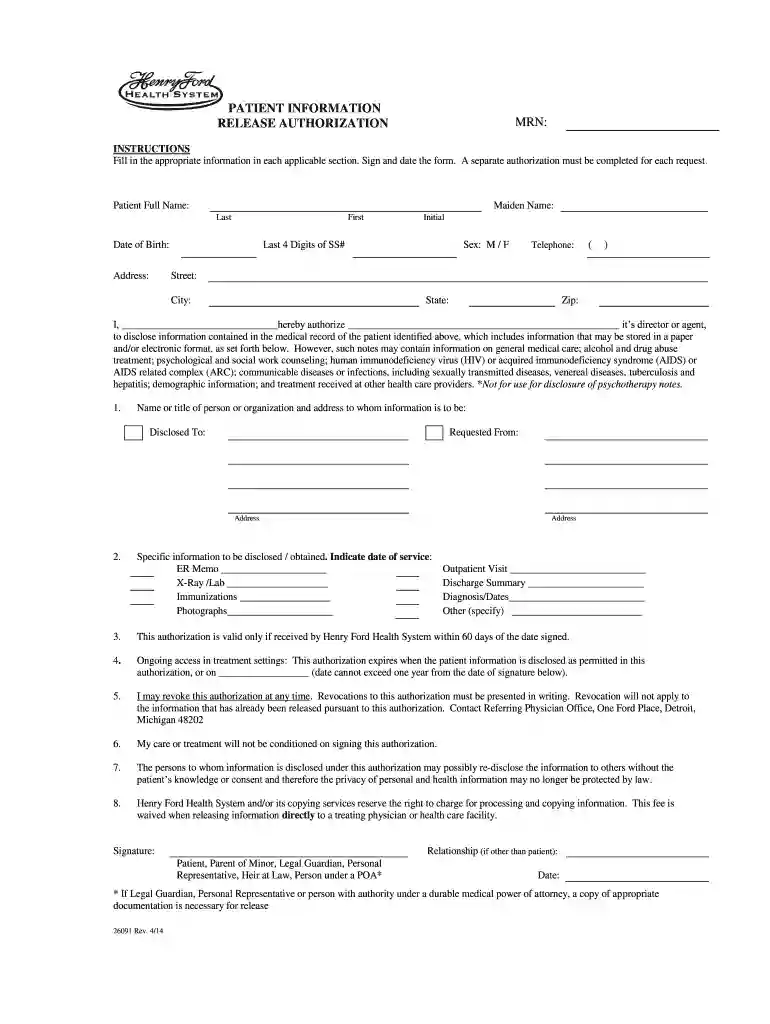
hospital forms from 2014 Preview on Page 1

Here's how it works

01. Edit your form online
Type text, add images, blackout confidential details, add comments, highlights and more.

02. Sign it in a few clicks
Draw your signature, type it, upload its image, or use your mobile device as a signature pad.

03. Share your form with others
Send it via email, link, or fax. You can also download it, export it or print it out.

How to use or fill out hospital forms from 2014 with our platform

Form edit decoration
9.5
Ease of Setup
DocHub User Ratings on G2
9.0
Ease of Use
DocHub User Ratings on G2
  1. Click ‘Get Form’ to open the Patient Information Release Authorization form in the editor.
  2. Begin by filling in your full name, including your maiden name if applicable. Ensure you provide your date of birth and address accurately.
  3. Enter the last four digits of your Social Security Number and select your sex. Provide a contact telephone number for any follow-up.
  4. In the authorization section, clearly state the name or title of the person or organization to whom you are disclosing information, along with their address.
  5. Specify what information is to be disclosed by checking the relevant boxes such as ER Memo, X-Ray/Lab results, or Outpatient Visit details.
  6. Sign and date the form at the bottom. If you are signing on behalf of someone else, indicate your relationship and ensure appropriate documentation is attached if necessary.

Start using our platform today to easily fill out and manage your hospital forms for free!

See more hospital forms from 2014 versions

We've got more versions of the hospital forms from 2014 form. Select the right hospital forms from 2014 version from the list and start editing it straight away!
Versions Form popularity Fillable & printable
2021 4.8 Satisfied (111 Votes)
2020 4.4 Satisfied (125 Votes)
2020 4.2 Satisfied (103 Votes)
2018 4.3 Satisfied (97 Votes)
2017 4.3 Satisfied (120 Votes)
2016 4.2 Satisfied (64 Votes)
2014 4 Satisfied (32 Votes)
2010 4 Satisfied (57 Votes)
be ready to get more

Complete this form in 5 minutes or less

Get form

Got questions?

We have answers to the most popular questions from our customers. If you can't find an answer to your question, please contact us.
Contact us
Hospital Incident Command System (HICS) is an incident command system (ICS) designed for hospitals sites providing medical care and intended for use in both emergency and non-emergency situations. The standard forms have been modified somewhat for TMTS operations.
HICS provides a framework for hospitals to respond quickly and effectively to various incidents and supports hospitals in emergency management planning, response, and recovery capabilities. Key elements of HICS include: Identifying needs and establishing objectives to resolve the incident.
The HICS structure is an ICS structure specifically designed for hospitals. The principles presented in the HICS framework overlap the mission areas: Prevention, Protection, Mitigation, Response, and Recovery. HICS can be used in both emergent incidents or non-emergent events.
The following forms can be found on this page and can be helpful to those creating a COOP: HICS 251 - Facility System Status Report; HICS 252 - Section Personnel Time Sheet; HICS 256 - Procurement Summary Report; and HICS 257 - Resource Accounting Record.
Key Components of HICS Command Structure. A key aspect of HICS is the scalable command structure. Incident Action Planning (IAP) Scalable Integration of Personnel. Training and Preparedness. Continuous Improvement. Streamlining Communication. Efficient Resource Allocation. Training Simulations.

Security and compliance

At DocHub, your data security is our priority. We follow HIPAA, SOC2, GDPR, and other standards, so you can work on your documents with confidence.

Learn more
ccpa2
pci-dss
gdpr-compliance
hipaa
soc-compliance
be ready to get more

Complete this form in 5 minutes or less

Get form