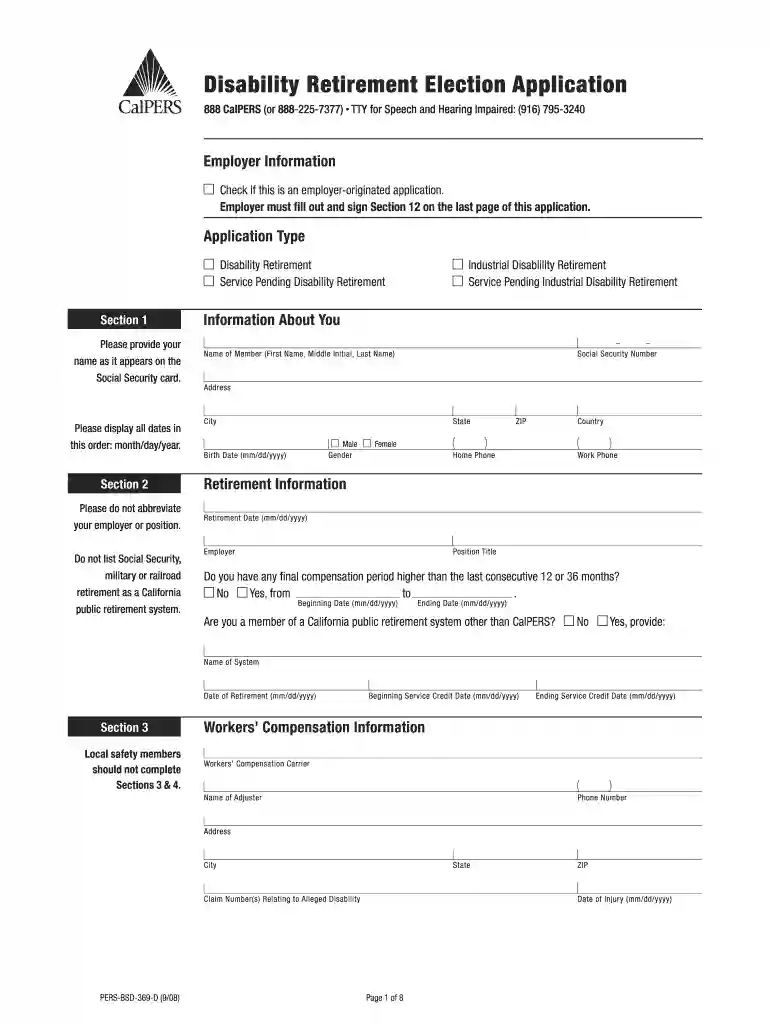
Calpers disability retirement fillable 2008 form-2026

Get Form
calpers disability retirement Preview on Page 1

Here's how it works

01. Edit your calpers disability retirement online
Type text, add images, blackout confidential details, add comments, highlights and more.

02. Sign it in a few clicks
Draw your signature, type it, upload its image, or use your mobile device as a signature pad.

03. Share your form with others
Send medical retirement calpers via email, link, or fax. You can also download it, export it or print it out.

How to use or fill out Calpers disability retirement fillable 2008 form with our platform

Form edit decoration
9.5
Ease of Setup
DocHub User Ratings on G2
9.0
Ease of Use
DocHub User Ratings on G2
  1. Click ‘Get Form’ to open the Calpers disability retirement fillable 2008 form in the editor.
  2. Begin by filling out your personal information in Section 1. Enter your name, Social Security number, address, and birth date. Ensure all dates are formatted as month/day/year.
  3. In Section 2, provide details about your retirement information including your employer, position title, and any final compensation periods. Be sure to answer whether you belong to another California public retirement system.
  4. Proceed to Section 4 where you will describe your specific disability and its impact on your job performance. Include details about your treating physician.
  5. In Section 5, select your retirement payment option and designate beneficiaries as required. Follow the instructions carefully for each option selected.
  6. Complete Sections 6 through 12 as applicable, ensuring all necessary signatures are obtained and that you have included any additional documentation if needed.

Start using our platform today for free to streamline the completion of your Calpers disability retirement form!

See more Calpers disability retirement fillable 2008 form versions

We've got more versions of the Calpers disability retirement fillable 2008 form form. Select the right Calpers disability retirement fillable 2008 form version from the list and start editing it straight away!
Versions Form popularity Fillable & printable
2014 4.9 Satisfied (450 Votes)
2008 4.3 Satisfied (43 Votes)
be ready to get more

Complete this form in 5 minutes or less

Get form

Got questions?

We have answers to the most popular questions from our customers. If you can't find an answer to your question, please contact us.
Contact us
If you are applying for disability retirement, you must complete SF 3107, Appli cation for Immediate Retirement, and SF 3112, Documentation In Support of Disability Retirement. Your employing agency will help you complete these forms and will forward the completed forms to the Office of Personnel Manage ment (OPM).
Your retirement benefit is calculated using a formula with three factors: Service credit (Years) multiplied by your benefit factor (percentage per year) multiplied by your final monthly compensation equals your unmodified allowance. Service Credit - Total years of employment with a CalPERS employer.
Disability Retirement (also referred to as DR) is the inability to perform the usual job duties, due to an injury or illness regardless of how the disability originated. Industrial Disability Retirement (also referred to as IDR) is the inability to perform the usual job duties due to a work-related injury or illness.
The Primary Insurance Amount for SSDI If you become eligible for SSDI benefits in 2022, your PIA would be the total of: 90% of the first $1,024 of your AIME. 32% of your AIME between $1,024 and $6,172. 15% of your AIME over $6,172.
PEPRA Miscellaneous Member: 2% at 62; which means you can retire at 62 and receive 2% x (years of service) x (avg of highest 3 years salary).

Security and compliance

At DocHub, your data security is our priority. We follow HIPAA, SOC2, GDPR, and other standards, so you can work on your documents with confidence.

Learn more
ccpa2
pci-dss
gdpr-compliance
hipaa
soc-compliance

People also ask

If you enter into employment with a reciprocal retirement system, the California State Teachers Retirement System (CalSTRS), the Judges Retirement System (JRS), the Judges Retirement System II (JRS II), or the Legislators Retirement System (LRS) within six months of leaving your CalPERS-covered employment, you are
Log in to your myCalPERS account at my.calpers.ca.gov for information on determining which formula applies to you. You can refer to your CalPERS Annual Member Statement to verify your retirement formula. If you have questions, call us at 888 CalPERS (or 888-225-7377).
Additionally, employees typically opt for disability retirement when they cannot continue their federal employment due to their condition. On the other hand, regular retirement offers the flexibility to continue working and potentially increase future benefits.

Related links