Pennsylvania declaration dli 2026

Get Form
libc 513 Preview on Page 1

Here's how it works

01. Edit your libc 513 online
Type text, add images, blackout confidential details, add comments, highlights and more.

02. Sign it in a few clicks
Draw your signature, type it, upload its image, or use your mobile device as a signature pad.

03. Share your form with others
Send 513 form via email, link, or fax. You can also download it, export it or print it out.

How to use or fill out Pennsylvania Declaration DLI with DocHub

Form edit decoration
9.5
Ease of Setup
DocHub User Ratings on G2
9.0
Ease of Use
DocHub User Ratings on G2
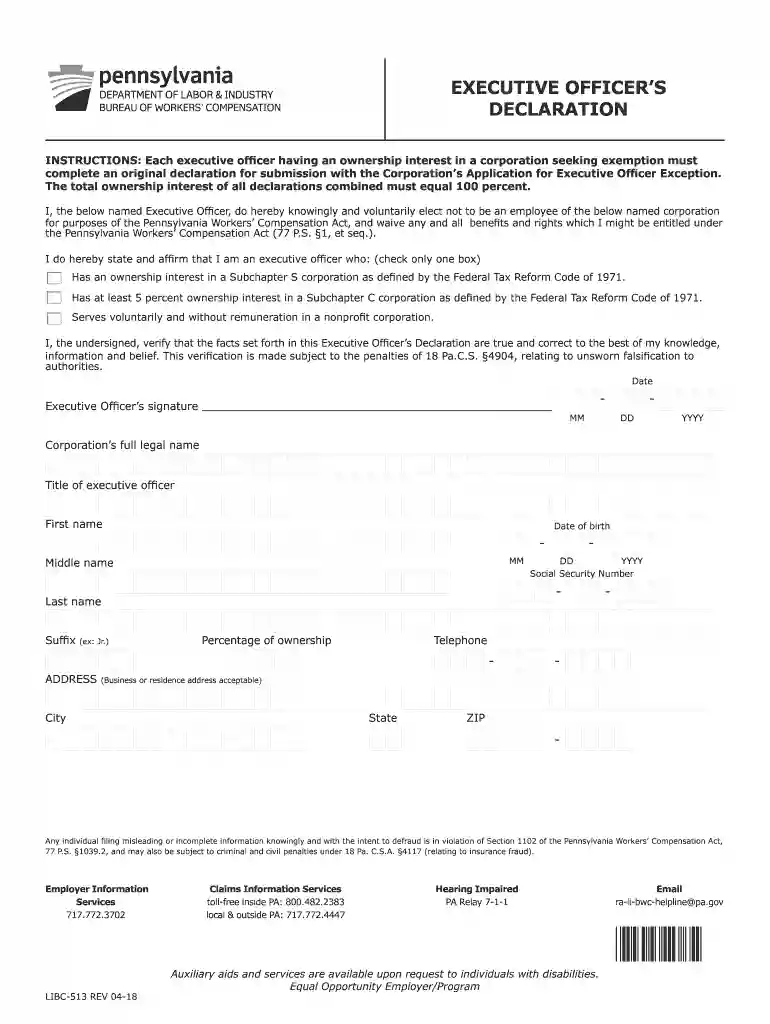
  1. Click ‘Get Form’ to open the Pennsylvania Declaration DLI in our editor.
  2. Begin by entering the corporation’s full legal name in the designated field. This is crucial for identifying the entity associated with the declaration.
  3. Fill in your title as the executive officer, followed by your first name, middle name (if applicable), and last name. Ensure accuracy to avoid any discrepancies.
  4. Provide your date of birth and social security number in the specified fields. This information is necessary for verification purposes.
  5. Indicate your percentage of ownership in the corporation. Remember, this must reflect your actual stake in the company.
  6. Select one of the options regarding your ownership interest by checking the appropriate box. This step is essential for compliance with Pennsylvania regulations.
  7. Finally, sign and date the form at the bottom to affirm that all provided information is true and correct.

Start using our platform today to fill out your Pennsylvania Declaration DLI quickly and efficiently!

See more pennsylvania declaration dli versions

We've got more versions of the pennsylvania declaration dli form. Select the right pennsylvania declaration dli version from the list and start editing it straight away!
Versions Form popularity Fillable & printable
2018 4.8 Satisfied (77 Votes)
2013 4.4 Satisfied (94 Votes)
be ready to get more

Complete this form in 5 minutes or less

Get form

Got questions?

We have answers to the most popular questions from our customers. If you can't find an answer to your question, please contact us.
Contact us

Yes, you can utilize DocHub for signing any business and private paperwork, including your officers declaration form. All electronic signatures you create with our service are legally binding and court-admissible, as DocHub complies with standards required by ESIGN and UETA. Save your completed document with a detailed Audit Trail if needed.

With a swift editing platform like DocHub, you do not require anything but a browser and connection to the internet to edit your libc513 on the internet swiftly. Add your document or find the appropriate form in DocHub’s catalog, open our editor with one click, and complete it electronically. To revise your forms anytime, sign up a free account with DocHub.

Pennsylvania(1787) The Keystone State. Our home state became the second state to ratify the Constitution. It was also the state where the Declaration of Independence was signed, where the Constitutional Convention was held, and where the Constitution was effectually created.
The signing of the United States Declaration of Independence occurred primarily on August 2, 1776, at the Pennsylvania State House, later renamed Independence Hall, in Philadelphia.
It was drafted by Robert Whitehill, Timothy Matlack, Dr. Thomas Young, George Bryan, James Cannon, and Benjamin Franklin. Many of the men who took part in its creation were not members of Pennsylvanias government at the time, but rather an elected court composed of many non-landowners.

Security and compliance

At DocHub, your data security is our priority. We follow HIPAA, SOC2, GDPR, and other standards, so you can work on your documents with confidence.

Learn more
ccpa2
pci-dss
gdpr-compliance
hipaa
soc-compliance
be ready to get more

Complete this form in 5 minutes or less

Get form

People also ask

The Second Continental Congress convened in Philadelphia on May 10, 1775. This time it met in the Pennsylvania State House, or Independence Hall, as it is now called. It was in this building that the Declaration of Independence was signed.
An employee injury is to be reported to the employer within 21 days; if not reported within 120 days from the date of injury or having knowledge of a work-related disease, no compensation is allowed (except for cases involving progressive diseases).

Related links