
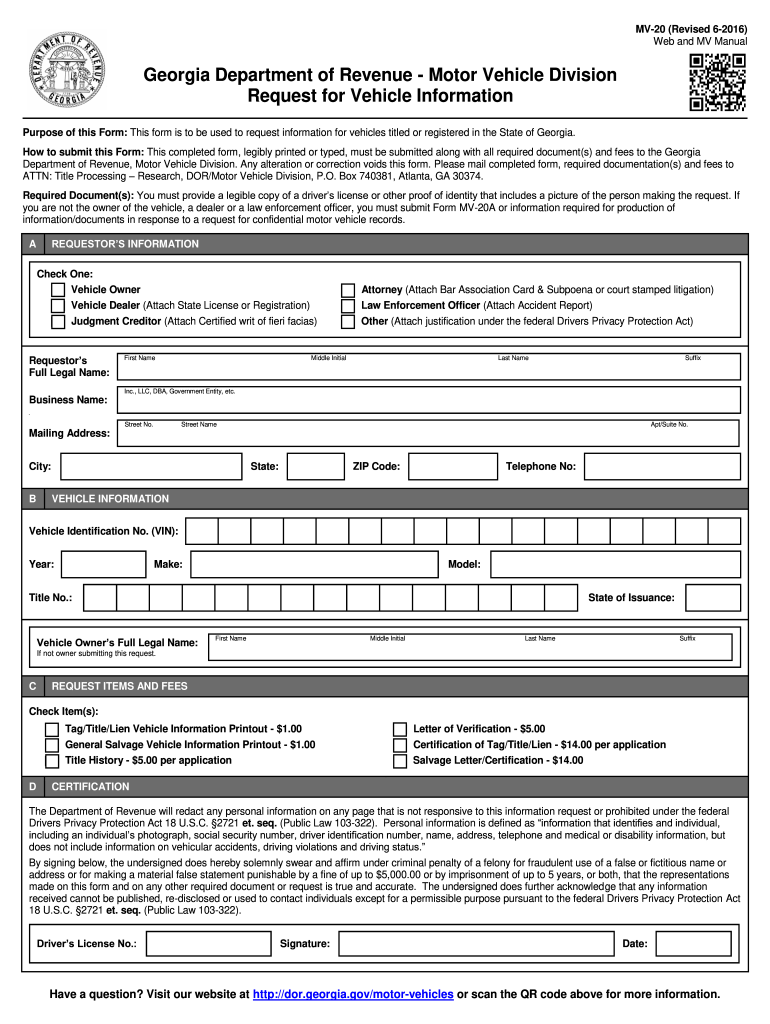





Georgia mv 20 2026

Get Form
mv 20 form Preview on Page 1

Here's how it works

01. Edit your mv 20 form online
Type text, add images, blackout confidential details, add comments, highlights and more.
02. Sign it in a few clicks
Draw your signature, type it, upload its image, or use your mobile device as a signature pad.
03. Share your form with others
Send mv20 via email, link, or fax. You can also download it, export it or print it out.

How to use or fill out Georgia MV-20 with our platform

Form edit decoration
9.5
Ease of Setup
DocHub User Ratings on G2
9.0
Ease of Use
DocHub User Ratings on G2
  1. Click ‘Get Form’ to open the Georgia MV-20 in the editor.
  2. Begin by completing the Requestor’s Information section. Select your status (Vehicle Owner, Attorney, etc.) and provide your full legal name, business name if applicable, mailing address, and telephone number.
  3. Next, fill in the Vehicle Information section. Enter the Vehicle Identification Number (VIN), year, make, model, title number, and the vehicle owner's full legal name.
  4. In the Request Items and Fees section, check off the items you are requesting and ensure you include the corresponding fees.
  5. Finally, certify that all statements are true by signing and dating the form. Don’t forget to attach a legible copy of your driver’s license or proof of identity.

Start using our platform today to easily complete your Georgia MV-20 form online for free!

See more georgia mv 20 versions

We've got more versions of the georgia mv 20 form. Select the right georgia mv 20 version from the list and start editing it straight away!
Versions Form popularity Fillable & printable
2021 4.8 Satisfied (148 Votes)
2019 4.3 Satisfied (61 Votes)
2016 4.1 Satisfied (102 Votes)
2011 4 Satisfied (36 Votes)
be ready to get more

Complete this form in 5 minutes or less

Get form

Got questions?

We have answers to the most popular questions from our customers. If you can't find an answer to your question, please contact us.
Contact us

Sure, a typed name is accepted as a legitimate electronic signature when you add it to your paperwork using a compliant solution like DocHub. Simply add your mv 20 to our editor, click Sign in the top tool pane → Create your signature → Type your name in the proper tab, and decide how it will appear on your document.

If you want to edit your mv20 form online swiftly, it does not matter what web browser you employ. DocHub’s simple editing tools are available using any internet browser. Simply open the appropriate tab in the editor, add your document, and fill it out without stress.

Quick answer: To obtain a copy of your driving record, you can request it from the DMV either in person, by mail, or online, with fees varying by state.
ServiceTermFee Motor Vehicle Report (MVR) - 3 Year Report N/A $6 Motor Vehicle Report (MVR) - 7 Year Report N/A $8 Motor Vehicle Report (MVR) - Lifetime Report N/A $8 License Renewal - Online and the DDS 2 GO app Varies $5 Discount off Original License Fee5 more rows
The Motor Vehicle Division works with county tax commissioners to issue license plates and certificates of title. MVD also records vehicle liens and security interest information and runs the Dealer Registration Unit, Sponsor/Special Tags Unit, and the Commercial Vehicle Unit.

Security and compliance

At DocHub, your data security is our priority. We follow HIPAA, SOC2, GDPR, and other standards, so you can work on your documents with confidence.

Learn more
ccpa2
pci-dss
gdpr-compliance
hipaa
soc-compliance
be ready to get more

Complete this form in 5 minutes or less

Get form

People also ask

Effective January 1, 2022, this form is to be used by a dealer to show the calculation of the TAVT on the sale of a new or used vehicle only. Please refer to Form MV-7L to calculate the TAVT on leased vehicles.
There are 3 ways to obtain an Individual Georgia Driving History Report also known as a Motor Vehicle Report (MVR). By creating an Online Account, individuals will be able to request a 3-year or 7-year non-certified or certified MVR. You must have a valid credit card for the Internet.
By creating an Online Account, individuals will be able to request a 3-year or 7-year non-certified or certified MVR. You must have a valid credit card for the Internet. We accept Visa, Mastercard, American Express, and Discover. Payments can also be made by mail.

Related links

