Type text, add images, blackout confidential details, add comments, highlights and more.
02. Sign it in a few clicks
Draw your signature, type it, upload its image, or use your mobile device as a signature pad.
03. Share your form with others
Send oregondmv com renew via email, link, or fax. You can also download it, export it or print it out.
How to use or fill out oregon dmv 24 with our platform
Ease of Setup
DocHub User Ratings on G2
Ease of Use
DocHub User Ratings on G2
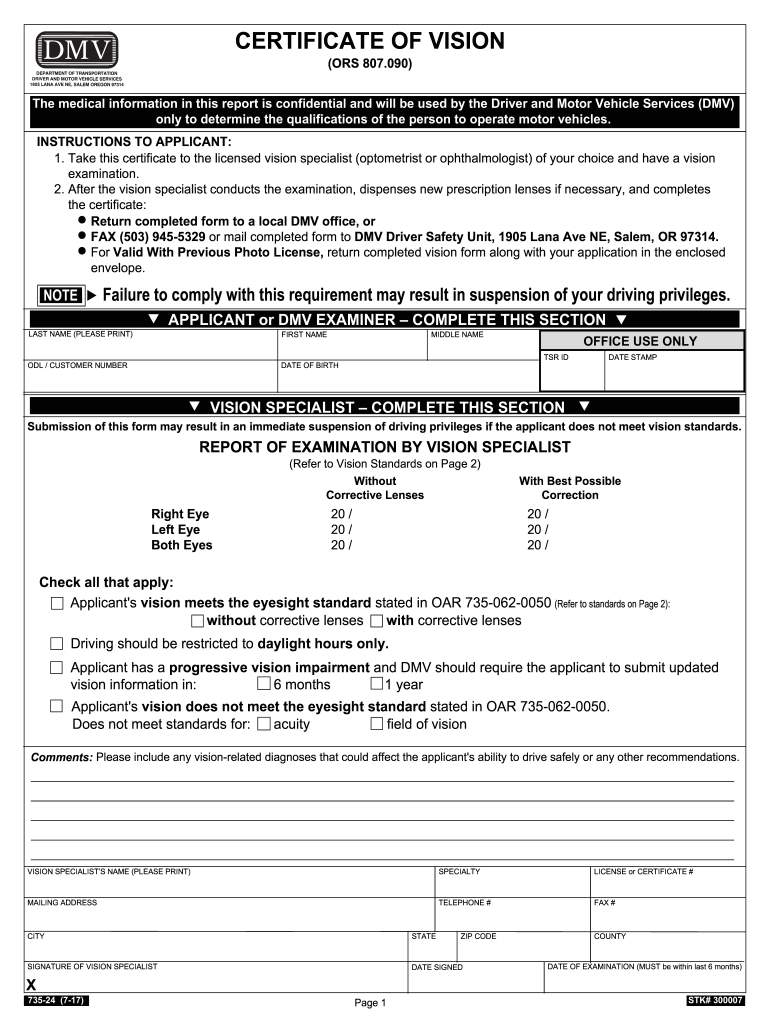
Click ‘Get Form’ to open the Oregon DMV 24 in the editor.
Begin by filling out your personal information in the 'Applicant' section. Include your last name, first name, middle name, date of birth, and ODL/customer number.
Next, proceed to the 'Vision Specialist' section. This part will be completed by your licensed vision specialist after your examination.
Ensure that the vision specialist records the results of your eye examination under 'Report of Examination.' They will indicate your vision acuity with and without corrective lenses.
Check all applicable boxes regarding your eyesight standards and any restrictions on driving. The specialist should also provide comments if necessary.
Finally, have the vision specialist sign and date the form before you submit it either in person at a local DMV office or via fax/mail as instructed.
Start using our platform today for free to complete your Oregon DMV 24 form effortlessly!
(1) DMV randomly selects motor vehicles for financial responsibility verification. The total number randomly selected each year will not exceed ten percentRead more
Requires proof of surgery to change sex designation. Oregon, M or F, with one exception where a birth certificate was changed to say NonbinaryRead more
Cookie consent notice
This site uses cookies to enhance site navigation and personalize your experience.
By using this site you agree to our use of cookies as described in our Privacy Notice.
You can modify your selections by visiting our Cookie and Advertising Notice.