




Here's how it works



How to use or fill out hsmv 85017 with our platform

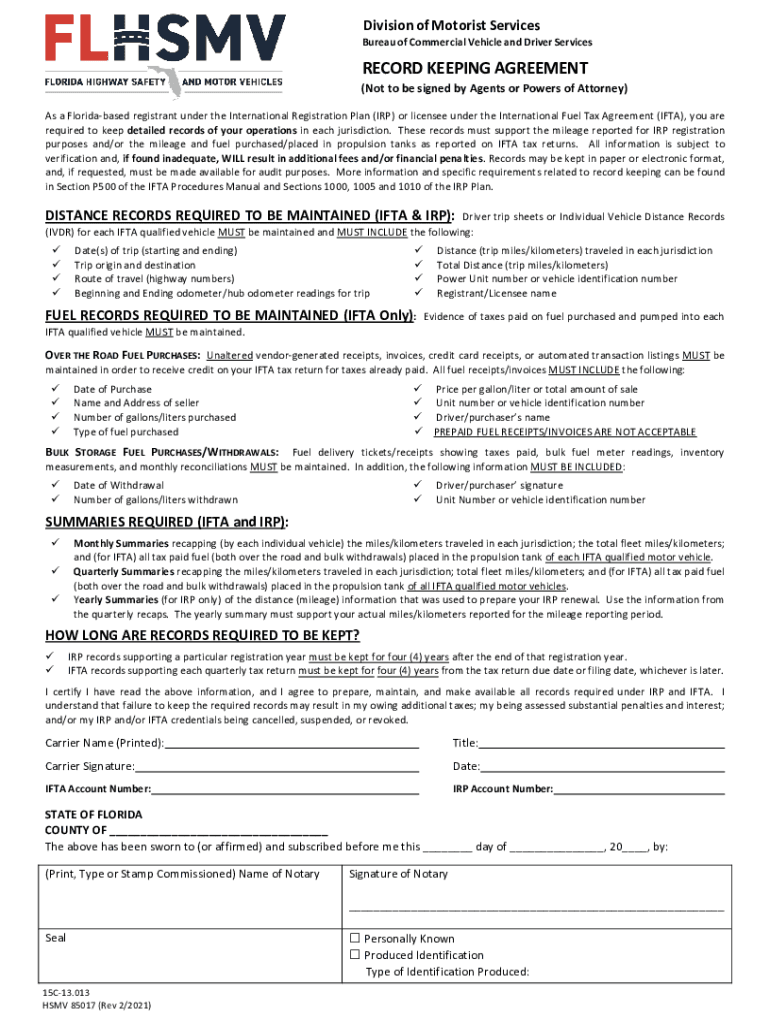
- Click ‘Get Form’ to open the hsmv 85017 in the editor.
- Begin by entering your Carrier Name in the designated field. This identifies the registrant under the International Registration Plan (IRP) or International Fuel Tax Agreement (IFTA).
- Next, fill in your Title, which indicates your position within the organization responsible for maintaining records.
- In the Carrier Signature section, sign your name to certify that you have read and agree to maintain all required records as outlined.
- Enter the Date of signing to document when you completed this agreement.
- Provide your IFTA Account Number and IRP Account Number in their respective fields for proper identification.
- Finally, ensure that a Notary Public completes their section by providing their signature and seal, confirming that you have sworn to the information provided.
Start using our platform today for free to streamline your form completion process!
It's free
Got questions?
How do I sign my record keeping agreement form free of charge?
Most eSignature services require users to have a paid subscription. With DocHub, there are two options for you to create an electronic signature to your record keeping agreement form at no cost:
- You can do it during a 7-day trial period;
- You can subscribe to a free plan.
The second option, though, has limitations on the number of signatures, sign requests, emails, and forms for adjusting available per month. You can check for full details here.
How do you edit 85017 form online?
With DocHub, there are several convenient ways to edit your 85017 form online. You can drag and drop the form and modify it straight at the DocHub site or use our browser extension to fill out your form right away. On top of that, you can modify your PDF on your phone, as DocHub works with all the available mobile platforms.
What forms of payment does the Florida DMV accept?
Does form HSMV 82053 need to be notarized?
Do you need an IFTA sticker in Florida?
Security and compliance
At DocHub, your data security is our priority. We follow HIPAA, SOC2, GDPR, and other standards, so you can work on your documents with confidence.
Learn more




