Marriage ssa 2026

Get Form
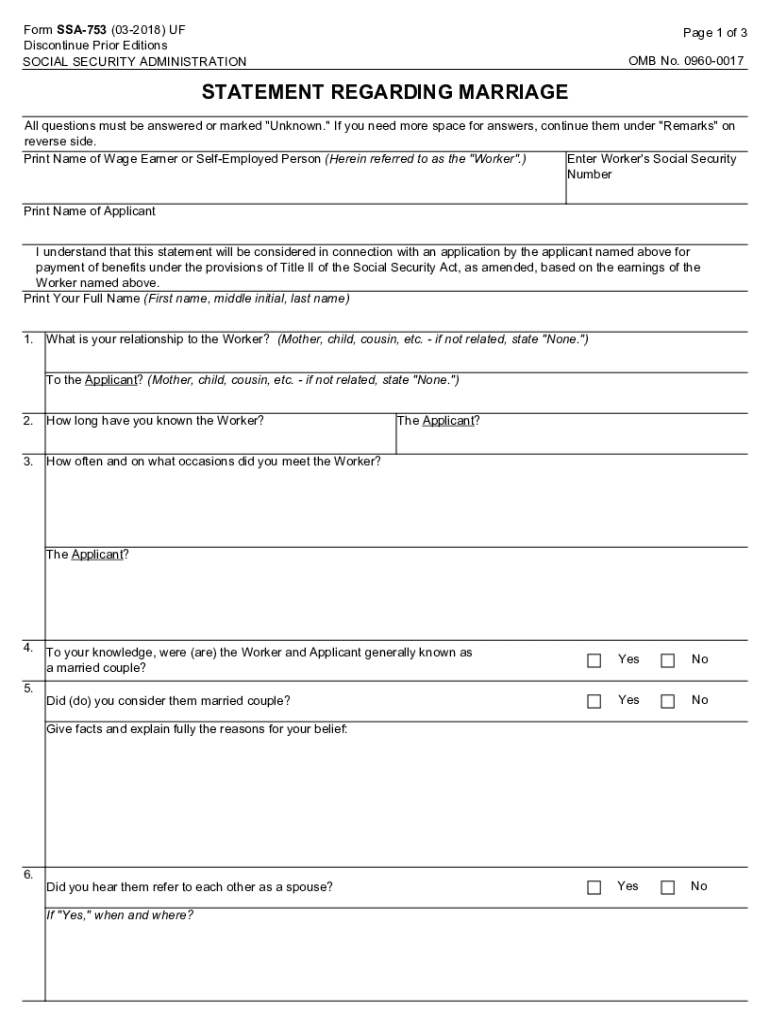
social security statement Preview on Page 1

Here's how it works

01. Edit your social security statement online
Type text, add images, blackout confidential details, add comments, highlights and more.
02. Sign it in a few clicks
Draw your signature, type it, upload its image, or use your mobile device as a signature pad.
03. Share your form with others
Send ssa 753 form via email, link, or fax. You can also download it, export it or print it out.

How to use or fill out marriage SSA with our platform

Form edit decoration
9.5
Ease of Setup
DocHub User Ratings on G2
9.0
Ease of Use
DocHub User Ratings on G2
  1. Click ‘Get Form’ to open the marriage SSA in the editor.
  2. Begin by entering the Worker’s Social Security Number and their full name. This identifies the individual whose earnings are being referenced.
  3. Next, provide your relationship to the Worker and the Applicant. Be specific, indicating if you are a family member or state 'None' if not related.
  4. Answer questions regarding how long you have known both the Worker and Applicant, including details about your interactions.
  5. Indicate whether you believe the Worker and Applicant were generally recognized as a married couple, providing explanations where necessary.
  6. Complete any additional questions regarding their living arrangements and previous marriages, ensuring all fields are filled accurately.
  7. Finally, sign and date the form. If signed by mark (X), ensure two witnesses provide their signatures and addresses.

Start using our platform today for free to streamline your document editing and signing process!

See more marriage ssa versions

We've got more versions of the marriage ssa form. Select the right marriage ssa version from the list and start editing it straight away!
Versions Form popularity Fillable & printable
2018 4.8 Satisfied (76 Votes)
2011 4.3 Satisfied (55 Votes)
be ready to get more

Complete this form in 5 minutes or less

Get form

Got questions?

We have answers to the most popular questions from our customers. If you can't find an answer to your question, please contact us.
Contact us

You should use only trusted software solutions with strong security compliance to approve your documents electronically. DocHub is just the type of service you need! It stores data on Amazon Web Servers and complies with all necessary security requirements and eSignature regulations, so it’s a trustworthy way to electronically sign your ssa 753 or other paperwork with this tool.

When you edit your ssa753 with DocHub, you only need a steady web connection and virtually any web browser installed on your device. No need to set up any third-party applications or research tutorials. Just open a tab with DocHub, drag and drop your file, and edit it immediately.

Members of a married couple are each entitled to Social Security benefits based upon their own work records (a \u201cworker benefit\u201d). This benefit, at Full Retirement Age,1 is known as the Primary Insurance Amount (PIA).
Marriage has no impact on your Social Security retirement benefit, which is based on your work record and earnings history. You and your spouse, assuming he or she also qualifies for retirement benefits, each collect your own separate benefits, and the amounts do not limit or otherwise affect each other.
By calling our national toll-free service at 1-800-772-1213 (TTY 1-800-325-0778) or visiting your local Social Security office.

Security and compliance

At DocHub, your data security is our priority. We follow HIPAA, SOC2, GDPR, and other standards, so you can work on your documents with confidence.

Learn more
ccpa2
pci-dss
gdpr-compliance
hipaa
soc-compliance
be ready to get more

Complete this form in 5 minutes or less

Get form

People also ask

What are the marriage requirements to receive Social Security spouse's benefits? Generally, you must be married for one year before you can get spouse's benefits. However, if you are the parent of your spouse's child, the one-year rule does not apply.

disability statement