Ssa 753 2026

Get Form
ssa 753 Preview on Page 1

Here's how it works

01. Edit your ssa 753 online
Type text, add images, blackout confidential details, add comments, highlights and more.
02. Sign it in a few clicks
Draw your signature, type it, upload its image, or use your mobile device as a signature pad.
03. Share your form with others
Send it via email, link, or fax. You can also download it, export it or print it out.

How to use or fill out SSA 753 with our platform

Form edit decoration
9.5
Ease of Setup
DocHub User Ratings on G2
9.0
Ease of Use
DocHub User Ratings on G2
  1. Click ‘Get Form’ to open the SSA 753 in the editor.
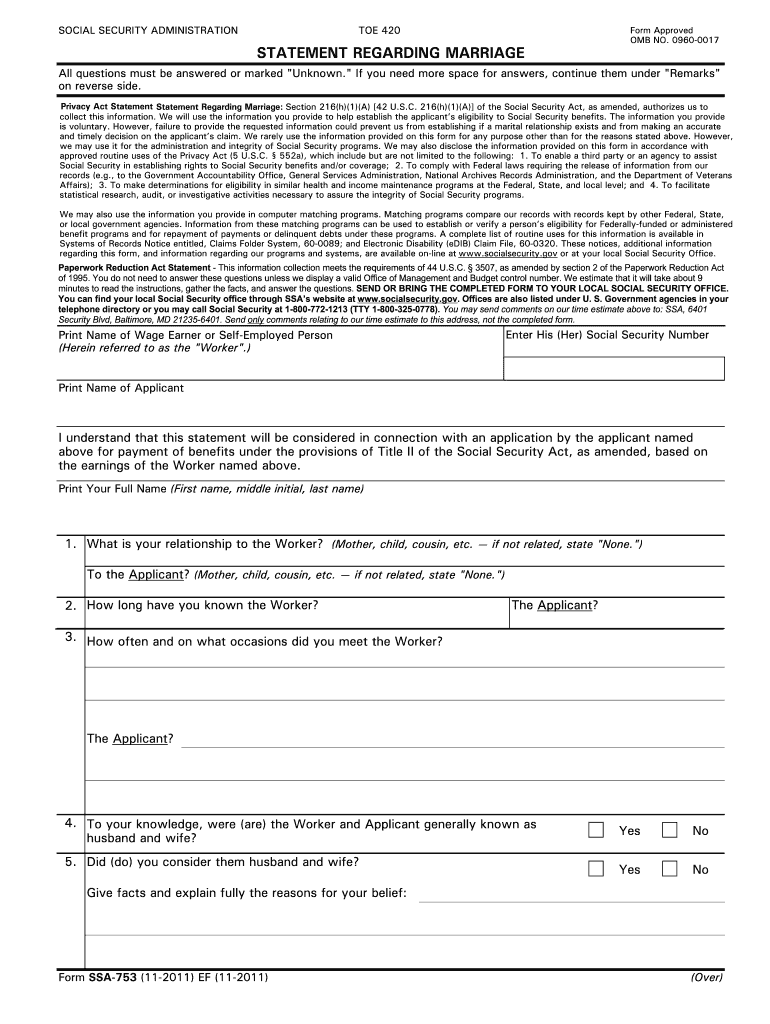
  2. Begin by entering the 'Print Name of Wage Earner or Self-Employed Person' and their Social Security Number. This identifies the worker related to the benefits claim.
  3. Next, input the 'Print Name of Applicant.' This is crucial as it links the applicant to the worker for benefit eligibility.
  4. Proceed to answer questions regarding your relationship to both the Worker and Applicant. Be specific about how long you have known them and how often you met.
  5. In sections regarding marital status, provide detailed responses about whether they were known as husband and wife, including any relevant facts that support your answers.
  6. Complete any additional remarks if necessary, ensuring all fields are filled accurately before signing at the bottom of the form.

Start using our platform today for free to streamline your SSA 753 form completion!

See more ssa 753 versions

We've got more versions of the ssa 753 form. Select the right ssa 753 version from the list and start editing it straight away!
Versions Form popularity Fillable & printable
2018 4.8 Satisfied (76 Votes)
2011 4.3 Satisfied (55 Votes)
be ready to get more

Complete this form in 5 minutes or less

Get form

Got questions?

We have answers to the most popular questions from our customers. If you can't find an answer to your question, please contact us.
Contact us

Yes, a typed name is recognized as a legitimate electronic signature when you add it to your form utilizing a compliant solution like DocHub. Simply import your ssa 753 to our editor, click Sign in the top tool pane → Create your signature → Type your name in the appropriate tab, and decide how it will look on your document.

When you edit your ssa 753 with DocHub, you only require a stable web connection and virtually any browser installed on your device. No need to install any third-party applications or research tutorials. Simply open a tab with DocHub, drag and drop your file, and modify it on the spot.

Change of Marital Status - Marriage, divorce, and annulment of marriage. You must report marriage even if you believe that an exception applies. You return to work (as an employee or self- employed) regardless of amount of earnings.
WHEN DO YOU NEED TO REPORT? Report any changes that may affect your SSI as soon as possible and no later than 10 days after the end of the month in which the change occurred.
Hi. Form SSA-795 is a multi-purpose form used to submit written requests to Social Security. The title of the form is "Statement of Claimant", and Social Security prefers to have people use the form as opposed to other types of correspondence because it contains a penalty clause for making false statements.

Security and compliance

At DocHub, your data security is our priority. We follow HIPAA, SOC2, GDPR, and other standards, so you can work on your documents with confidence.

Learn more
ccpa2
pci-dss
gdpr-compliance
hipaa
soc-compliance
be ready to get more

Complete this form in 5 minutes or less

Get form

People also ask

Whenever we send you a notice, it is because there is something you should know or do about your claim, benefit status or benefit amount. We send you a notice before we make a change to your benefit amount or eligibility. We will send a notice whenever we must tell you about activity on your case.
If you fail to report changes in a timely way, or if you intentionally make a false statement, we may stop your SSI, disability, and retirement benefits. We may also impose a sanction against your payments. The first sanction is a loss of payments for six months. Subsequent sanctions are for 12 and 24 months.
1. General information for recording statements on the SSA-795. Use an SSA-795 whenever a signed statement is required or desirable, except when we request some other form or questionnaire or we can readily adapt for the statement.
You prove a ceremonial marriage by providing: A certified copy of the public record of the marriage; A certified copy of the religious record of the marriage; or. The original marriage certificate.
Form SSA-1 | Information You Need To Apply For Retirement Benefits Or Medicare | Social Security Administration.

Related links