




Here's how it works



How to use or fill out Minnesota PCR with our platform

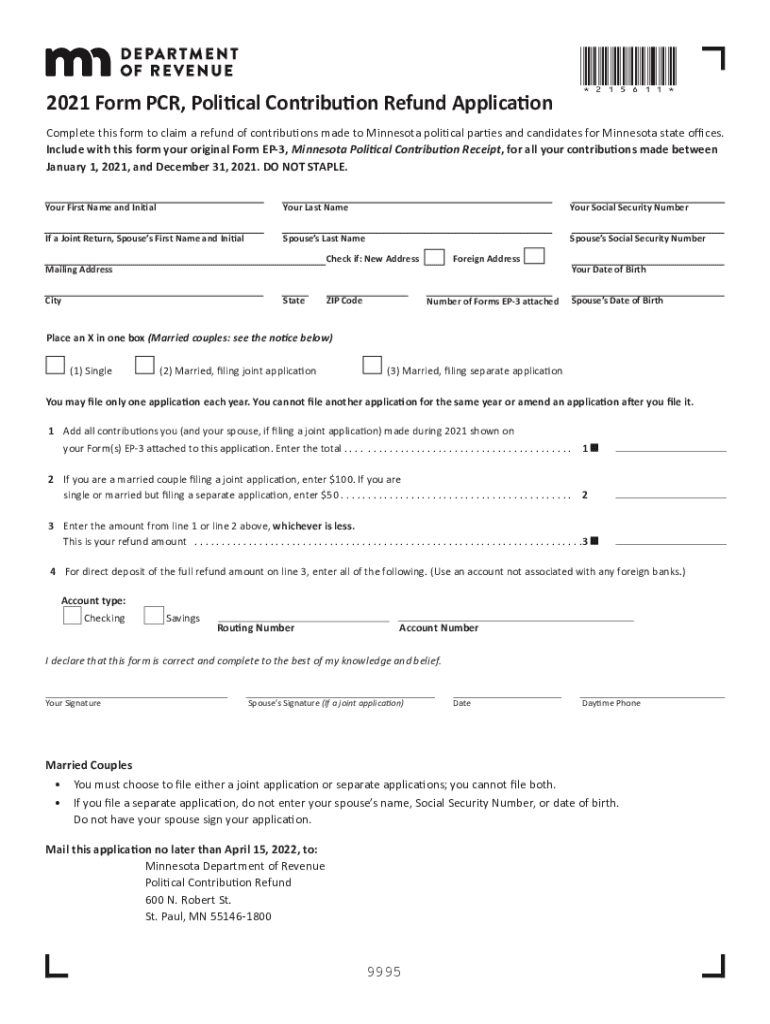
- Click ‘Get Form’ to open the Minnesota PCR in the editor.
- Begin by entering your first name, last name, and Social Security Number. If filing jointly, include your spouse's information as well.
- Indicate if you have a new address and fill in your mailing address, city, state, and ZIP code.
- Select your filing status by placing an X in the appropriate box: Single, Married filing jointly, or Married filing separately.
- Add all contributions made during 2021 from your attached EP-3 forms and enter the total on line 1.
- Enter $100 for joint applications or $50 for single/separate applications on line 2.
- On line 3, enter the lesser amount from lines 1 or 2 to determine your refund amount.
- If opting for direct deposit, provide your account type, routing number (9 digits), and account number (up to 17 digits).
- Finally, sign the form along with your spouse if applicable and include a daytime phone number before submitting it by mail.
Start filling out your Minnesota PCR form online for free today!
It's free
See more minnesota pcr versions
Got questions?
How can I eSign my minnesota pcr from Gmail?
With DocHub, it’s pretty simple. The service offers users an add-on called DocHub for Gmail, which you can find in the Google Workspace Marketplace without being charged. Install it and give it access to your Google account. Open your email with your minnesota pcr attached and click on the add-on button in the right-side panel. Log in to your DocHub account, and upload the form to our editor, where you can complete it and sign.
How do you edit minnesota pcr on Android?
Document editing with DocHub is equally convenient on desktop and mobile devices. You just need an internet browser to edit your minnesota pcr on Android. Open our website and sign in to access the tools you need. Add your document and introduce your intended changes. After that, you can keep your form in your document storage or send it out instantly.
Security and compliance
At DocHub, your data security is our priority. We follow HIPAA, SOC2, GDPR, and other standards, so you can work on your documents with confidence.
Learn more




