





Mn political contribution refund 2026

Get Form
mn pcr form Preview on Page 1

Here's how it works

01. Edit your mn pcr form online
Type text, add images, blackout confidential details, add comments, highlights and more.
02. Sign it in a few clicks
Draw your signature, type it, upload its image, or use your mobile device as a signature pad.
03. Share your form with others
Send mn political contribution refund via email, link, or fax. You can also download it, export it or print it out.

How to use or fill out mn political contribution refund with our platform

Form edit decoration
9.5
Ease of Setup
DocHub User Ratings on G2
9.0
Ease of Use
DocHub User Ratings on G2
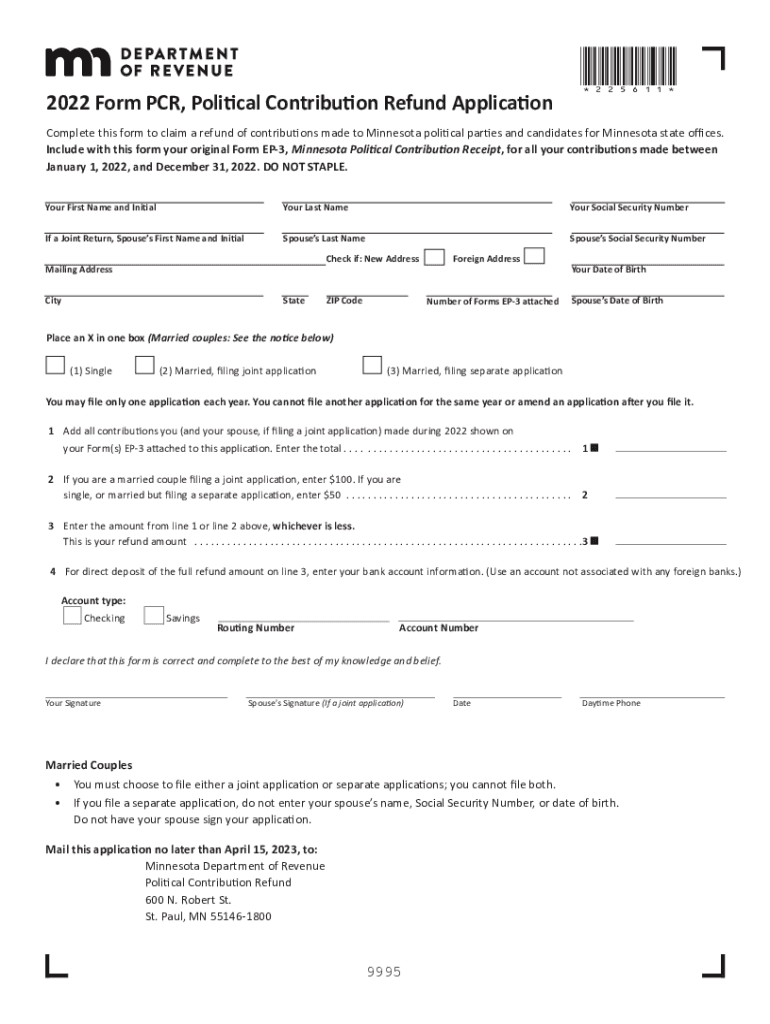
  1. Click ‘Get Form’ to open the mn political contribution refund application in the editor.
  2. Begin by entering your personal information, including your first name, last name, and Social Security Number. If filing jointly, include your spouse's details as well.
  3. Indicate if you have a new address and provide your mailing address, city, state, and ZIP code.
  4. Select your filing status by placing an X in the appropriate box: Single, Married filing jointly, or Married filing separately.
  5. Add up all contributions made during 2022 from your attached Form EP-3 receipts and enter the total on line 1.
  6. Enter $100 if married filing jointly or $50 if single/married filing separately on line 2.
  7. On line 3, enter the lesser amount from lines 1 or 2 to determine your refund amount.
  8. If you prefer direct deposit for your refund, fill in your bank account information on line 4.
  9. Finally, sign the form and ensure all required fields are completed before submitting it by mail to the Minnesota Department of Revenue.

Start using our platform today to easily complete your mn political contribution refund application for free!

See more mn political contribution refund versions

We've got more versions of the mn political contribution refund form. Select the right mn political contribution refund version from the list and start editing it straight away!
Versions Form popularity Fillable & printable
2023 4.6 Satisfied (58 Votes)
2022 4.9 Satisfied (52 Votes)
2021 4.3 Satisfied (154 Votes)
2020 4.2 Satisfied (46 Votes)
2019 4.3 Satisfied (97 Votes)
be ready to get more

Complete this form in 5 minutes or less

Get form

Got questions?

We have answers to the most popular questions from our customers. If you can't find an answer to your question, please contact us.
Contact us

Microsoft Word doesn’t have signing tools to create legitimate electronic signatures and enforceable documents. Luckily, DocHub is an online eSignature-compliant editor that supports different file formats, including .doc files. Sign in to your account and add the Word edition of your free pcr donation from your device and cloud, or URL - our editor will automatically turn it into an editable PDF. Make all essential adjustments in your document and click Sign to create your own legally-binding electronic signature. There are four signing methods from which to choose.

If you edit your contribution refund application with DocHub, you simply will not need to look for other applications or solutions to sign it. An electronic signature is a component of DocHub’s substantial editing toolset, which allows you to implement changes in your form without switching between platforms. Just complete your form, double-check the correctness of the data and put your electronic signature at the end to make it submission-ready within a few minutes.

Contributions are the most common source of campaign support. A contribution is anything of value given, loaned or advanced to influence a federal election.
Political parties in the UK may be funded through membership fees, party donations or through state funding, the latter of which is reserved for administrative costs.
As of 2021, the maximum yearly contribution limit is $1650 to a given federal political party, $1650 to a given partys riding associations, $1650 to a given partys leadership candidates, and $1650 for each independent candidate. The maximum total contribution is set at $3300.

Security and compliance

At DocHub, your data security is our priority. We follow HIPAA, SOC2, GDPR, and other standards, so you can work on your documents with confidence.

Learn more
ccpa2
pci-dss
gdpr-compliance
hipaa
soc-compliance
be ready to get more

Complete this form in 5 minutes or less

Get form

People also ask

Power Search can be used to quickly search for contributions to candidates and ballot measures and contributions from individuals, businesses and other campaign committees. It can also be used to search for independent expenditures made to support or oppose candidates or ballot measures.
Are Political Contributions Tax Deductible? Both business and individual donations to political parties are not tax deductible. While American taxpayers may choose to donate to political organizations and campaigns to influence the political landscape, these contributions cannot be deducted on tax returns.
A political donation is a gift made to, or for the benefit of, a political party, elected member, candidate, group of candidates, or other person or entity including an associated entity or third-party campaigner in New South Wales. People and entities making political donations are called donors.
A political contribution is not a gift if properly reported or is exempt from the reporting. The use of a bulk mailing permit owned by a legislators campaign committee or used in a legislators election campaign is not a gift.

minnesota pcr

