




Here's how it works



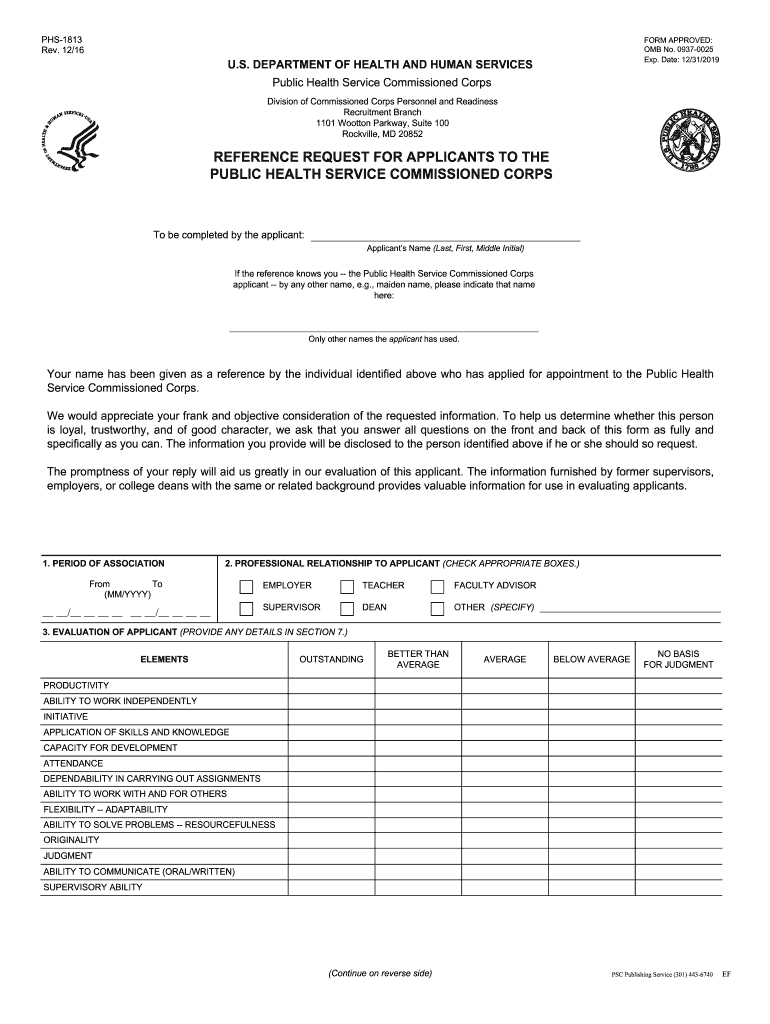
How to use or fill out FORM PSC-1813. Reference Request for Applicants to the Commissioned Corps of the U.S. Public Health Service with DocHub

- Click ‘Get Form’ to open it in the editor.
- Begin by entering your name in the designated field at the top of the form, including your last name, first name, and middle initial.
- If applicable, provide any other names you have used, such as a maiden name, in the specified area.
- Fill out the 'Period of Association' section by indicating the dates (MM/YYYY) during which you were associated with the applicant.
- Select your professional relationship to the applicant by checking the appropriate boxes provided.
- Evaluate the applicant across various elements listed in Section 3 by selecting one option for each category based on your assessment.
- In Section 4, specify what specialization or field you believe the applicant is best suited for.
- Answer whether you know of any limitations that might affect the applicant's effectiveness and provide details if necessary.
- Indicate if you would be willing to employ or re-employ this individual and provide reasons if applicable.
- Use Section 7 for any additional comments or information regarding your evaluation of the applicant.
- Complete your signature and fill out your title, institution address, and date at the end of the form before submitting it.
Start using our platform today to easily complete FORM PSC-1813 online for free!
It's free
See more FORM PSC-1813. Reference Request for Applicants to the Commissioned Corps of the U.S. Public Health Service versions
Got questions?
How do I sign my FORM PSC-1813. Reference Request for Applicants to the Commissioned Corps of the U.S. Public Health Service without printing?
Electronic signatures are a perfect alternative to traditional signing, as they save time, effort, and costs people spend on printing, scanning, and paper delivery. You can eSign your FORM PSC-1813. Reference Request for Applicants to the Commissioned Corps of the U.S. Public Health Service using a trustworthy and powerful online document management services like DocHub. It complies with main eSignature policies (ESIGN and UETA), so all forms approved there are legally binding and have the same validity as physically signed ones.
How to complete and sign FORM PSC-1813. Reference Request for Applicants to the Commissioned Corps of the U.S. Public Health Service online?
You may easily fill out, modify, and even eSign your FORM PSC-1813. Reference Request for Applicants to the Commissioned Corps of the U.S. Public Health Service using DocHub. Create a new profile and begin your free trial. After that, you may upload the document with the form and easily make all the required edits. No need to print on paper or use a third-party application to sign it, as you can place your electronic signature on your document quicker through DocHub.
Security and compliance
At DocHub, your data security is our priority. We follow HIPAA, SOC2, GDPR, and other standards, so you can work on your documents with confidence.
Learn more




