Type text, add images, blackout confidential details, add comments, highlights and more.

02. Sign it in a few clicks
Draw your signature, type it, upload its image, or use your mobile device as a signature pad.

03. Share your form with others
Send it via email, link, or fax. You can also download it, export it or print it out.

How to use or fill out Vermont MRT Form with our platform
Ease of Setup
DocHub User Ratings on G2
Ease of Use
DocHub User Ratings on G2
Click ‘Get Form’ to open it in the editor.
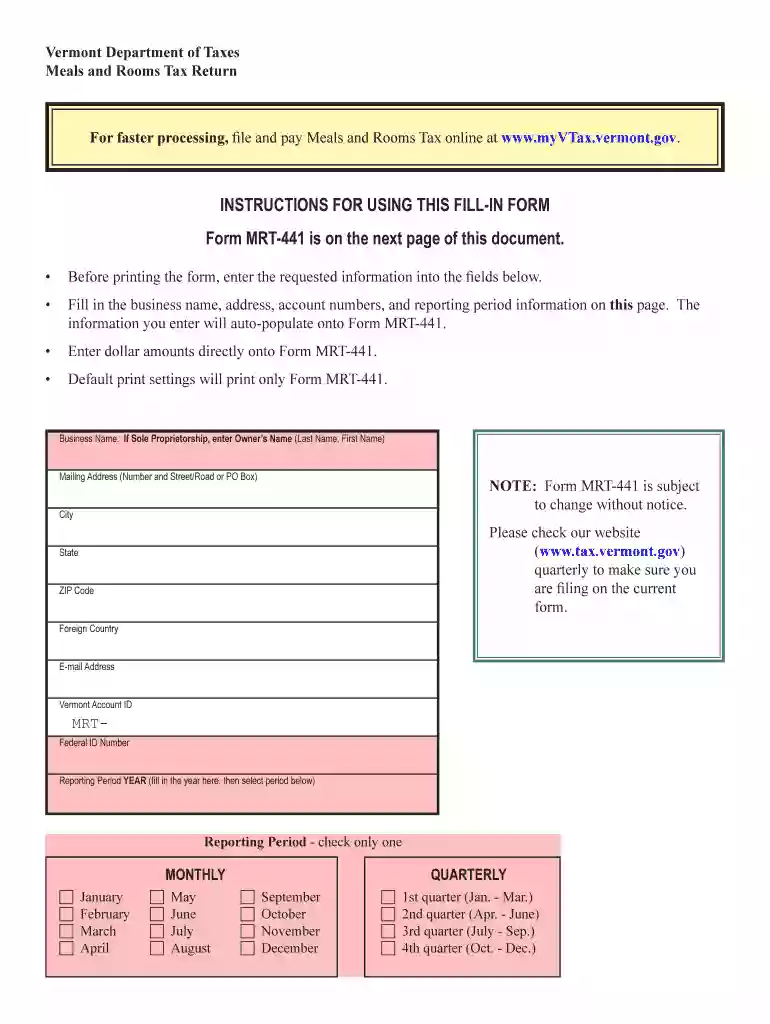
Begin by entering your business name and address. If you are a sole proprietor, include the owner's name in the format 'Last Name, First Name'.
Fill in your Vermont Account ID and Federal ID Number. Ensure all information is accurate as it will auto-populate onto Form MRT-441.
Select the reporting period by checking only one box for either monthly or quarterly reporting. Enter the year and choose the corresponding month or quarter.
Proceed to Part I of the form where you will enter total amounts for meals, rent, and alcohol. Make sure to differentiate between exempt and taxable amounts.
In Part III, calculate your total taxes due by adding up the relevant lines from previous sections.
Finally, complete the certification section by signing and dating the form before submission.
Start using our platform today to simplify your Vermont MRT form completion for free!
Vermont. Does Meet. Vermont Secretary of State. 89 Main Street. 3rd Floor. Montpelier, VT 05620-3402. 802-828-1505. Contact: OPR Contact Form (vermont.gov).Read more
Cookie consent notice
This site uses cookies to enhance site navigation and personalize your experience.
By using this site you agree to our use of cookies as described in our Privacy Notice.
You can modify your selections by visiting our Cookie and Advertising Notice.