




01. Edit your i 9 form 2019 pdf online
Type text, add images, blackout confidential details, add comments, highlights and more.

Type text, add images, blackout confidential details, add comments, highlights and more.

Draw your signature, type it, upload its image, or use your mobile device as a signature pad.

Send i 9 form 2017 pdf via email, link, or fax. You can also download it, export it or print it out.
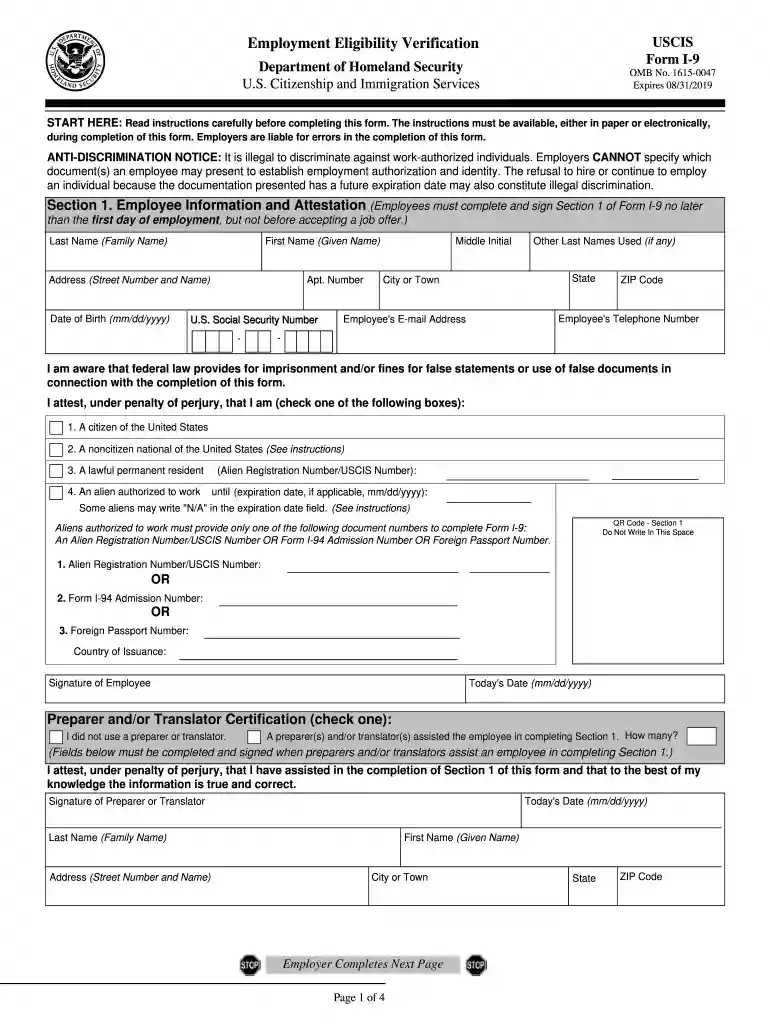
The fillable I-9 Form 2019 is the essential document required for Employment Eligibility Verification in the United States. This form enables employers to verify an employee's identity and employment authorization, ensuring compliance with federal regulations. Below, we explore detailed aspects of the I-9 form, including completion steps, necessary documents, and key considerations.
The I-9 form is divided into three main sections that capture different information:
Employee Information and Attestation (Section 1): This section requires the employee to provide personal data including their name, address, date of birth, and Social Security number. Employees must also attest to their eligibility to work in the U.S. by checking the appropriate box indicating their status (citizen, lawful permanent resident, or alien authorized to work).
Employer Review and Verification (Section 2): Employers must complete this section within three days of the employee’s start date. It requires verification of employment eligibility by examining and recording details of acceptable identification documents presented by the employee. Employers must document specific information regarding the form of identification, such as the document title, issuing authority, document number, and expiration date.
Updating and Reverification (Section 3): This section is used for re-verifying employment eligibility when necessary. It’s crucial when an employee's work authorization documents expire or when an employee's status changes.
Completing the I-9 Form correctly is imperative for both employees and employers. Here’s a step-by-step guide:
Gather Required Documents: Employees must present valid documentation that verifies both their identity and employment eligibility. This can include combinations of documents from List A (which establishes both identity and employment authorization), or a combination from List B (identity) and List C (employment authorization).
Fill Out Section 1: The employee must complete this section on or before their first day of employment. Each field should be filled out completely and accurately, and the employee must sign and date the form to certify the provided information.
Complete Section 2: Once the employee presents their documents, the employer must fill in this section, ensuring to input the details accurately. This includes the dates of employment and verification of the documents used.
Refer to Section 3 if Applicable: If an employee’s documents need to be updated or reverified, the employer should use this section to document the new information.
Retention of the I-9 Form: Employers must retain completed forms for a specific retention period, either three years after hire or one year after employment ends, whichever is longer.
To verify identity and work eligibility, the I-9 form incorporates a structured list of documents:
List A (Documents that establish both identity and employment eligibility):
List B (Documents that establish identity):
List C (Documents that establish employment eligibility):
Understanding which documents are acceptable is critical for compliance and streamlining the hiring process.
Understanding the legal framework surrounding the I-9 form is essential for employers and employees alike. Failure to comply with I-9 regulations can result in severe penalties, including:
Civil Penalties: Employers may be fined for failing to complete the I-9 form correctly or for not keeping the records as required. Fines can range from $230 to $2,292 per violation, depending on the severity and frequency of non-compliance.
Criminal Penalties: In cases of knowingly hiring unauthorized workers, employers could face criminal charges, including heavy fines and potential imprisonment.
Reputational Damage: Beyond financial penalties, non-compliance may damage an organization’s reputation, affecting future hiring and operational capabilities.
Utilizing a fillable format for the I-9 form offers numerous advantages:
Ease of Completion: Employees can easily fill out the form online, reducing the likelihood of errors associated with manual entry. This also allows for immediate electronic submission to employers.
Enhanced Data Security: Utilizing platforms that offer encryption can protect sensitive information during storage and transfer, ensuring compliance with privacy regulations.
Improved Record Keeping: Digital forms can be stored and organized efficiently, ensuring easier access to completed forms during audits or inspections.
Automatic Verification Features: Some platforms provide built-in prompts to guide users through the completion process, reducing the risk of missing information.
Understanding the fillable I-9 Form 2019 and its components is vital for ensuring compliance with U.S. employment laws. By adhering to the completion procedures and documenting required information accurately, both employers and employees can mitigate risks while fostering a legally compliant workplace environment.
We've got more versions of the i 9 form 2019 pdf form. Select the right i 9 form 2019 pdf version from the list and start editing it straight away!
| Versions | Form popularity | Fillable & printable |
|---|---|---|
| 2025 | 4.9 Satisfied (31 Votes) | |
| 2023 | 4.8 Satisfied (66 Votes) | |
| 2019 | 4.8 Satisfied (103 Votes) | |
| 2017 | 4.4 Satisfied (275 Votes) | |
| 2016 | 4 Satisfied (29 Votes) | |
| 2013 | 4.7 Satisfied (39 Votes) | |
| 2009 | 4.2 Satisfied (68 Votes) | |
| 2009 | 5 Satisfied (20 Votes) | |
| 2008 | 4 Satisfied (56 Votes) | |
| 2007 | 4.3 Satisfied (30 Votes) | |
| 2005 | 4 Satisfied (27 Votes) | |
| 1991 | 4.2 Satisfied (30 Votes) |
At DocHub, your data security is our priority. We follow HIPAA, SOC2, GDPR, and other standards, so you can work on your documents with confidence.




Apr 2, 2025 Use Form I-9, Employment Eligibility Verification, to verify the identity and employment authorization of individuals hired for employment in the United States.Read more
START HERE: Employers must ensure the form instructions are available to employees when completing this form. Employers are liable for.Read more
The information collected on this form is necessary to determine applicant eligibility for airman ratings. We estimate it will take 30.Read more


