Alabama dhr can form 2026

Get Form
dhr form 1598 instructions Preview on Page 1

Here's how it works

01. Edit your dhr form 1598 instructions online
Type text, add images, blackout confidential details, add comments, highlights and more.

02. Sign it in a few clicks
Draw your signature, type it, upload its image, or use your mobile device as a signature pad.

03. Share your form with others
Send form 1598 via email, link, or fax. You can also download it, export it or print it out.

How to use or fill out Alabama DHR CAN Form with our platform

Form edit decoration
9.5
Ease of Setup
DocHub User Ratings on G2
9.0
Ease of Use
DocHub User Ratings on G2
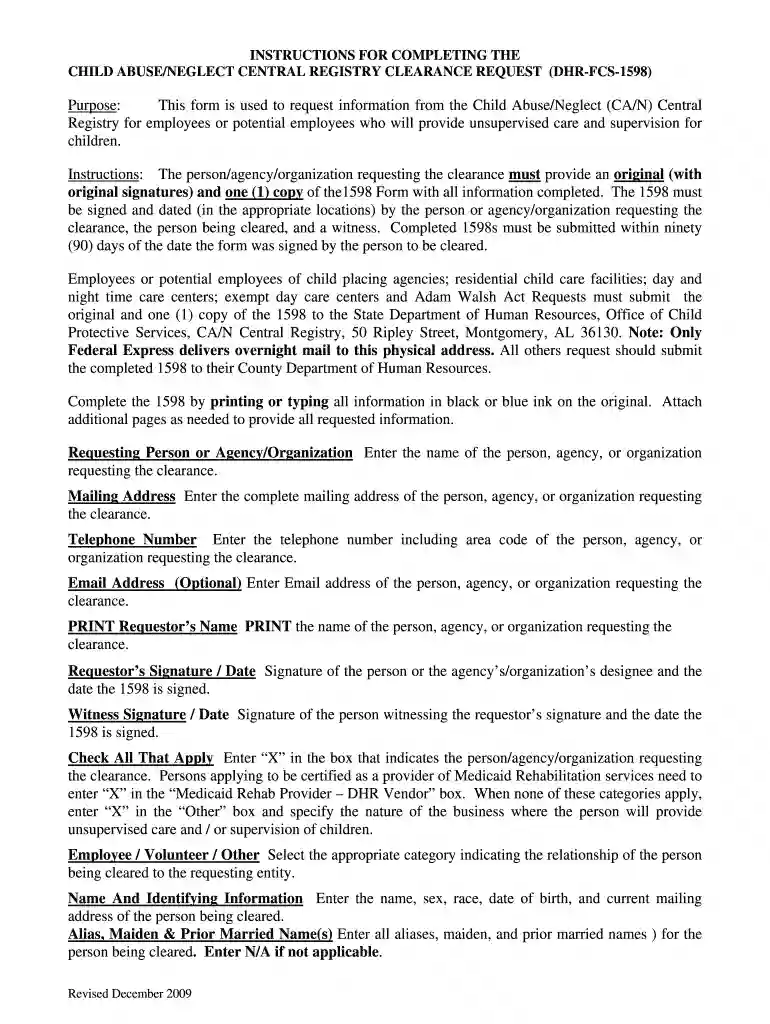
  1. Click ‘Get Form’ to open the Alabama DHR CAN form in the editor.
  2. Begin by entering the name of the person, agency, or organization requesting the clearance in the designated field.
  3. Fill in the complete mailing address and telephone number, ensuring accuracy for communication purposes.
  4. Optionally, provide an email address for further correspondence.
  5. Print and sign your name along with the date in the appropriate section. A witness must also sign and date this form.
  6. Indicate your category by checking all applicable boxes, such as Medicaid Rehab Provider if relevant.
  7. Complete personal details of the individual being cleared, including their name, sex, race, date of birth, and current address.
  8. List any aliases or prior names if applicable. Repeat this for spouse and children information as needed.
  9. Finally, ensure that both you and a witness have signed before submitting your completed form to the appropriate department.

Start using our platform today to fill out your Alabama DHR CAN form easily and for free!

See more alabama dhr can form versions

We've got more versions of the alabama dhr can form form. Select the right alabama dhr can form version from the list and start editing it straight away!
Versions Form popularity Fillable & printable
2009 4.9 Satisfied (45 Votes)
be ready to get more

Complete this form in 5 minutes or less

Get form

Got questions?

We have answers to the most popular questions from our customers. If you can't find an answer to your question, please contact us.
Contact us
Out-of-Home (Non-Foster Care) Safety plans are designed to provide protection for children by arranging for them to live temporarily outside of their own home. This type plan is developed by agreement between the child welfare staff, the parent/primary caregiver, and person responsible for providing protection.
You can break your safety plan at any time. Just like any other contract, legal or not. However, if you do, there will be consequences or repercussions.
The maximum timeframe that an Out-of-Home Non-Foster Care safety plan can be in place without court involvement is ninety (90) days. Court involvement occurs either by filing a dependency petition or initiating contact with legal counsel to start legal action.
If DHR arrives with law enforcement but does not have a warrant or court order, youre not obligated to let them into your home. Step outside and politely ask if they have the necessary documentation. Protecting your home and rights doesnt mean being uncooperative; it simply means following legal protocols.
Under Alabama law, it is negligent treatment or maltreatment of a child, including the failure to provide adequate food, medical treatment, clothing, or shelter: provided, however, that a parent or guardian legitimately practicing his religious beliefs who thereby does not provide specified medical treatment for a

Security and compliance

At DocHub, your data security is our priority. We follow HIPAA, SOC2, GDPR, and other standards, so you can work on your documents with confidence.

Learn more
ccpa2
pci-dss
gdpr-compliance
hipaa
soc-compliance
be ready to get more

Complete this form in 5 minutes or less

Get form

People also ask

The maximum timeframe that an Out-of-Home Non-Foster Care safety plan can be in place without court involvement is ninety (90) days.
Under the Alabama Elder and Adult in Need of Protective Services Abuse Registry, also known as Shirleys Law, certain service providers must query the registry to determine whether any of their employees or volunteers have a history of abuse, neglect, exploitation, or crimes against the elderly or adults in need of
Thirty (30) Days. SDM Safety Plans that do not affect parent/child custody, contact, visitation or residence are valid for no more than thirty (30) calendar days from the date of initial contact or until a referral is promoted to a case.

1598 form