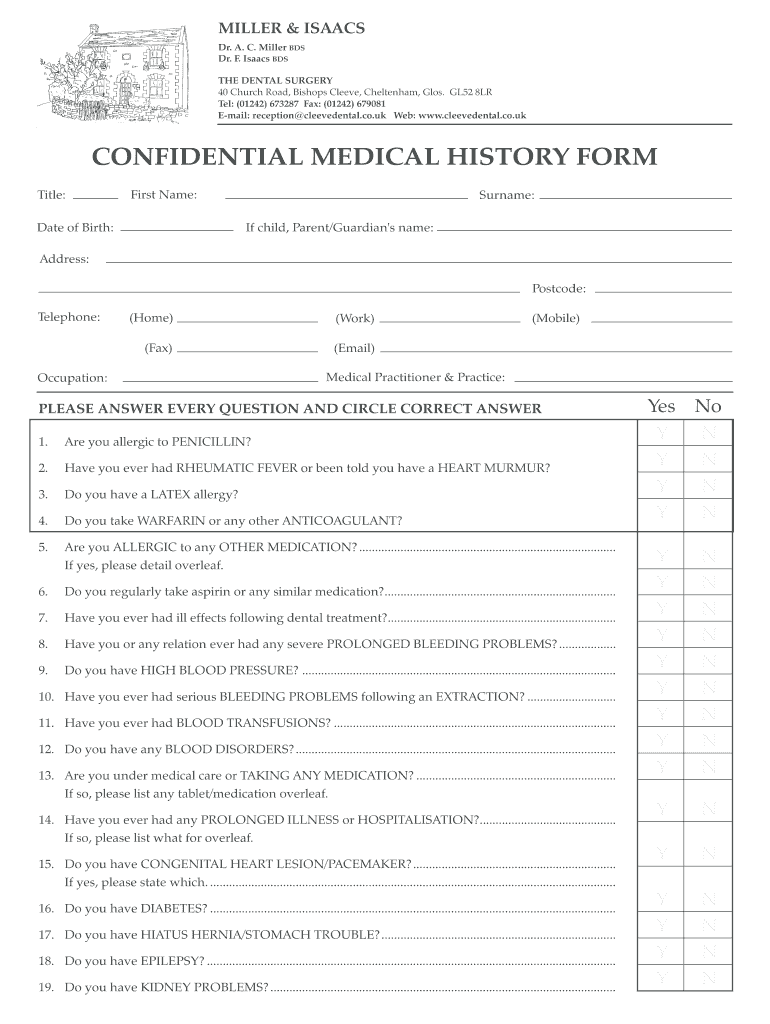
CONFIDENTIAL MEDICAL HISTORY FORM - cleevedentalcouk - cleevedental co 2026

Get Form
CONFIDENTIAL MEDICAL HISTORY FORM - cleevedentalcouk - cleevedental co Preview on Page 1

Here's how it works

01. Edit your form online
Type text, add images, blackout confidential details, add comments, highlights and more.
02. Sign it in a few clicks
Draw your signature, type it, upload its image, or use your mobile device as a signature pad.
03. Share your form with others
Send it via email, link, or fax. You can also download it, export it or print it out.

How to use or fill out CONFIDENTIAL MEDICAL HISTORY FORM - cleevedentalcouk - cleevedental co with our platform

Form edit decoration
9.5
Ease of Setup
DocHub User Ratings on G2
9.0
Ease of Use
DocHub User Ratings on G2
  1. Click ‘Get Form’ to open the CONFIDENTIAL MEDICAL HISTORY FORM in the editor.
  2. Begin by filling in your personal details, including Title, First Name, Surname, Date of Birth, and contact information such as Address and Telephone numbers.
  3. Carefully read each question regarding your medical history. Circle 'Yes' or 'No' for questions about allergies, medications, and past medical conditions.
  4. If you answer 'Yes' to any questions that require further details, please provide that information in the space provided overleaf.
  5. Complete the section on additional information if there are any other relevant medical or dental history details you wish to share.
  6. Sign and date the form at the bottom to confirm that all information is accurate before submitting it.

Start using our platform today for free to complete your CONFIDENTIAL MEDICAL HISTORY FORM effortlessly!

See more CONFIDENTIAL MEDICAL HISTORY FORM - cleevedentalcouk - cleevedental co versions

We've got more versions of the CONFIDENTIAL MEDICAL HISTORY FORM - cleevedentalcouk - cleevedental co form. Select the right CONFIDENTIAL MEDICAL HISTORY FORM - cleevedentalcouk - cleevedental co version from the list and start editing it straight away!
Versions Form popularity Fillable & printable
2021 4.2 Satisfied (25 Votes)
2012 4.8 Satisfied (47 Votes)
be ready to get more

Complete this form in 5 minutes or less

Get form

Got questions?

We have answers to the most popular questions from our customers. If you can't find an answer to your question, please contact us.
Contact us
How you make your request will depend on your providers processes. You may be able to request your record through your providers patient portal. You may have to fill out a form called a health or medical record release form, or request for accesssend an email, or mail or fax a letter to your provider.
Key form fields typically include: Name and contact details of the patient. Patients current and past medical conditions. Medications is the patient currently taking. Allergies. Surgical history. Family medical history. Lifestyle factors that might affect health (e.g., smoking, alcohol use)
Ask for the information you need the way you need it like part or all of your record, a paper or electronic record, and the number of copies you need. Request a copy of your health record from your provider including how to fill out a form asking for your record.
South Carolina: For paper and electronic copies, 83 per page for the first 30 pages, 63 per page for each additional page, plus a $32.06 clerical fee. For paper copies, altogether these fees cannot exceed $256.58, and for electronic records, these combined fees cannot exceed $192.44.

Security and compliance

At DocHub, your data security is our priority. We follow HIPAA, SOC2, GDPR, and other standards, so you can work on your documents with confidence.

Learn more
ccpa2
pci-dss
gdpr-compliance
hipaa
soc-compliance
be ready to get more

Complete this form in 5 minutes or less

Get form