Type text, add images, blackout confidential details, add comments, highlights and more.
02. Sign it in a few clicks
Draw your signature, type it, upload its image, or use your mobile device as a signature pad.
03. Share your form with others
Send mcs 90 example via email, link, or fax. You can also download it, export it or print it out.
How to use or fill out mcs 90 form with our platform
Ease of Setup
DocHub User Ratings on G2
Ease of Use
DocHub User Ratings on G2
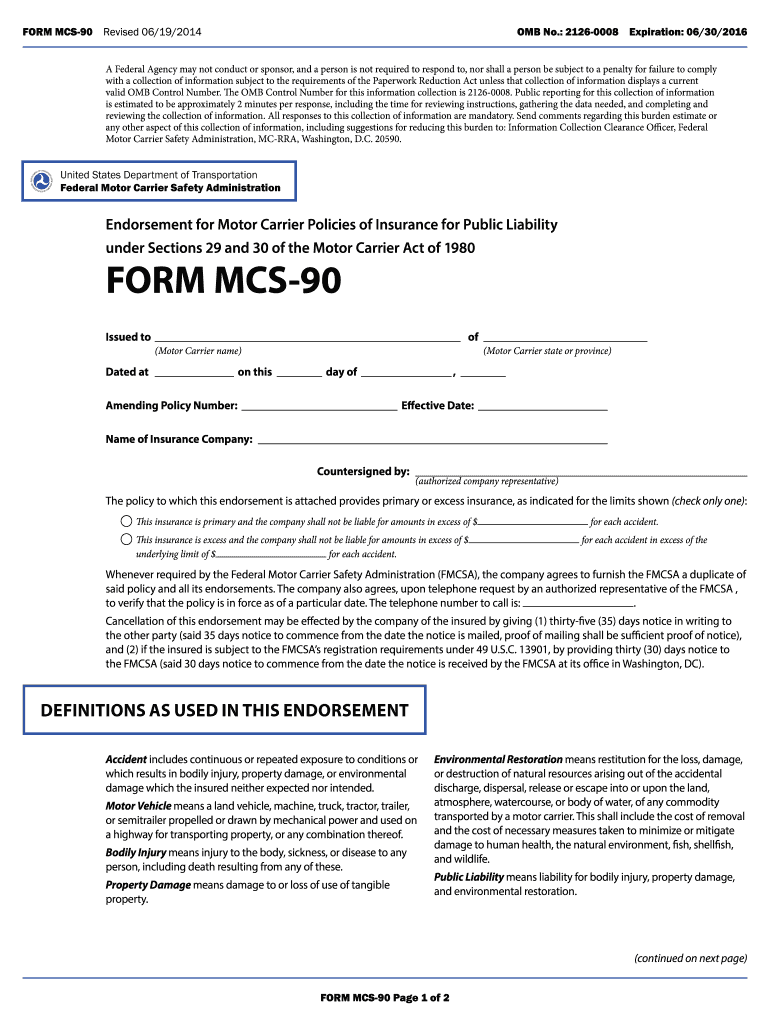
Click ‘Get Form’ to open the MCS-90 form in the editor.
Begin by entering the Motor Carrier name and state or province in the designated fields. Ensure accuracy as this information is crucial for identification.
Fill in the effective date and policy number. This helps establish the timeline of your insurance coverage.
Indicate whether the insurance is primary or excess by checking the appropriate box. Enter the limits of liability for each accident as required.
Provide the name of your insurance company and ensure it is countersigned by an authorized representative, confirming that all details are correct.
Review all entries for completeness and accuracy before saving or exporting your completed form.
Start using our platform today to fill out your MCS-90 form online for free!
MCS-90 form PDFPrintable mcs 90 formWhere to get MCS 90 formMCS-90 ProgressiveWho fills out the MCS 90 formMCS 90 requirementsMCS 90 exampleMCS 90 form expiration date
Security and compliance
At DocHub, your data security is our priority. We follow HIPAA, SOC2, GDPR, and other standards, so you can work on your documents with confidence.
Feb 27, 2025 The photolysis of MCs can form mineral products as well as transformation products that may be more toxic than the original compounds. TNT.Read more
Endorsements for policies of insurance (Form MCS-90) and surety bonds (Form MCS-82) must be in the form prescribed by the FMCSA and approved by the OMB.Read more
Cookie consent notice
This site uses cookies to enhance site navigation and personalize your experience.
By using this site you agree to our use of cookies as described in our Privacy Notice.
You can modify your selections by visiting our Cookie and Advertising Notice.