




Here's how it works

01. Edit your dd 2853 online
Type text, add images, blackout confidential details, add comments, highlights and more.

02. Sign it in a few clicks
Draw your signature, type it, upload its image, or use your mobile device as a signature pad.

03. Share your form with others
Send mds section gg worksheet via email, link, or fax. You can also download it, export it or print it out.
How to use or fill out TRICARE Plus with our platform

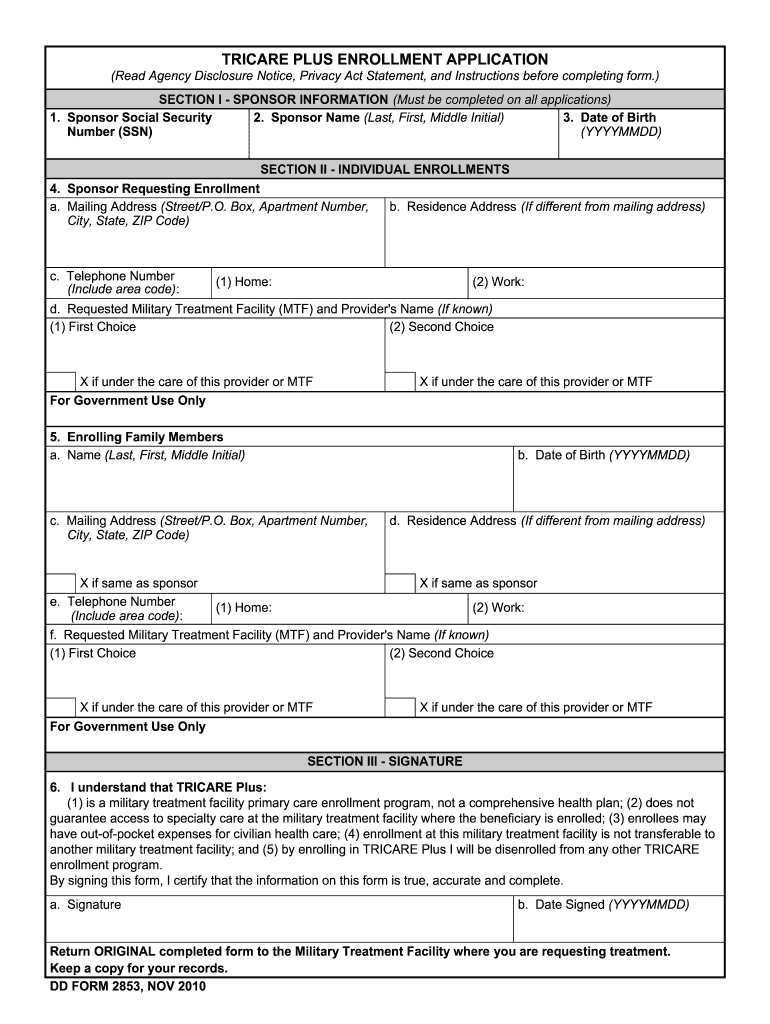
- Click ‘Get Form’ to open the TRICARE Plus Enrollment Application in the editor.
- Begin with Section I, where you will enter the Sponsor Information. Fill in the Sponsor's Social Security Number, Name, and Date of Birth accurately.
- Proceed to Section II for Individual Enrollments. Here, provide your Mailing Address, Residence Address (if different), and Telephone Numbers. Specify your requested Military Treatment Facility (MTF) and provider's name if known.
- List any enrolling family members by entering their names, dates of birth, addresses, and telephone numbers. Indicate if they are under the care of a specific provider or MTF.
- In Section III, review the understanding statement about TRICARE Plus. Sign and date the application to certify that all information is true and complete.
- Finally, save your completed form and submit it to the appropriate MTF while keeping a copy for your records.
Start using our platform today to easily fill out your TRICARE Plus application online for free!
Fill out tricare plus online
It's free
Security and compliance
At DocHub, your data security is our priority. We follow HIPAA, SOC2, GDPR, and other standards, so you can work on your documents with confidence.
Learn more


Related forms
Form request hearing
The document is a request form for a Medicare hearing by an Administrative Law Judge (ALJ) regarding a reconsideration d ...

Form death claim life insurance
The document is a Death Claim Form for Group Life Insurance provided by MetLife, detailing the necessary information and ...
Combined insurance instructions claims printable
The document provides detailed instructions for filing accident and health claims with the Combined Insurance Company of ...

Specialty incident report form
The document is an Incident Report Form designed to be filled out in cases of injury or property damage. It collects ess ...
Well care exam exam forms
The document outlines the revised Well Care (EPSDT) Exam Forms and Anticipatory Guidance for children from birth to age ...

Amended and Restated Articles of Incorporation Form DC-5
The document is a form for submitting Amended and Restated Articles of Incorporation to the State of Hawaii's Department ...
Llc warrant notice
The document is an LLC Warrant that outlines the terms under which a warrant holder can purchase units of a limited liab ...
Utah consumer complaint form
The document is a Consumer Complaint Form for Salt Lake City, designed for individuals who believe they have experienced ...