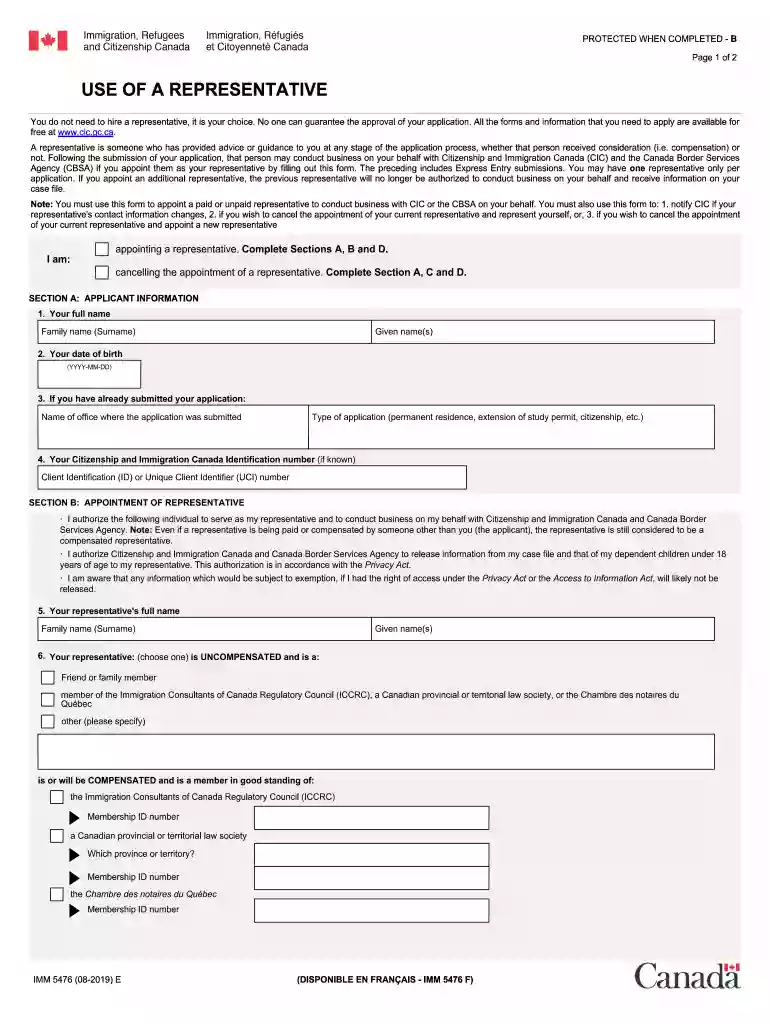
Imm 5476 form 2021-2025

Get Form
imm5476 Preview on Page 1

Here's how it works

01. Edit your imm5476 online
Type text, add images, blackout confidential details, add comments, highlights and more.

02. Sign it in a few clicks
Draw your signature, type it, upload its image, or use your mobile device as a signature pad.

03. Share your form with others
Send imm 5476 form via email, link, or fax. You can also download it, export it or print it out.

How to use or fill out imm 5476 form 2021 with our platform

Form edit decoration
9.5
Ease of Setup
DocHub User Ratings on G2
9.0
Ease of Use
DocHub User Ratings on G2
  1. Click ‘Get Form’ to open the imm 5476 form 2021 in the editor.
  2. Begin by entering your personal information in Section A. This includes your name, date of birth, and contact details. Ensure all entries are accurate to avoid processing delays.
  3. In Section B, specify the type of application you are submitting. Carefully read the options provided and select the one that best fits your situation.
  4. Proceed to Section C where you will need to provide details about your representative, if applicable. Fill in their name, address, and contact information accurately.
  5. Finally, review all sections for completeness and accuracy before saving your work. Utilize our platform’s features to sign electronically if required.

Start using our platform today for free to complete your imm 5476 form efficiently!

See more imm 5476 form 2021 versions

We've got more versions of the imm 5476 form 2021 form. Select the right imm 5476 form 2021 version from the list and start editing it straight away!
Versions Form popularity Fillable & printable
2021 4.1 Satisfied (39 Votes)
2021 4.8 Satisfied (206 Votes)
2019 4.3 Satisfied (118 Votes)
2015 4.3 Satisfied (130 Votes)
2014 4 Satisfied (54 Votes)
2013 4.3 Satisfied (85 Votes)
2011 4.4 Satisfied (161 Votes)
2010 4.2 Satisfied (31 Votes)
2004 4.8 Satisfied (41 Votes)
be ready to get more

Complete this form in 5 minutes or less

Get form

Got questions?

We have answers to the most popular questions from our customers. If you can't find an answer to your question, please contact us.
Contact us
Complete this form only if you are: appointing a representative; updating contact information for your previously appointed representative; cancelling a representatives appointment; cancelling the appointment of a representative and appointing a new representative; or.
Electronic signature (e-signature): If you are submitting the form through a secure portal or authorized online service, you may use: Typing your name directly into the PDF. docHubs Fill Sign tool.
0:24 0:59 And from here youll be able to open it in a file reader such as docHub. Here you can fill inMoreAnd from here youll be able to open it in a file reader such as docHub. Here you can fill in the application. And before saving be sure to click validate to see which information is missing.
Application for Temporary Resident Visa (IMM 5257) This form must be completed by each person applying for a Temporary Resident Visa to visit Canada.
Statutory declaration of common-law union (IMM 5409); Use of representative (IMM 5476)Note this is only required if you have used the services of a representative, or if you are appointing or cancelling use of a representative; and.

People also ask

Electronic signature (e-signature): If you are submitting the form through a secure portal or authorized online service, you may use: Typing your name directly into the PDF. docHubs Fill Sign tool. Third-party tools like docHub.

imm5476 download