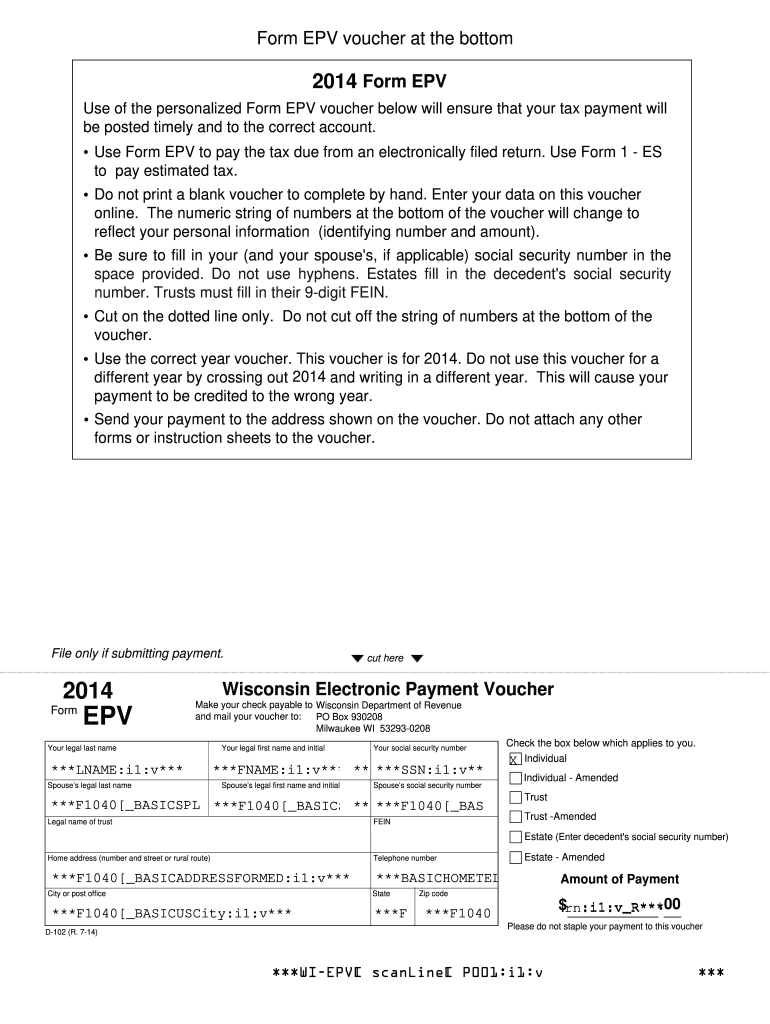
2014 Form EPV, Wisconsin Electronic Payment Voucher-2026

Get Form
2014 Form EPV, Wisconsin Electronic Payment Voucher Preview on Page 1

Here's how it works

01. Edit your form online
Type text, add images, blackout confidential details, add comments, highlights and more.
02. Sign it in a few clicks
Draw your signature, type it, upload its image, or use your mobile device as a signature pad.
03. Share your form with others
Send it via email, link, or fax. You can also download it, export it or print it out.

How to use or fill out 2014 Form EPV, Wisconsin Electronic Payment Voucher with DocHub

Form edit decoration
9.5
Ease of Setup
DocHub User Ratings on G2
9.0
Ease of Use
DocHub User Ratings on G2
  1. Click ‘Get Form’ to open the 2014 Form EPV in our platform.
  2. Begin by entering your legal last name and first name along with your initial in the designated fields. Ensure accuracy as this information is crucial for processing your payment.
  3. Input your social security number without hyphens. If applicable, repeat this step for your spouse's information.
  4. Select the appropriate checkbox that applies to you: Individual, Individual - Amended, Trust, or Estate. This helps categorize your payment correctly.
  5. Fill in your home address, including city, state, and zip code. This ensures that any correspondence regarding your payment reaches you promptly.
  6. Enter the amount of payment due in the specified field. Double-check this figure to avoid any discrepancies.
  7. Finally, review all entered information for accuracy before submitting. Once confirmed, print the voucher and send it to the address provided on the form.

Start using our platform today to complete your 2014 Form EPV effortlessly and for free!

See more 2014 Form EPV, Wisconsin Electronic Payment Voucher versions

We've got more versions of the 2014 Form EPV, Wisconsin Electronic Payment Voucher form. Select the right 2014 Form EPV, Wisconsin Electronic Payment Voucher version from the list and start editing it straight away!
Versions Form popularity Fillable & printable
2019 4.8 Satisfied (118 Votes)
2018 4.3 Satisfied (112 Votes)
2016 4.2 Satisfied (39 Votes)
2014 4 Satisfied (57 Votes)
2013 4 Satisfied (37 Votes)
be ready to get more

Complete this form in 5 minutes or less

Get form

Got questions?

We have answers to the most popular questions from our customers. If you can't find an answer to your question, please contact us.
Contact us

Sure, and it’s really straightforward! DocHub is a web-based PDF editor with advanced document processing capabilities that allow you promptly modify your paperwork, complete blank fields and insert new ones for other people to fill out, and create electronic signatures in several ways. Import your 2014 Form EPV, Wisconsin Electronic Payment Voucher, provide information as required, and choose how you want to eSign your document - by typing your name, drawing your signature, uploading its image, or using a QR code.

You may quickly fill out, edit, and even eSign your 2014 Form EPV, Wisconsin Electronic Payment Voucher using DocHub. Create a new profile and begin your free trial. After that, you may upload the document with the form and easily make all the needed edits. No need to print on paper or use a third-party application to sign it, as you can place your electronic signature on your document faster via DocHub.

For those who do not have internet access or the ability to print, paper forms and instructions are available upon request. Call or visit any of the Department of Revenue offices located throughout the state. Call (608) 266-2486. Email DORFormsRequests@wisconsin.gov.
If you filed your return electronically but pay the Department of Revenue by check, you should include a Payment Voucher with the check you mail. Use of any of the personalized vouchers below ensures that your tax payment is timely posted by the department to the correct account.
If you are filing Wisconsin Form 1, send your return to the Wisconsin Department of Revenue at: If refund or no tax due. PO Box 59. Madison, WI 53785-0001. If refund or no tax due. PO Box 59. Madison, WI 53785-0001. If tax is due or submitting Schedule CC to request a closing certificate: PO Box 8918. Madison, WI 53708-8918.

Security and compliance

At DocHub, your data security is our priority. We follow HIPAA, SOC2, GDPR, and other standards, so you can work on your documents with confidence.

Learn more
be ready to get more

Complete this form in 5 minutes or less

Get form

People also ask

You may obtain most Wisconsin tax forms and publications in one of the following ways: Download forms and publications in docHub PDF format by visiting the Forms page or the Publications page. Between January and April, many libraries will have a supply of Wisconsin individual income tax forms on hand.

Related links