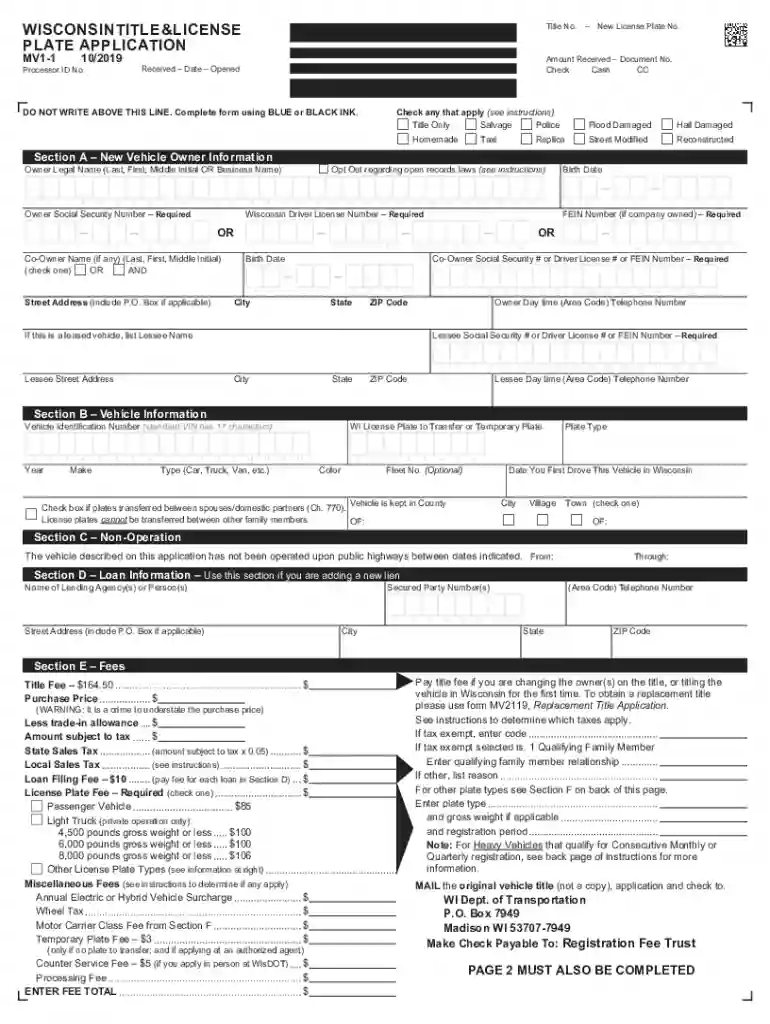
mv1 form wisconsin Preview on Page 1

Wisconsin mv 2026

Here's how it works

  • 01. Edit your mv1 form wisconsin online

    Type text, add images, blackout confidential details, add comments, highlights and more.

  • 02. Sign it in a few clicks

    Draw your signature, type it, upload its image, or use your mobile device as a signature pad.

  • 03. Share your form with others

    Send wisconsin mv1 form pdf via email, link, or fax. You can also download it, export it or print it out.

How to use or fill out Wisconsin MV with our platform

Form edit decoration
9.5
Ease of Setup
DocHub User Ratings on G2
9.0
Ease of Use
DocHub User Ratings on G2
  1. Click ‘Get Form’ to open the Wisconsin MV application in the editor.
  2. Begin with Section A, entering the Vehicle Owner Information. Include names of all owners and their Social Security Numbers or Wisconsin Driver License Numbers as required.
  3. Proceed to Section B for Vehicle Information. Input the Vehicle Identification Number (VIN), make, model, and color of your vehicle. If transferring a license plate, provide the current plate number.
  4. In Section E, calculate and enter applicable fees including title fee, sales tax, and any miscellaneous fees based on your vehicle type and registration needs.
  5. Complete Section F by selecting the appropriate License Plate Type based on your vehicle's classification. Ensure you check all relevant boxes.
  6. Finally, sign in Section H if applicable, especially if any owner is under 18 years old. Review all entries for accuracy before submitting.

Start filling out your Wisconsin MV application online for free today!

See more mv1 form wisconsin versions

We've got more versions of the mv1 form wisconsin form. Select the right mv1 form wisconsin version from the list and start editing it straight away!

VersionsForm popularityFillable & printable
20194.9 Satisfied (59 Votes)
20194.3 Satisfied (52 Votes)
20184.4 Satisfied (144 Votes)
20144 Satisfied (28 Votes)
20123.8 Satisfied (34 Votes)
20104.2 Satisfied (52 Votes)

be ready to get more

Complete this form in 5 minutes or less

Got questions?

We have answers to the most popular questions from our customers. If you can't find an answer to your question, please contact us.

Yes, and it’s really straightforward! DocHub is a web-based PDF editor with advanced document management features that allow you quickly modify your documents, complete empty fields and drop new ones for other people to fill out, and create eSignatures in several ways. Upload your mv1 form, give information as requested, and decide how you want to eSign your template - by typing your name, drawing your signature, uploading its picture, or using a QR code.

With DocHub, you have several convenient methods to edit your wisconsin mv1 form online. You can drag and drop the form and modify it directly at the DocHub website or use our browser extension to fill out your form right away. Additionally, you can modify your PDF on your smartphone, as DocHub is compatible with all the available mobile platforms.

11:30 a.m.\u20136:45 p.m. \u2014 Monday through Friday (Closed 2:15 p.m.\u20133 p.m.) 10 a.m.\u20134:45 p.m. \u2014 Saturday (Closed 1:15 p.m.\u20132 p.m.) Madison Odana Renewal Center (Full access for persons with a disability.)
What will I need? Your out-of-state driver's license. Your completed Wisconsin Driver License Application form. Proof of identity and date of birth. Proof of legal residence. Proof of your social security number. Proof of Wisconsin residence. Proof of your Social Security Number.
If you are new to Wisconsin, go to your nearest DMV customer service center to start the application process before you can make an appointment. Acceptable documentation of legal presence, name and date of birth, identity and Wisconsin residency are required.

Security and compliance

At DocHub, your data security is our priority. We follow HIPAA, SOC2, GDPR, and other standards, so you can work on your documents with confidence.

People also ask

What should I bring to DMV to get a REAL ID? Proof of Name and Date of Birth. Proof of Legal Presence in the U.S. Proof of Identity. Proof of Name Change (if your name is different than what's on your birth certificate, proof is needed for each name change)\u200b Proof of Address (two forms)\u200b
Those who would like to apply for a student driver's permit or a driver's license may now utilize the online portal of the Land Transportation Office (LTO).
Call (608) 266-2353 and request that your driver record address be changed.
6 Points of ID At least one Primary Document. At least one Secondary Document. A verifiable Social Security Number (SSN), or Individual Tax Identification Number (ITIN), or a letter of ineligibility for an SSN from the Social Security Administration (SSA) ... Proof of address.
Acceptable documents for a Wisconsin driver license or identification (ID) card Proof of name and date of birth. Proof of identity\u200b Proof of citizenship or legal status in the U.S.\u200b Proof of Wisconsin residency. Provide your Social Security number.

wi mv1

OWNERS MANUAL - Dealer E Process

Ohio, Wisconsin, Kansas, Missouri. Central Region. 1705 Sequoia Drive. Aurora, Illinois 60506. (800) 633-5151. Western Region: Alaska, Hawaii,. Arizona,Read more

Learn more
Wisconsin State Drivers License or Identification Card

Wisconsin State Drivers Licenses Complete the Form MV 3001 application. Schedule your appointment at the DMV. You must bring the following documents with youRead more

Learn more
Wisconsin DMV Official Government Site

Driver License and Permits - Order a replacement, renew, road test appointments, and other information Online Driver Services - get it done online! DriverRead more

Learn more
If you believe that this page should be taken down, please follow our DMCA take down process here