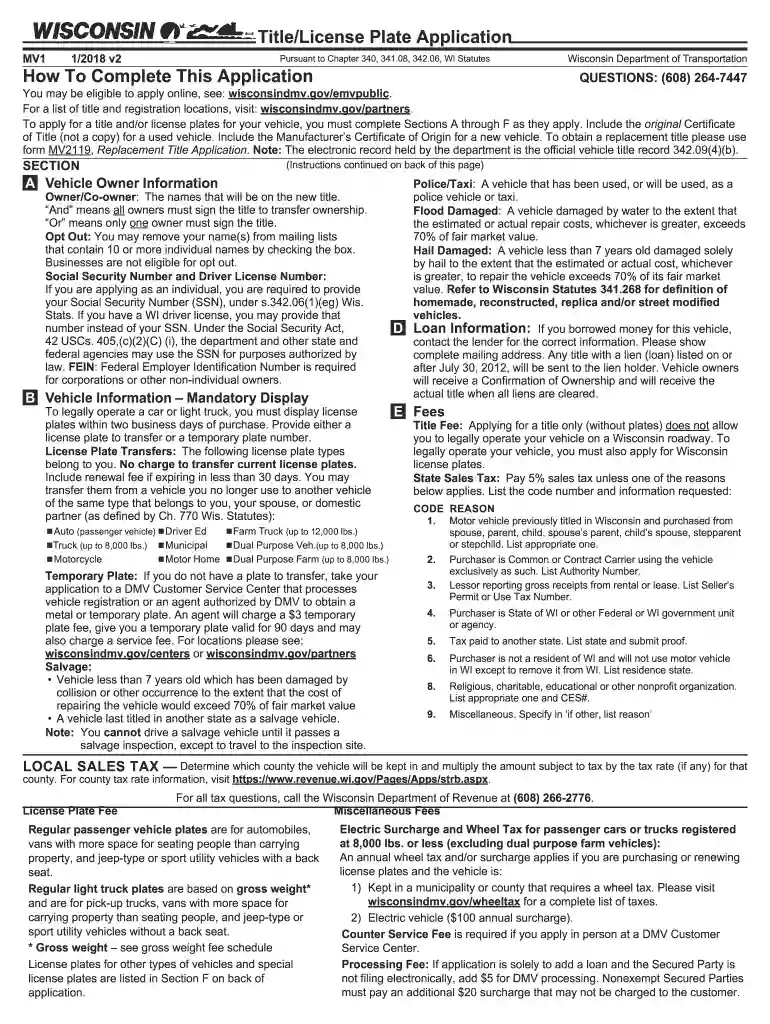
2018 wisconsin title application-2026

Get Form
wisconsin title application Preview on Page 1

Here's how it works

01. Edit your wisconsin title application online
Type text, add images, blackout confidential details, add comments, highlights and more.

02. Sign it in a few clicks
Draw your signature, type it, upload its image, or use your mobile device as a signature pad.

03. Share your form with others
Send wi title application via email, link, or fax. You can also download it, export it or print it out.

How to use or fill out 2018 Wisconsin Title Application with DocHub

Form edit decoration
9.5
Ease of Setup
DocHub User Ratings on G2
9.0
Ease of Use
DocHub User Ratings on G2
  1. Click ‘Get Form’ to open the 2018 Wisconsin Title Application in our platform's editor.
  2. Begin with Section A, where you will enter the Vehicle Owner Information. Fill in the names of all owners as they will appear on the title. If applicable, check the opt-out box to remove your name from mailing lists.
  3. Proceed to Section B for Vehicle Information. Here, provide details such as the Vehicle Identification Number (VIN), make, model, and whether you are transferring a license plate or need a temporary one.
  4. In Section C, indicate if the vehicle has been non-operational and provide any relevant dates. This is important for record-keeping.
  5. Next, complete Section D if there is a loan associated with the vehicle. Include lender information and secured party numbers.
  6. In Section E, calculate and enter all applicable fees including title fees and sales tax based on your purchase price.
  7. Finally, review all sections for accuracy before signing in Section H if applicable. Ensure that all required signatures are included.

Start filling out your 2018 Wisconsin Title Application online for free using our platform today!

See more 2018 wisconsin title application versions

We've got more versions of the 2018 wisconsin title application form. Select the right 2018 wisconsin title application version from the list and start editing it straight away!
Versions Form popularity Fillable & printable
2019 4.9 Satisfied (59 Votes)
2019 4.3 Satisfied (52 Votes)
2018 4.4 Satisfied (144 Votes)
2014 4 Satisfied (28 Votes)
2012 3.8 Satisfied (34 Votes)
2010 4.2 Satisfied (52 Votes)
be ready to get more

Complete this form in 5 minutes or less

Get form

Got questions?

We have answers to the most popular questions from our customers. If you can't find an answer to your question, please contact us.
Contact us
Use the Statement of Intent Form MV2489 to get a corrected title when your title or Manufacturer Statement of Origin (MSO) has a change or erasure in the purchaser, lien holder or odometer area.
How to Fill Out an Application for Title or Registration Form Vehicle Information. The Owners Information. Title Holders Information. Fill in the Cost and Operation Information. The Owners Signature. The Owners Second Signature. Recheck the Vehicle Information.
The Division of Motor Vehicles also provides a Statement of Vehicle Transfer (MV2488) for this purpose. Completing this DMV form will help eliminate your liability if the new owner fails to properly register the vehicle. These forms are available at DMV Service Centers and at our department.
The form MV11 Application for Title / Registration is restricted to licensed dealers for their retail customers. Regardless of the revision date, the MV11 forms includes dealer assignment, odometer statement and is printed by a secure printing process.
The MV1 Application will help you complete a title and/or license plate application for your vehicle. Answer a series of questions to generate the MV1 Wisconsin Title and License Plate Application with estimated fees.

Security and compliance

At DocHub, your data security is our priority. We follow HIPAA, SOC2, GDPR, and other standards, so you can work on your documents with confidence.

Learn more
ccpa2
pci-dss
gdpr-compliance
hipaa
soc-compliance
be ready to get more

Complete this form in 5 minutes or less

Get form