Type text, add images, blackout confidential details, add comments, highlights and more.
02. Sign it in a few clicks
Draw your signature, type it, upload its image, or use your mobile device as a signature pad.
03. Share your form with others
Send el2 form via email, link, or fax. You can also download it, export it or print it out.
How to use or fill out Florida EL2 Form 2010 with DocHub
Ease of Setup
DocHub User Ratings on G2
Ease of Use
DocHub User Ratings on G2
Click ‘Get Form’ to open the Florida EL2 form in our editor.
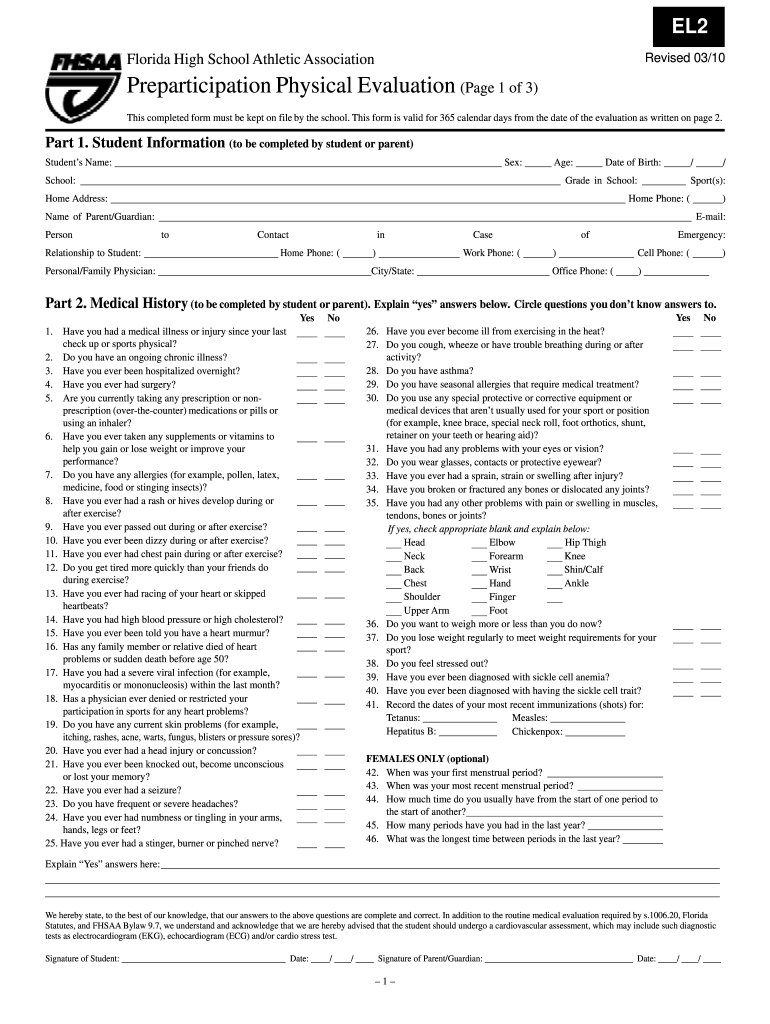
Begin with Part 1: Student Information. Fill in the student's name, sex, age, school, date of birth, grade, home address, sport(s), and contact information for both the student and parent/guardian.
Move to Part 2: Medical History. Carefully answer each question regarding medical conditions and history. Circle any questions you are unsure about and provide explanations for 'yes' answers in the designated area.
In Part 3: Physical Examination, ensure a licensed physician completes this section. They will assess various health metrics such as weight, height, blood pressure, and overall physical condition.
Finally, make sure both the student and parent/guardian sign and date the form at the bottom of Page 1 to validate it.
Start using our platform today to fill out your Florida EL2 form quickly and efficiently!
We've got more versions of the florida el2 form 2010 form. Select the right florida el2 form 2010 version from the list and start editing it straight away!
Florida el2 form 2010 pdf free downloadFlorida el2 form 2010 pdfFlorida el2 form 2010 pdf downloadFlorida el2 form 2010 printableEL2 Physical Form 2026Florida el2 form 2010 downloadFHSAA EL2 Form pdfFlorida EL2 Form 2025
Security and compliance
At DocHub, your data security is our priority. We follow HIPAA, SOC2, GDPR, and other standards, so you can work on your documents with confidence.
The control element controls the sequence of com- puter operations and their execution. Instructions are obtained from stor- age in the form of individualRead more
Cookie consent notice
This site uses cookies to enhance site navigation and personalize your experience.
By using this site you agree to our use of cookies as described in our Privacy Notice.
You can modify your selections by visiting our Cookie and Advertising Notice.