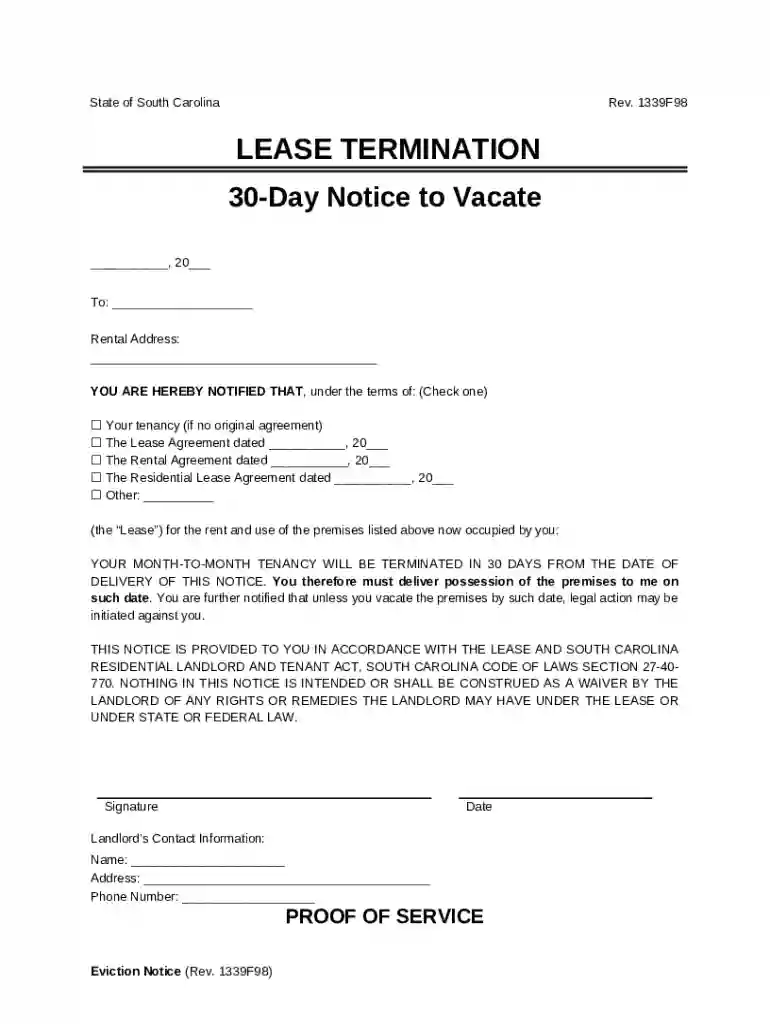
South Carolina 30-Day Notice to Vacate Preview on Page 1

South Carolina 30-Day Notice to Vacate 2026

Here's how it works

  • 01. Edit your form online

    Type text, add images, blackout confidential details, add comments, highlights and more.

  • 02. Sign it in a few clicks

    Draw your signature, type it, upload its image, or use your mobile device as a signature pad.

  • 03. Share your form with others

    Send it via email, link, or fax. You can also download it, export it or print it out.

The fastest way to redact South Carolina 30-Day Notice to Vacate online

Form edit decoration
9.5
Ease of Setup
DocHub User Ratings on G2
9.0
Ease of Use
DocHub User Ratings on G2

Dochub is a perfect editor for changing your documents online. Adhere to this straightforward guideline edit South Carolina 30-Day Notice to Vacate in PDF format online at no cost:

  1. Sign up and log in. Register for a free account, set a secure password, and proceed with email verification to start working on your forms.
  2. Upload a document. Click on New Document and select the file importing option: add South Carolina 30-Day Notice to Vacate from your device, the cloud, or a secure URL.
  3. Make changes to the template. Utilize the top and left panel tools to redact South Carolina 30-Day Notice to Vacate. Insert and customize text, pictures, and fillable fields, whiteout unnecessary details, highlight the important ones, and provide comments on your updates.
  4. Get your documentation completed. Send the sample to other individuals via email, create a link for faster file sharing, export the template to the cloud, or save it on your device in the current version or with Audit Trail added.

Try all the benefits of our editor right now!

be ready to get more

Complete this form in 5 minutes or less

Security and compliance

At DocHub, your data security is our priority. We follow HIPAA, SOC2, GDPR, and other standards, so you can work on your documents with confidence.
be ready to get more

Complete this form in 5 minutes or less

Related links

A Lawyers Guide to the South Carolina Residential Landlord

by CR LANDLORD 1988 Cited by 6 Moreover, the thirty-day period runs from the date of the promulgation of the regulations, not from the date on which the tenant receives notice. The RLTARead more

Learn more
The Use of Direct Push Well Technology for Long-term

Specific guidance for Direct Push wells was found in the South Carolina regulations. Direct Push wells are allowed without restrictions other than a statementRead more

Learn more
South Carolina Residential Landlord and Tenant Act

(b) The landlord or the tenant may terminate a month-to-month tenancy by a written notice given to the other at least thirty days before the termination dateRead more

Learn more
If you believe that this page should be taken down, please follow our DMCA take down process here