




Here's how it works

01. Edit your crsc form 12e online
Type text, add images, blackout confidential details, add comments, highlights and more.

02. Sign it in a few clicks
Draw your signature, type it, upload its image, or use your mobile device as a signature pad.

03. Share your form with others
Send crsc reconsideration form via email, link, or fax. You can also download it, export it or print it out.
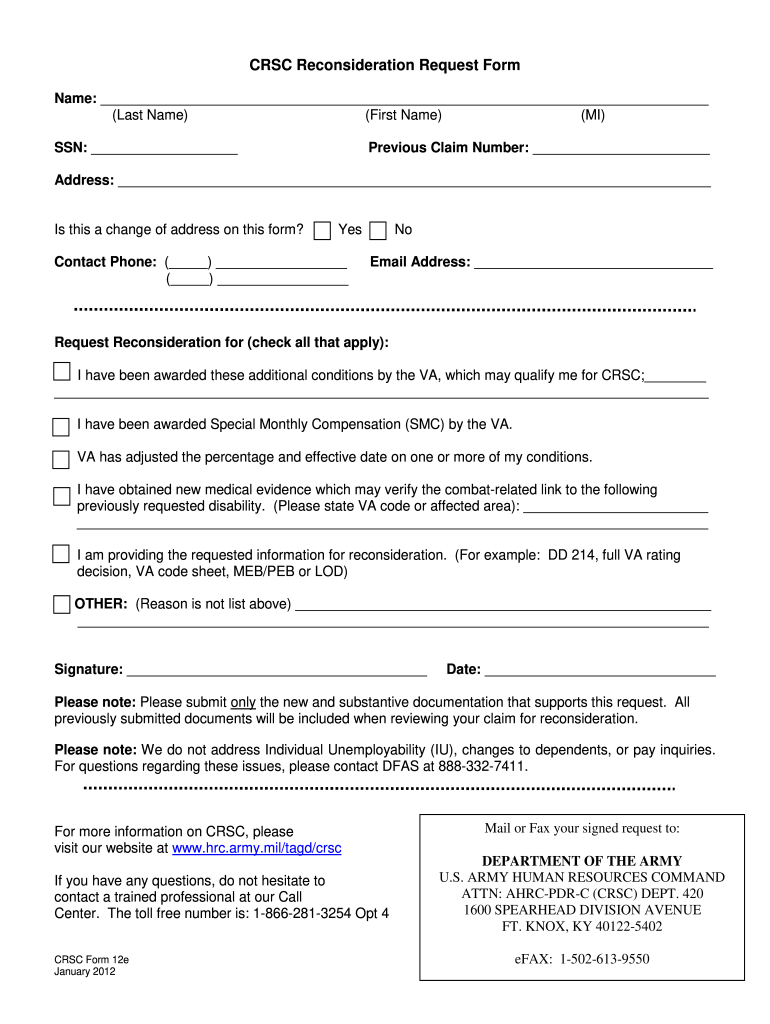
How to use or fill out please reconsideration requested with our platform

- Click ‘Get Form’ to open the please reconsideration requested in the editor.
- Begin by entering your name in the designated fields for Last Name, First Name, and Middle Initial. This ensures that your request is properly identified.
- Input your Social Security Number (SSN) and Previous Claim Number to provide necessary identification for your request.
- Fill in your current address. If this is a change of address, indicate 'Yes' or 'No' as applicable.
- Provide your contact phone numbers and email address to facilitate communication regarding your request.
- In the section requesting reconsideration reasons, check all applicable boxes and provide detailed information where prompted, especially regarding new medical evidence or additional conditions awarded by the VA.
- Sign and date the form at the bottom to validate your request before submission.
Start using our platform today for free to streamline your document editing and submission process!
Fill out please reconsideration requested online
It's free
See more please reconsideration requested versions
We've got more versions of the please reconsideration requested form. Select the right please reconsideration requested version from the list and start editing it straight away!
Security and compliance
At DocHub, your data security is our priority. We follow HIPAA, SOC2, GDPR, and other standards, so you can work on your documents with confidence.
Learn more


Related forms

Z1 leave form
The document is an application form for leave of absence (Z1(a)) that outlines the process for employees to request vari ...

Vfw application form
The document is a VFW (Veterans of Foreign Wars) membership application form that collects personal information, militar ...
Bp a0629
The document is a visitor information request form from the U.S. Department of Justice, specifically for the Federal Bur ...
JOHN CROYLE SPEAKING ENGAGEMENT REQUEST FORM - Big - bigoak
The document is a request form for scheduling a speaking engagement with John Croyle, detailing the necessary informatio ...