






Definition & Meaning
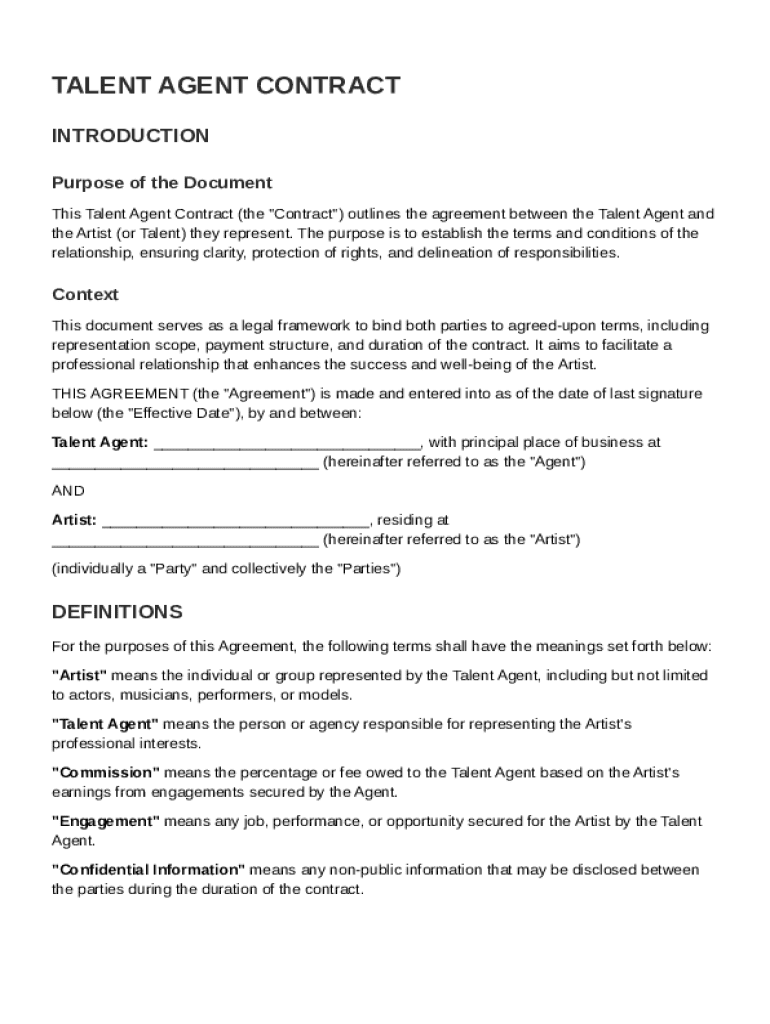
A Talent Agent Contract Template serves as a formal agreement between a talent agent and an artist. This document specifies the terms and conditions of their professional relationship, which includes the responsibilities of both parties, the compensation structure, and confidentiality obligations. This contract is crucial in providing a clear legal framework, ensuring both the talent agent and the artist understand their roles and commitments.
Key Elements of the Talent Agent Contract Template
The template typically includes multiple essential components that structure the relationship between the agent and the artist effectively:
-
Responsibilities and Duties: Details the roles and responsibilities of both the agent and artist, outlining expectations for promoting and securing opportunities.
-
Compensation and Commission: Specifies how the agent will be compensated, including commission rates derived from the artist's earnings.
-
Duration and Termination: States the duration of the contract and conditions under which the agreement can be terminated by either party.
-
Confidentiality Clause: Includes measures for protecting sensitive information shared between the agent and the artist during their contractual relationship.
-
Dispute Resolution: Provides guidelines on how potential disputes between the parties will be resolved, often recommending mediation or arbitration.
Steps to Complete the Talent Agent Contract Template
Completing the Talent Agent Contract Template involves several key steps to ensure thoroughness and accuracy:
-
Identify the Parties: Clearly state the names and details of both the talent agent and the artist.
-
Define Scope of Services: Specify the services the agent will provide, such as marketing, securing gigs, or negotiating deals.
-
Outline Payment Terms: Include the precise commission rate and how it will be calculated, specifying any additional payment terms.
-
Set Contract Duration: Define the start and end dates of the agreement and any renewal options.
-
Add Confidentiality Clauses: Insert appropriate confidentiality terms to protect all shared sensitive information.
-
Specify Termination Conditions: Outline conditions under which the contract may be terminated by either party.
-
Review and Sign: Both parties should thoroughly review the contract details before signing to confirm understanding and agreement.
Who Typically Uses the Talent Agent Contract Template
The Talent Agent Contract Template is widely utilized by various individuals and entities within the entertainment industry:
-
Talent Agents: Professionals searching for a standardized document to manage relationships with artists in multiple fields, such as music, acting, and sports.
-
Artists and Performers: Individuals seeking representation to advance their careers through professional management services.
-
Legal Advisors: Lawyers and consultants drafting or reviewing agreements on behalf of their clients.


Legal Use of the Talent Agent Contract Template
The template is legally binding and ensures compliance with various legal statutes by:
-
Adhering to U.S. Contract Law: Drafted in alignment with contract laws applicable within the United States, ensuring enforceability.
-
Incorporating State-Specific Clauses: Includes clauses adhering to state-specific legal requirements when applicable.
-
Providing a Framework for Resolution: Establishes a clear pathway for resolving disputes to prevent protracted legal battles.
Software Compatibility
The Talent Agent Contract Template can be accessed and edited using a variety of software platforms:
-
DocHub: Offers robust tools for editing, signing, and sharing the template online without transitions between different applications.
-
Microsoft Word and Google Docs: Easily customizable with popular word-processing software, providing flexibility in document editing.
-
PDF Editors: Utilize PDF editing programs to ensure the document maintains its format and integrity when shared.
Digital vs. Paper Version
Choosing between digital and paper versions depends on the circumstances:
-
Digital Versions: Supported by platforms like DocHub, which allow for seamless online editing, sharing, and signing — ideal for quick modifications and distribution.
-
Paper Versions: Preferred in scenarios where hard-copy proof is essential, but may require more effort to distribute and sign.
Business Types That Benefit Most
Numerous business types gain considerable advantages by utilizing a Talent Agent Contract Template:
-
Entertainment Agencies: Facilitate the management of large client bases and provide standardized agreements.
-
Creative Agencies: Offer structured management services for a wide array of artists, ensuring clear understanding and expectations with clients.
-
Freelance Artists/Managers: Benefit from organized contracts that clarify their working conditions and payment structures, fostering professional relationships while avoiding misunderstandings.