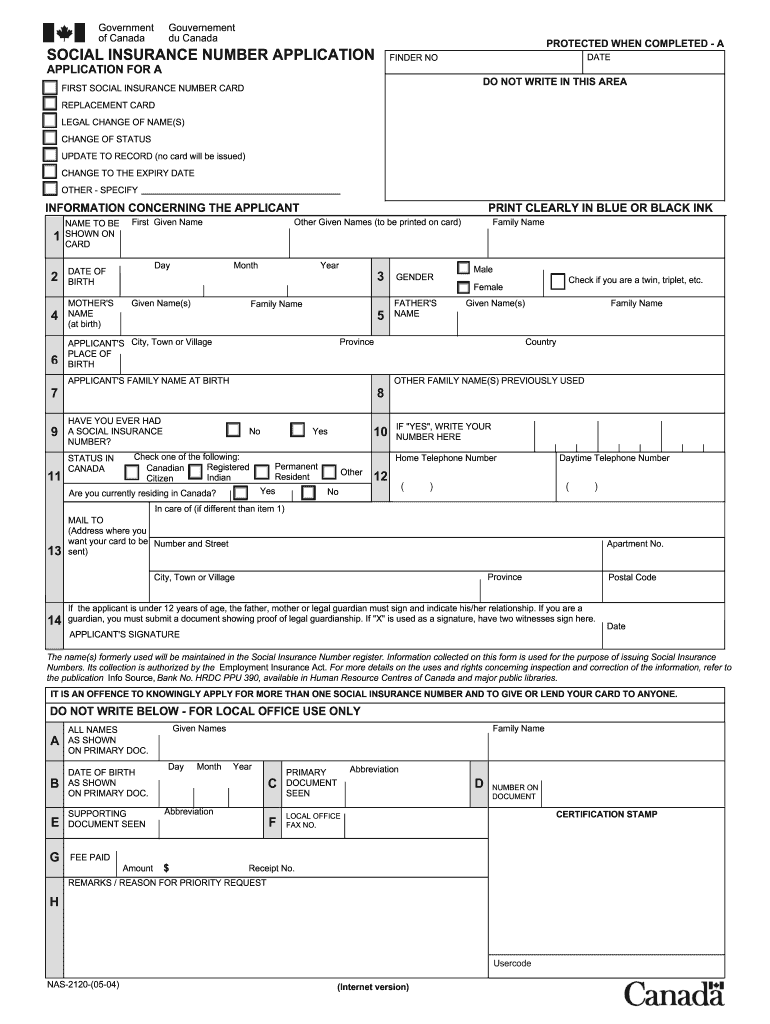
Social Insurance Number Application Form 2026

Get Form
sin number application Preview on Page 1

Here's how it works

01. Edit your sin number application online
Type text, add images, blackout confidential details, add comments, highlights and more.
02. Sign it in a few clicks
Draw your signature, type it, upload its image, or use your mobile device as a signature pad.
03. Share your form with others
Send sin application form via email, link, or fax. You can also download it, export it or print it out.

How to use or fill out Social Insurance Number Application Form with our platform

Form edit decoration
9.5
Ease of Setup
DocHub User Ratings on G2
9.0
Ease of Use
DocHub User Ratings on G2
  1. Click ‘Get Form’ to open the Social Insurance Number Application Form in the editor.
  2. Begin by filling out your personal information. Enter your first name, other given names, and family name clearly in blue or black ink.
  3. Provide your date of birth by selecting the day, month, and year from the dropdown menus.
  4. Indicate your place of birth by entering the city, town, or village along with the country.
  5. If applicable, check if you have ever had a Social Insurance Number before and provide it if you answer 'Yes'.
  6. Fill in your current status in Canada by selecting one of the options: Registered Canadian Indian, Citizen, Permanent Resident, or Other.
  7. Complete your contact information including home and daytime telephone numbers.
  8. Specify where you want your card mailed by providing the complete address including postal code.
  9. If you are under 12 years old, ensure that a parent or legal guardian signs the application form.
  10. Review all entered information for accuracy before submitting your application through our platform.

Start using our platform today to fill out your Social Insurance Number Application Form easily and for free!

See more Social Insurance Number Application Form versions

We've got more versions of the Social Insurance Number Application Form form. Select the right Social Insurance Number Application Form version from the list and start editing it straight away!
Versions Form popularity Fillable & printable
2020 4.8 Satisfied (251 Votes)
2018 4.3 Satisfied (65 Votes)
2017 4.2 Satisfied (46 Votes)
2014 4 Satisfied (54 Votes)
2013 4 Satisfied (31 Votes)
2012 4.1 Satisfied (61 Votes)
2004 4 Satisfied (53 Votes)
be ready to get more

Complete this form in 5 minutes or less

Get form

Got questions?

We have answers to the most popular questions from our customers. If you can't find an answer to your question, please contact us.
Contact us

Yes, and it’s really straightforward! DocHub is a web-based PDF editor with advanced document management features that allow you rapidly modify your forms, fill out empty fields and add new ones for others to fill out, and create electronic signatures in several ways. Upload your sin application form pdf, provide information as required, and decide how you want to eSign your document - by typing your name, drawing your signature, uploading its picture, or using a QR code.

You can easily edit and complete your sin full form canada on any iOS device. Open an internet browser of your choice, go to the DocHub website, authorize or create a new account, add your file for editing, and make your desired alterations. Our service is mobile-friendly, so using its features on your phone will be a no-brainer, even on the first try.

Social Insurance Number Application Form - You can download the SIN application form from the Service Canada website.
Primary identity document A certificate of birth or birth certificate issued by the vital statistics agency in the province or territory of birth. A certificate of Canadian Citizenship issued by Immigration, Refugees and Citizenship Canada (IRCC) or Citizenship and Immigration Canada (CIC)
You will receive your SIN and original documents within 20 business days from the day the application is received.

Security and compliance

At DocHub, your data security is our priority. We follow HIPAA, SOC2, GDPR, and other standards, so you can work on your documents with confidence.

Learn more
ccpa2
pci-dss
gdpr-compliance
hipaa
soc-compliance

People also ask

Primary identity document A certificate of birth or birth certificate issued by the vital statistics agency in the province or territory of birth. A certificate of Canadian Citizenship issued by Immigration, Refugees and Citizenship Canada (IRCC) or Citizenship and Immigration Canada (CIC)
Key Takeaways Find your SIN on a card, a confirmation letter, or CRA-related tax forms such as income tax returns, tax slips, records of employment, and RRSP contribution documents. You can apply for a reissued version of your SIN confirmation letter for free.
SIN application form completed and signed If you are unable to print the application form, you can order one by phone at: 1-866-274-6627 (toll free number) or, if outside Canada, at 1-506-548-7961 (long distance charges will apply)
If everything is in order, you will receive a letter with your SIN by mail within 20 business days from the date the application is received. If more than 25 business days have passed and you would like to determine the status of your application, contact the SIN program.
To replace a lost SIN card or confirmation letter you'll need to: Visit your local Service Canada Centre....For More Information Documents required to apply for a SIN - A list of all types of proof of identity from Service Canada. Lost Wallet - Information about what to do when you lose your important identity documents.

sin form