






Definition & Meaning
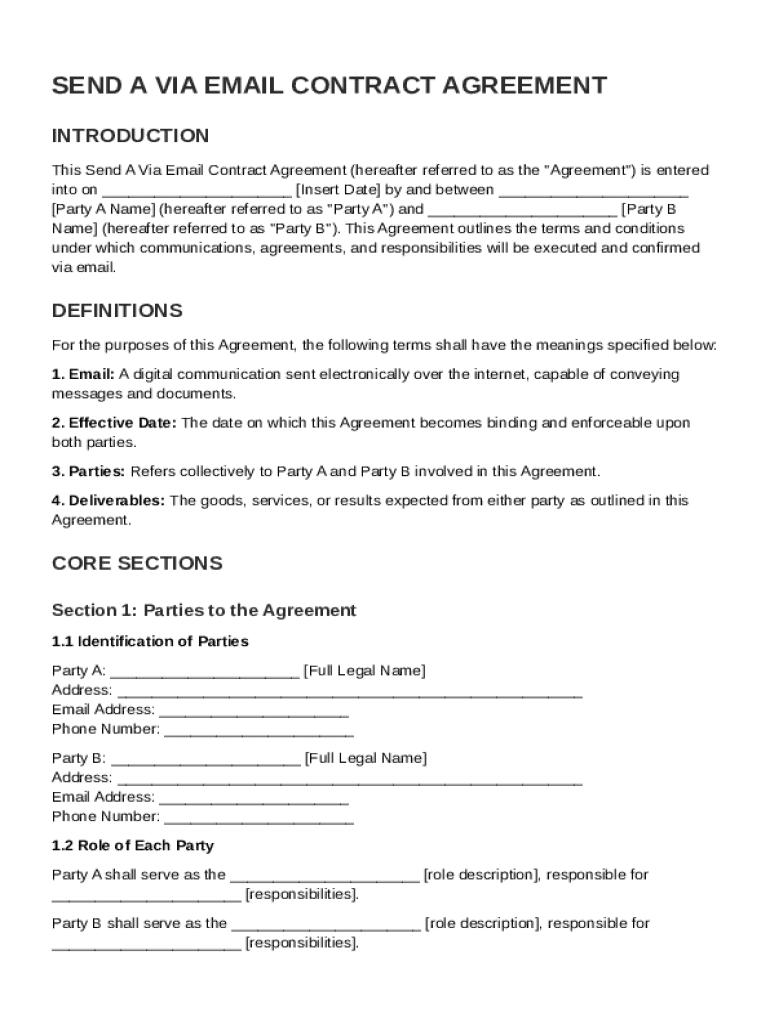
The "Send A Via Email Contract Template" refers to a standardized document format that facilitates contractual agreements electronically through email. This template includes standard legal language and structure, enabling both parties to quickly establish terms, responsibilities, confidentiality agreements, and communication protocols, all in a digital format. By relying on this template, users can streamline the creation and sharing of contracts, ensuring that both parties have a clear understanding of the agreement’s terms, which are legally recognized due to the emphasis on electronic communication and digital signatures.
How to Use the Send A Via Email Contract Template
To effectively utilize the "Send A Via Email Contract Template," users should follow a series of steps that ensure both clarity and compliance. First, download the template from a trusted source like DocHub, ensuring it meets the necessary legal standards. Next, customize the template by filling in essential information, such as party names, terms, and specific obligations. Pay close attention to the fields designated for personalization to accurately reflect the particulars of the agreement. Once completed, the document can be sent via email to the other party. Ensure the use of electronic signatures for both parties to confirm agreement, leveraging platforms like DocHub that verify legal compliance and provide an audit trail of the signing process.
Steps to Complete the Send A Via Email Contract Template
- Download the Template: Obtain the latest version of the "Send A Via Email Contract Template" from a reliable source.
- Enter Party Details: Fill in the names and contact information of Party A and Party B, ensuring accuracy in all personal details.
- Define Terms and Conditions: Input specific terms, such as payment schedules, duration, and responsibilities of each party.
- Include Confidentiality Clauses: Add necessary clauses related to confidentiality to protect sensitive information exchanged between the parties.
- Verify Electronic Signature Capability: Ensure that all parties involved can apply a legally binding electronic signature, using platforms that comply with the ESIGN Act.
- Review for Completeness and Accuracy: Before sending, double-check all sections for accuracy and completeness to prevent misunderstandings.
- Send Via Email: Use secure email protocols to send the completed contract to the relevant parties, setting up receipt notifications if available.
Key Elements of the Send A Via Email Contract Template
The "Send A Via Email Contract Template" comprises essential sections that define and govern the agreement:
- Identifying Information: Includes basic details about the parties involved.
- Agreement Terms: Clearly outlines the expectations and obligations of each party.
- Communication Protocols: Specifies that all formal communications are to occur through email.
- Confidentiality Rules: Defines how sensitive information will be handled and protected.
- Amendment Procedures: Provides guidelines on how changes to the agreement can be made.
- Termination Clauses: Lists conditions under which the contract can be terminated by either party.
- Governing Law: States the laws that will govern the contract, ensuring legal compliance and enforceability.
Legal Use of the Send A Via Email Contract Template
The "Send A Via Email Contract Template" serves as a legally binding document when executed properly. Adhering to the ESIGN Act, it provides for the validity of electronic signatures, ensuring that electronically signed agreements hold the same legal weight as traditional paper contracts. To ensure legal use, both parties must agree to electronic contracting, and the platform used for signing should provide features like signature authenticity verification, encrypted storage, and an audit trail detailing when each action was taken by the parties involved. Proper use of authentication measures, like password protection, reinforces the security and integrity of the contract.
Who Typically Uses the Send A Via Email Contract Template
This contract template is commonly utilized by a variety of parties who seek a streamlined, digital approach to contractual agreements:
- Small Business Owners: For establishing clear terms with vendors or clients.
- Freelancers and Consultants: To outline service provisions and payment terms with clients quickly.
- Corporate Entities: Who require standardized agreements for employee onboarding or third-party services.
- Legal Professionals: Who provide clients with digitally manageable contracts, facilitating easy revisions and quick exchanges.
- Real Estate Agents: To transact property deals that require efficient documentation and mutual understanding.


Advantages of Sending a Contract Template via Email
Sending a contract template via email offers numerous advantages:
- Speed and Efficiency: Email enables instant delivery and quick responses between parties, accelerating the contractual process.
- Reduced Paperwork: Transitioning from physical to digital contracts decreases reliance on paper, contributing to sustainable practices.
- Accessibility: Recipients can access the contract from various devices, whether a desktop, smartphone, or tablet, ensuring flexibility.
- Enhanced Tracking: Email platforms often provide receipt notifications and tracking tools that allow senders to monitor when the contract is received and opened.
- Security Features: Modern email systems and document platforms support encrypted communications, adding a layer of protection against unauthorized access.
Software Compatibility with Send A Via Email Contract Template
The template is compatible with a variety of software solutions to facilitate editing and signing:
- DocHub: Offers comprehensive tools for editing and signing the template, providing SSL encryption for added security.
- Microsoft Word: Allows users to easily modify the document, provided they convert it to a .doc or .docx file type.
- Google Docs: Enables real-time collaboration and sharing, ensuring accessibility and easy revisions.
- Adobe Acrobat: Typically used for PDF handling, this software supports digital signatures and form fill-ins seamlessly.
- Other Cloud Services: Such as Google Drive and Dropbox, for storing and sharing completed contracts securely.
Examples of Using the Send A Via Email Contract Template
Real-world scenarios demonstrating the usage of this template include:
- Business Partnership Agreements: Two parties agreeing on the division of responsibilities, profit-sharing, and dissolution terms via email.
- Freelance Service Contracts: Outline the scope of work, deadlines, and payment terms between client and freelancer.
- Vendor-Supplier Arrangements: Document the terms of product supply, payment schedules, and delivery obligations clearly.
- Lease Agreements: Where landlords and tenants clarify terms and conditions for property usage, committed to digitally.
- Confidentiality Agreements: For businesses needing to protect sensitive information, this template provides an enforceable framework for doing so.
Each scenario benefits from the template’s accessibility and the legal backing of electronic contracting, ensuring mutual understanding and legally-binding obligation effortlessly.