
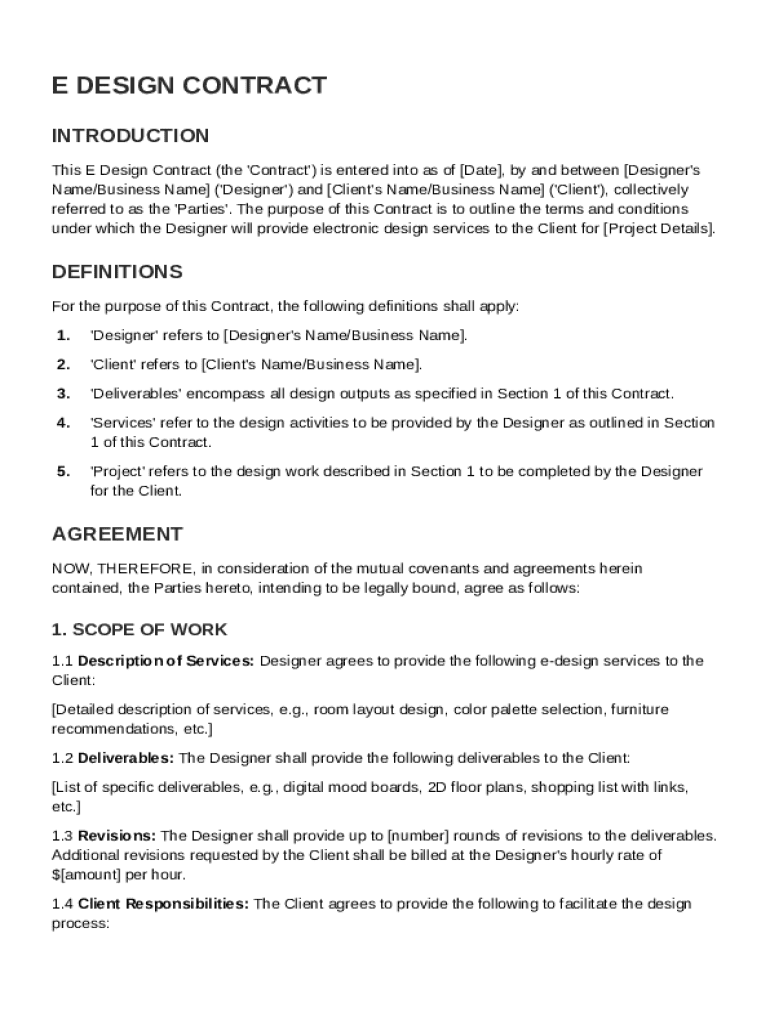







Definition & Meaning
The E Design Contract Template is a structured document used to outline the terms of an agreement between a designer and a client for electronic design services. It specifies various contractual aspects such as the scope of work, deliverables, compensation structure, and project timeline. Additionally, it addresses critical issues like intellectual property rights, termination conditions, and liability limitations. This template serves a dual purpose: facilitating clear communication between parties and providing a legal framework to bind both the designer and client to the agreed terms. Understanding this framework is crucial for both entities to prevent misunderstandings and ensure a successful collaboration.
Key Elements of the E Design Contract Template
The E Design Contract Template contains several essential sections that make it comprehensive and legally sound:
- Scope of Work: Details the specific services to be provided, including tasks, deadlines, and deliverables.
- Compensation Structure: Outlines the payment method, schedule, and amounts, ensuring clarity on financial transactions.
- Project Timeline: Specifies the start date, milestones, and deadlines to ensure the timely completion of the project.
- Intellectual Property Rights: Clarifies who retains ownership of the designs or work created.
- Termination Conditions: Provides clauses under which either party may terminate the agreement without legal repercussions.
- Liability Limitations: Defines the extent of responsibility and potential repercussions for both parties in case of contract breaches.
Each of these elements is crafted to cover all possible scenarios, reducing room for disputes and providing a clear path to resolution.
Steps to Complete the E Design Contract Template
Completing the E Design Contract Template involves several critical steps:
- Identify Parties: Clearly define who the designer and the client are, including contact details.
- Outline the Services: Specify in detail what the designer will be doing, so expectations are set from the beginning.
- Set Compensation Terms: Agree on how much the client will pay for the services and what payment schedule will be followed.
- Agree on a Timeline: Set realistic deadlines for each phase of the project, ensuring it aligns with the client's needs.
- Discuss Intellectual Property: Agree on who will hold the rights to the design after the project is complete.
- Define Termination Terms: Decide the conditions under which the contract can be canceled by either party.
- Include Liability Clauses: Outline who is responsible for what in case something goes wrong.
Completing each step with precision ensures that the contract is watertight and legally binding.
Who Typically Uses the E Design Contract Template
The E Design Contract Template is primarily used by freelance designers, design agencies, and small to medium-sized design businesses. It is particularly useful for those offering services such as web design, graphic design, interior design, and other digital design services. Clients who procure these services, including businesses seeking brand development or digital content creation, also use this template to formalize their relationship with the designer. The template acts as a guide to systematically acknowledge all pertinent details of the professional relationship, providing peace of mind for both parties involved.

Important Terms Related to E Design Contract Template
Understanding terms specific to the E Design Contract Template is crucial for clarity and compliance:
- Deliverables: The tangible and intangible items the designer must provide.
- Revisions: The number and scope of edits or changes allowed without additional charges.
- Non-disclosure Agreement (NDA): A clause preventing the sharing of sensitive information related to the project.
- Force Majeure: Situations beyond control (e.g., natural disasters) that allow for contract suspension or termination without penalty.
- Amendments: Changes that can be made to the contract with mutual consent.
Familiarity with these terms helps in understanding the contract’s full implications and ensuring both parties are on the same page.
Legal Use of the E Design Contract Template
The E Design Contract Template serves as a robust legal document that aligns with U.S. contract law, making it enforceable in court if necessary. It addresses all necessary legalities, from service descriptions and payment terms to confidentiality and dispute resolution. This ensures the agreement is legally binding and minimizes the risk of legal challenges. Proper use of this template involves ensuring that all information is accurate, up-to-date, and complies with any specific state requirements where the parties are located or the project is executed.
State-Specific Rules for the E Design Contract Template
While the E Design Contract Template provides a general framework, it's vital to be aware of and comply with state-specific rules and requirements. Each state may have different laws regarding contract enforcement, intellectual property rights, and consumer protection. For instance, some states have stricter rules on what constitutes a fair contract or define the timeframe for filing legal disputes. Designers should consult with legal professionals to adjust the template according to the state laws applicable to their projects to ensure complete legal compliance.
Digital vs. Paper Version
With advancements in technology, the E Design Contract Template is often available in both digital and paper formats. The digital version allows for ease of editing, sharing, and signing through platforms like DocHub. This format is especially beneficial for remote collaborations or when quick revisions are needed. In contrast, the paper version may still be preferred in certain scenarios, such as when a physical signature is required for legal purposes or when digital access is limited. Each format has distinct advantages, and the choice largely depends on the parties’ preferences and operational needs.




